
pangao AB5
PANGAO SLIM BELT
Instruction Manual
Product Overview
The PANGAO Slim Belt is designed to provide a convenient and effective way to target specific areas. This manual provides essential information on how to set up, operate, maintain, and troubleshoot your device to ensure optimal performance and longevity.
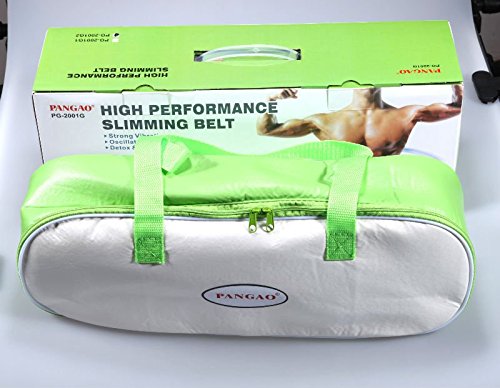
The image displays the PANGAO Slim Belt, neatly packed inside its light green and silver carrying case. Behind the case, the product's retail box is visible, featuring the brand name 'PANGAO' and the product title 'HIGH PERFORMANCE SLIMMING BELT' along with an image of a muscular torso.
Important Safety Information
Please read all instructions carefully before using the PANGAO Slim Belt. Failure to follow these guidelines may result in injury or damage to the device.
- Do not use if you have a pacemaker, are pregnant, or have any serious medical conditions without consulting a physician.
- Keep the device away from water and high humidity.
- Do not disassemble or attempt to repair the device yourself. Contact authorized service personnel.
- Ensure the power adapter is compatible with your local power supply.
- Keep out of reach of children.
Package Contents
Before first use, please check the package to ensure all items are present:
- 1 x PANGAO Slim Belt
- 1 x Power Adapter
- 1 x Instruction Manual (this document)
- 1 x Carrying Case
Setup
- Unpack the Device: Carefully remove the PANGAO Slim Belt and all accessories from its packaging.
- Inspect for Damage: Before connecting power, visually inspect the belt and power adapter for any signs of damage. Do not use if damaged.
- Connect Power: Insert the power adapter cable into the designated port on the slim belt. Plug the power adapter into a standard electrical outlet.
- Position the Belt: Wrap the belt around the desired area (e.g., waist, abdomen, thighs) ensuring it is snug but comfortable. Secure it using the fasteners.
Operating Instructions
- Power On: Press the POWER button on the control panel to turn on the device. An indicator light will illuminate.
- Select Mode: Use the MODE button to cycle through available operating modes (e.g., vibration, oscillation). Refer to the control panel for specific mode indicators.
- Adjust Intensity: Use the +/- buttons to increase or decrease the intensity level of the selected mode. Start with a lower intensity and gradually increase as comfortable.
- Set Timer (if applicable): Some models may have a timer function. Press the TIMER button to set the desired duration for your session.
- Usage Recommendation: It is recommended to use the belt for 15-30 minutes per session, 1-2 times a day. Do not exceed 30 minutes per session.
- Power Off: After your session, press the POWER button again to turn off the device. Unplug the power adapter from the outlet.
Maintenance
- Cleaning: Disconnect the power adapter before cleaning. Wipe the surface of the belt with a soft, damp cloth. Do not use abrasive cleaners or immerse the belt in water.
- Storage: Store the belt in its original carrying case in a cool, dry place away from direct sunlight and extreme temperatures.
- Cable Care: Do not bend or twist the power cable excessively. Avoid placing heavy objects on the cable.
Troubleshooting
| Problem | Possible Cause | Solution |
|---|---|---|
| Device does not turn on. | Power adapter not connected properly or no power from outlet. | Ensure power adapter is securely plugged into the belt and a working electrical outlet. Test the outlet with another device. |
| Weak or no vibration/oscillation. | Intensity level set too low or belt not properly positioned. | Increase the intensity level using the +/- buttons. Adjust the belt's position to ensure proper contact. |
| Unusual noise during operation. | Internal component issue. | Discontinue use immediately and contact customer support. Do not attempt to repair. |
Specifications
- Brand: pangao
- Model Number: AB5
- ASIN: B07BPBC4JM
- Net Quantity: 1 count
- Date First Available: 23 March 2018
- Manufacturer: pangao
Warranty and Support
The PANGAO Slim Belt comes with a standard manufacturer's warranty against defects in materials and workmanship. Please refer to the warranty card included in your package for specific terms and conditions, including the warranty period.
For technical support, troubleshooting assistance, or warranty claims, please contact your retailer or the manufacturer directly. Keep your purchase receipt as proof of purchase.
Note: Warranty may be voided by unauthorized repairs or misuse of the product.
Ask a question about this manual
Ask about setup, troubleshooting, compatibility, parts, safety, or missing instructions. Manuals+ will review the question and use this page’s manual context to help answer it.