1. Introduction
The ASUS PRIME B360M-A is a micro-ATX motherboard designed for 8th generation Intel Core processors. It offers a robust foundation for building a personal computer, featuring hardware-level safeguards, advanced fan control, and optimized memory stability.
Key Features:
- Designed exclusively for 8th generation Intel Core processors to maximize connectivity and speed with integrated dual M.2 slots with Intel Optane Memory compatibility and USB 3.1 Gen2.
- 5X Protection III Hardware-level safeguards provide component longevity and reliability.
- FanXpert 2+ delivers advanced fan control for dynamic cooling.
- ASUS OptiMem improves memory stability and performance by improving trace isolation between PCB layers to maintain signal integrity even at higher frequencies.
- On-board 8-Channel HD Audio provides warm, immersive crystal-clear surround sound.
2. Product Overview
This section provides a visual and descriptive overview of the ASUS PRIME B360M-A motherboard and its components.

Figure 2.1: The ASUS PRIME B360M-A motherboard alongside its retail packaging, highlighting its compact mATX form factor and key features.

Figure 2.2: A top-down view of the motherboard, showcasing the LGA 1151 CPU socket, four DDR4 DIMM slots, M.2 slots, and various headers and connectors.
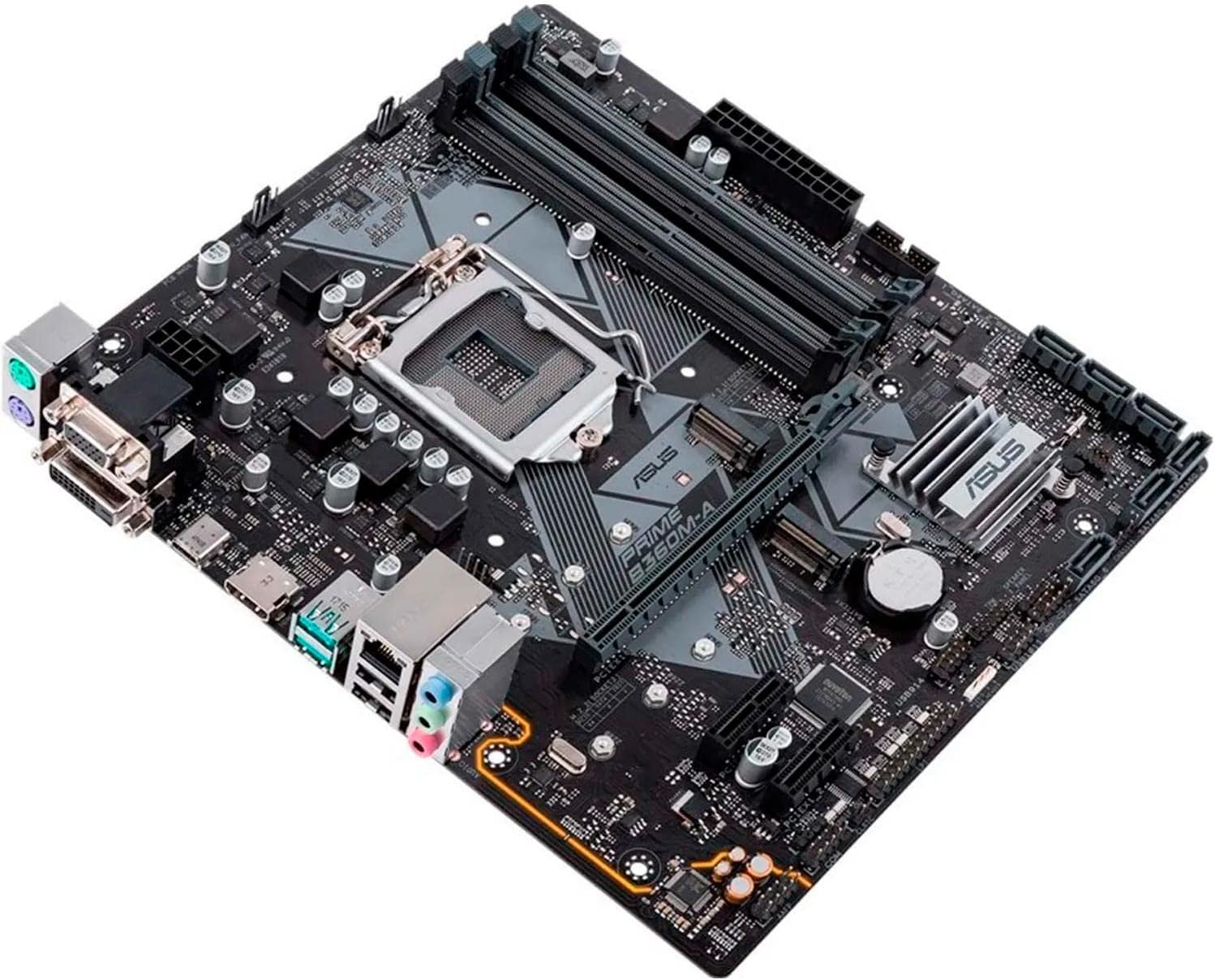
Figure 2.3: An angled perspective of the motherboard, providing a clearer view of the PCIe slots, SATA ports, and the chipset heatsink.

Figure 2.4: Close-up of the rear I/O panel, displaying the various ports including USB, HDMI, DVI, VGA, LAN, and audio jacks.

Figure 2.5: Another view of the motherboard, emphasizing the layout of components and power connectors.
3. Setup and Installation
Proper installation is crucial for the stable operation of your system. Always ensure your system is powered off and unplugged before handling components.
3.1. Pre-Installation Checklist
- Ensure you have all necessary components: CPU, RAM, storage devices (SSD/HDD), power supply, and a compatible PC case.
- Gather tools: Phillips-head screwdriver, anti-static wrist strap (recommended).
- Review the detailed user manual for specific installation diagrams and warnings. A PDF version is available here.
3.2. Component Installation Steps
- Install the CPU: Carefully align the CPU with the socket, ensuring the triangle mark on the CPU matches the mark on the socket. Lower the retention arm to secure the CPU.
- Install the CPU Cooler: Attach the appropriate cooler for your CPU, ensuring proper thermal paste application and secure mounting.
- Install RAM Modules: Open the DIMM slot clips, align the RAM modules with the notch, and press down firmly until the clips snap into place. Refer to the motherboard manual for recommended slot population for dual-channel memory.
- Mount the Motherboard: Install the I/O shield into your PC case. Carefully place the motherboard into the case, aligning it with the standoffs. Secure the motherboard with screws.
- Install Storage Devices: Connect M.2 SSDs to the M.2 slots and SATA drives to the SATA ports.
- Install Graphics Card (Optional): Insert your graphics card into the primary PCIe x16 slot and secure it.
- Connect Power Cables: Connect the 24-pin ATX power connector and the 8-pin CPU power connector from your power supply to the motherboard. Connect power to other components as needed.
- Connect Front Panel Headers: Connect the power button, reset button, USB ports, and audio jacks from your case to the corresponding headers on the motherboard. Refer to the motherboard manual for pinout diagrams.
4. Operating Your System
4.1. First Boot and BIOS/UEFI Setup
Upon the first boot, your system will likely enter the BIOS (Basic Input/Output System) or UEFI (Unified Extensible Firmware Interface). The ASUS BIOS is known for its user-friendly interface.
- Press the DEL key during startup to enter the BIOS/UEFI setup.
- Configure boot order to install your operating system.
- Adjust system time and date.
- Enable XMP/DOCP for optimal memory performance if using high-speed RAM.
- Save changes and exit BIOS to proceed with OS installation.
4.2. Operating System Installation
The ASUS PRIME B360M-A motherboard is compatible with Windows 10. Follow the standard installation procedures for your chosen operating system.
4.3. Driver Installation
After installing the operating system, install the necessary drivers for the motherboard's components to ensure full functionality and performance. Drivers are typically provided on a support CD or can be downloaded from the ASUS official website.
- Chipset Drivers
- LAN Drivers
- Audio Drivers
- USB Drivers
- Graphics Drivers (for integrated graphics or discrete GPU)
5. Maintenance
Regular maintenance helps ensure the longevity and optimal performance of your motherboard and PC system.
5.1. Dust Management
- Periodically clean dust from inside your PC case, especially from fans and heatsinks, using compressed air or a soft brush.
- Ensure proper airflow within the case to prevent overheating.
5.2. BIOS Updates
ASUS regularly releases BIOS updates to improve system stability, compatibility, and performance. Check the ASUS support website for the latest BIOS versions for your PRIME B360M-A motherboard.
- Download the correct BIOS file for your model.
- Follow the instructions provided by ASUS for updating the BIOS (e.g., using EZ Flash utility).
- Caution: Do not interrupt the BIOS update process, as this can render the motherboard inoperable.
5.3. Connection Checks
- Occasionally check all internal cable connections (power, SATA, front panel) to ensure they are securely seated.
6. Troubleshooting
This section provides solutions to common issues you might encounter with your ASUS PRIME B360M-A motherboard.
6.1. No Power / No POST (Power-On Self-Test)
- Ensure all power cables (24-pin ATX, 8-pin CPU) are securely connected to the motherboard and power supply.
- Verify the power supply switch is in the ON position.
- Check front panel connections (power button header).
- Try reseating RAM modules, CPU, and graphics card.
- Clear CMOS (Complementary Metal-Oxide-Semiconductor) by removing the CMOS battery for a few minutes or using the clear CMOS jumper (refer to manual).
6.2. System Instability / Random Reboots
- Check CPU and GPU temperatures to ensure they are within safe operating limits. Improve cooling if necessary.
- Verify RAM stability using memory diagnostic tools.
- Ensure all drivers are up to date.
- Update BIOS to the latest version.
- Check power supply wattage and ensure it is sufficient for all components.
6.3. Audio Issues
- Ensure audio drivers are correctly installed and updated.
- Check audio cable connections to the rear I/O panel or front panel audio header.
- Verify audio output settings in your operating system.
6.4. M.2 Slot Interference
Some users have reported potential interference between aftermarket NVMe heatsinks and larger graphics cards due to the lower M.2 slot's position. Ensure adequate clearance during installation.
7. Technical Specifications
| Feature | Specification |
|---|---|
| Brand | ASUS |
| Series | PRIME B360M-A |
| Model Name | PRIME B360M-A |
| CPU Socket | LGA 1151 |
| Compatible Processors | Intel Socket 1151 for 8th Generation Core i7/Core i5/Core i3/Pentium/Celeron Processor |
| Chipset Type | Intel B360 |
| RAM Memory Technology | DDR4 |
| Memory Clock Speed | 2133 MHz (Supports up to 2666MHz with compatible CPUs) |
| Memory Storage Capacity | 64 GB (Max) |
| Product Dimensions (LxWxH) | 9.6 x 2.03 x 8.1 inches |
| Item Weight | 1.65 pounds |
| Platform | Windows 10 |
| USB 2.0 Ports | 2 (Rear I/O) |
| USB 3.0 Ports | 2 (Rear I/O) |
| Manufacturer | ASUS Computer International Direct |
| First Available Date | April 3, 2018 |
8. Warranty and Support
8.1. What's in the Box
The retail package for the ASUS PRIME B360M-A motherboard typically includes:
- Motherboard
- Warranty Card
- User Manual
- Software Drivers CD/DVD
- SATA Cables
- I/O Shield
8.2. Official User Manual
For detailed instructions, diagrams, and advanced configurations, please refer to the official User Manual in PDF format, available here.
8.3. Customer Support
For technical assistance, warranty claims, or further inquiries, please visit the official ASUS support website or contact their customer service. You can also visit the ASUS Store on Amazon for more product information.


