
1. Product Overview
This document provides instructions for the safe and effective use of the PLUSPOE 24V 0.65A AC DC Switching Power Supply Adapter, model EK1858. This adapter is designed to power various essential oil diffusers and aroma humidifiers requiring a 24V DC input.
Important: Before connecting, always verify that the specifications of your device match the adapter's output. Incorrect voltage or current can damage your device.

Image 1: The PLUSPOE 24V 0.65A AC DC Switching Power Supply Adapter, highlighting its UL Listed certification and VI efficiency rating. Input: 100-240VAC, Output: 24VDC 0.65A.
2. Compatibility Guidelines
To ensure proper function and prevent damage, it is crucial to verify compatibility with your device. This adapter is compatible with many essential oil diffusers and room humidifiers, including models from Pure Enrichment, URPOWER, VicTsing, ASAKUKI, ArtNaturals, InnoGear, and others that require a 24V DC power input with a 5.5mm x 2.1mm DC barrel plug.
2.1. How to Check Compatibility
- Check the Voltage: Locate the "Information Label" or "Power Socket" on your device. Verify that the required input voltage is 24V. If your device requires a different voltage (e.g., 12V, 9V, 6V, 5V), this adapter is not compatible.
- Check the Current: On the same label, check the required current. This adapter provides 0.65A (650mA) and is compatible with devices requiring 0.3A, 0.4A, 0.5A, or 0.65A. If the required current is higher than 0.65A, this adapter is not compatible.
- Check the DC Jack Size and Polarity: The adapter features a 5.5mm x 2.1mm DC barrel plug. Ensure your device's power input matches this size. Additionally, verify the polarity. This adapter has a positive center pole. If your device requires a negative center pole, this adapter is not compatible.
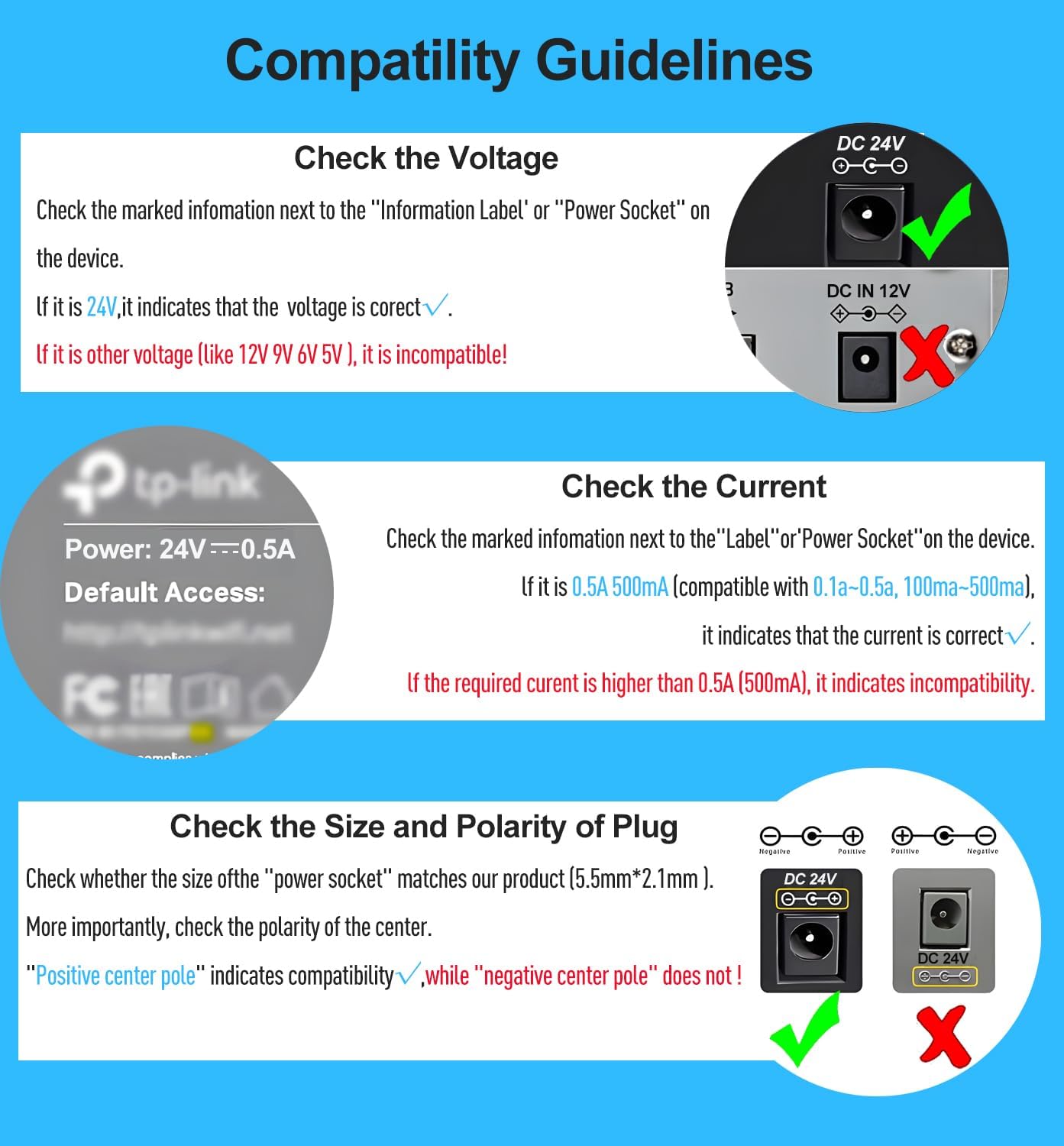
Image 2: Visual guide for checking device compatibility, including voltage (24V), current (0.5A-0.65A), and DC plug size (5.5mm x 2.1mm) with positive center polarity.

Image 3: The power adapter displayed alongside several types of essential oil diffusers and humidifiers, illustrating its broad compatibility.
3. Setup Instructions
- Verify Compatibility: Before proceeding, ensure your device's power requirements (voltage, current, DC jack size, and polarity) match the adapter's specifications as detailed in Section 2.
- Connect to Device: Insert the DC barrel plug of the adapter firmly into the power input port of your essential oil diffuser or humidifier.
- Connect to Power Outlet: Plug the AC prongs of the adapter into a standard AC 100-240V wall outlet.
- Power On Device: Once connected, you may power on your device according to its own instruction manual.

Image 4: The PLUSPOE power adapter connected to a humidifier, demonstrating a typical setup in a home environment.
4. Operating Instructions
The PLUSPOE power adapter operates automatically once connected to a compatible device and a power outlet. It converts the AC wall current to the required 24V DC power for your device.
- Ensure the adapter is not covered to allow for proper ventilation.
- Avoid placing the adapter in direct sunlight or near heat sources.
- Do not operate the adapter with wet hands or in damp environments.
5. Maintenance
Proper maintenance ensures the longevity and safe operation of your power adapter.
- Cleaning: Disconnect the adapter from the power outlet and the device before cleaning. Use a dry, soft cloth to wipe the surface. Do not use liquid cleaners or abrasive materials.
- Storage: When not in use, store the adapter in a cool, dry place, away from direct sunlight and moisture. Avoid tightly coiling the cable to prevent damage.
- Inspection: Periodically inspect the cable and plug for any signs of damage, such as fraying, cuts, or bent prongs. If damage is observed, discontinue use immediately and replace the adapter.
6. Troubleshooting
6.1. Device Not Powering On
- Check Power Outlet: Ensure the wall outlet is functional by plugging in another device.
- Check Connections: Verify that the adapter is securely plugged into both the wall outlet and your device.
- Re-verify Compatibility: Double-check that your device's voltage, current, DC jack size, and polarity precisely match the adapter's specifications (refer to Section 2). An incompatibility is the most common reason for non-functionality or damage.
- Inspect Adapter: Look for any visible damage to the adapter's cable or housing. If damaged, do not use.
6.2. Adapter Overheating
- A slight warmth during operation is normal. However, if the adapter becomes excessively hot to the touch, immediately disconnect it from the power source and the device.
- Ensure the adapter is in a well-ventilated area and not covered by anything that could trap heat.
- Confirm that the connected device's current requirement does not exceed the adapter's 0.65A output.
If troubleshooting steps do not resolve the issue, contact customer support.
7. Specifications
| Feature | Specification |
|---|---|
| Brand | PLUSPOE |
| Model Number | EK1858 |
| Input Voltage | AC 100-240V, 50/60Hz |
| Output Voltage | DC 24V |
| Output Current | 0.65A (650mA) |
| Compatible Current | 0.3A, 0.4A, 0.5A, 0.65A |
| DC Jack Size | 5.5mm x 2.1mm Barrel Plug |
| DC Jack Polarity | Center Positive (+) |
| Cable Length | Approximately 6 Ft (1.8 meters) |
| Safety Certification | UL Listed |
| Efficiency Level | VI |
| Color | White |
8. Warranty and Support
PLUSPOE offers a one-year warranty for this product. We also provide lifetime customer service to assist you with any questions or concerns.
If you have any questions regarding the product, its operation, or require assistance with troubleshooting, please do not hesitate to contact our customer service team. Refer to your purchase documentation for specific contact information.