
Introduction
The Caline Pure Sky OD Guitar Pedal Effect CP-12 is designed to provide a transparent, high-end overdrive sound for electric guitars. It can function as a dedicated overdrive or as an always-on EQ to shape your tone. This manual provides essential information for setting up, operating, and maintaining your CP-12 pedal.
Key Features
- Transparent Overdrive: Delivers a clear, high-end overdrive suitable for various musical styles.
- Versatile Tone Shaping: Equipped with independent Volume, Gain, Treble, and Bass controls for precise sound adjustment.
- True Bypass: Ensures zero tone coloration when the effect is disengaged.
- LED Indicator: Clearly shows the pedal's operational status.
- Durable Construction: Housed in a sturdy aluminum alloy shell for reliability.
- Compact Design: Space-saving footprint for easy integration into any pedalboard.
Controls and Functions
The Caline Pure Sky OD pedal features four control knobs and a footswitch for intuitive operation.
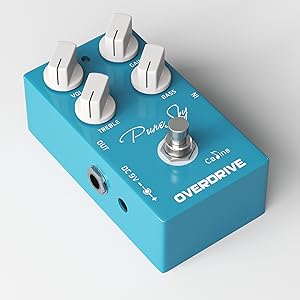
Image: Caline Pure Sky OD Pedal with numbered controls for easy identification.
- VOL (Volume) Knob: Adjusts the overall output level of the pedal. Turn clockwise to increase volume, counter-clockwise to decrease.
- TREBLE Knob: Controls the high-frequency response. Adjust to add brightness or reduce harshness.
- DC 9V Input: Connects to a standard 9V DC power adapter (center-negative).
- LED Indicator: Illuminates when the pedal is active.
- GAIN Knob: Adjusts the amount of overdrive/distortion. Higher settings produce more saturated tones.
- BASS Knob: Controls the low-frequency response. Adjust to add warmth or tighten the low end.
- IN (Input) Jack: Connect your guitar or the output of a preceding effect pedal here.
- Footswitch: Engages or disengages the effect. True bypass ensures your signal remains unaffected when the pedal is off.
Setup
Follow these steps to connect your Caline Pure Sky OD pedal:
- Ensure your amplifier is turned off or set to a clean channel with low volume.
- Connect your guitar to the IN jack (7) of the Pure Sky pedal using a standard 1/4-inch instrument cable.
- Connect the OUT jack of the Pure Sky pedal to your amplifier's input or the input of the next pedal in your signal chain.
- Connect a 9V DC power adapter (center-negative, not included) to the DC 9V input (3) on the side of the pedal.
- Turn on your amplifier and adjust the volume to a suitable level.

Image: Angled view of the Caline Pure Sky OD pedal, showing input and output jacks.
Operation
Once connected, you can begin using your Caline Pure Sky OD pedal:
- Engaging the Effect: Press the footswitch (8) to turn the effect on. The LED indicator (4) will illuminate.
- Disengaging the Effect: Press the footswitch again to turn the effect off. The LED indicator will turn off, and your signal will pass through unaffected (true bypass).
- Adjusting Volume: Use the VOL knob (1) to set the overall output level. Start with a lower setting and increase gradually to match your desired volume.
- Controlling Gain: The GAIN knob (5) determines the amount of overdrive. Lower settings provide a clean boost or light breakup, while higher settings deliver more saturated overdrive.
- Tone Shaping: The TREBLE (2) and BASS (6) knobs allow you to fine-tune your tone. Adjust the TREBLE for brightness and clarity, and the BASS for warmth and low-end presence. These controls are highly interactive and can significantly alter the character of the overdrive.
Experiment with different knob settings to discover the wide range of tones available. The pedal is designed to be transparent, allowing your guitar's natural tone to shine through while adding a rich overdrive.
Product Demonstration Video
Video: An official demonstration of the Caline Pure Sky OD Guitar Pedal Effect CP-12, showcasing its sound and features.
Maintenance and Safety
To ensure the longevity and proper functioning of your pedal, please observe the following:
- Do not use the pedal in environments with high temperatures, high humidity, or sub-zero conditions.
- Avoid exposing the pedal to direct sunlight for extended periods.
- Do not attempt to disassemble the pedal yourself. Unauthorized modifications may void the warranty and cause damage.
- Clean the pedal with a soft, dry cloth. Avoid using abrasive cleaners or solvents.
- Always disconnect the power adapter when the pedal is not in use or during cleaning.
Troubleshooting
If you encounter issues with your Caline Pure Sky OD pedal, consider the following general troubleshooting steps:
- No Sound: Check all cable connections (guitar to pedal, pedal to amp). Ensure the power adapter is correctly connected and functioning. Verify that your guitar's volume and amplifier's volume are turned up.
- Weak or Distorted Sound (unexpectedly): Check the battery (if applicable, though this model uses DC power) or power supply. Ensure all cables are in good condition and fully inserted. Test the pedal with different cables and a different power supply if possible.
- Excessive Noise: Ensure you are using a regulated 9V DC center-negative power supply. Unplug other pedals to isolate the source of noise. Check for proper grounding in your setup.
- Effect Not Engaging: Ensure the footswitch is fully pressed and the LED indicator illuminates.
If problems persist after these steps, contact customer support for further assistance.
Specifications
| Feature | Specification |
|---|---|
| Model Number | CP-12 |
| Input | 1/4" monaural jack (impedance: 470k Ohms) |
| Output | 1/4" monaural jack (impedance: 470 Ohms) |
| Power Requirements | AC adapter 9V DC (center minus plug) |
| Current Draw | 9 mA |
| Item Weight | 9.1 ounces (0.26 Kilograms) |
| Product Dimensions | 4.5 x 2.7 x 2.1 inches |
| Material | Aluminum-alloy casing |
| Color | Black (Product image shows blue, but specification lists black. User should refer to product packaging for exact color.) |
Warranty and Support
For warranty information or technical support, please refer to the documentation included with your purchase or visit the official Caline website. Keep your proof of purchase for any warranty claims.