1. Introduction
The FOXSUR Digital 12V Car Battery Tester (Model FBT1201) is a compact and precise diagnostic tool designed to analyze the health of 12V lead-acid starter batteries and evaluate vehicle starting and charging systems. It provides quick and accurate results for various battery types, including regular flooded, EFB, AGM tablet, AGM winding, GEL, WET, and SLA batteries.

Figure 1: FOXSUR Digital 12V Car Battery Tester (Model FBT1201) with its main unit and battery clamps.
2. Key Features
- Wide Application: Compatible with all car lead-acid starter batteries (flooded, EFB, AGM tablet, AGM winding, GEL, WET, SLA).
- Comprehensive Testing: Measures Battery Life (SOH), State of Charge (SOC), Cold Cranking Amps (CCA) value, Internal Resistance (IR), and evaluates Starting & Charging systems.
- Accurate Standards: Test results are based on SAE, DIN, IEC, EN, CA, and JIS standards.
- User-Friendly: Small, compact design with direct result display, suitable for beginners and professionals.
- No Internal Battery: Powered directly by the 12V battery being tested.
- Voltage Range: Operates within 7-15V DC.
3. Setup
The FOXSUR FBT1201 battery tester is designed for ease of use and requires minimal setup. It draws power directly from the battery being tested, eliminating the need for internal batteries or external power sources.
- Prepare the Battery: Ensure the battery terminals are clean and free of corrosion for accurate readings.
- Connect the Clamps:
- Connect the red positive (+) clamp to the positive terminal of the 12V battery.
- Connect the black negative (-) clamp to the negative terminal of the 12V battery.
Once connected, the tester will power on automatically and display the main menu.
4. Operating Instructions
Navigate through the menu using the up/down arrow buttons and confirm selections with the "ENTER" button.
4.1. Battery Test
This function assesses the overall health of the battery.
- From the main menu, select "Battery Test".
- Choose the battery type (e.g., Regular Flooded, AGM, GEL).
- Input the battery's rated CCA (Cold Cranking Amps) value, usually found on the battery label.
- The tester will perform the analysis and display results such as Voltage, Internal Resistance (IR), State of Health (SOH), and State of Charge (SOC).

Figure 2: Testing battery voltage for accurate results.

Figure 3: Displaying Internal Resistance (IR) of the battery.

Figure 4: Displaying State of Health (SOH) of the battery.

Figure 5: Displaying State of Charge (SOC) of the battery.
4.2. Cranking System Test (In-Vehicle)
This test evaluates the starter motor's performance.
- Ensure the tester is connected to the vehicle's battery.
- From the main menu, select "Cranking Test" or "Starting System Test".
- Follow the on-screen prompts to start the vehicle's engine.
- The tester will measure the cranking voltage and display the result, indicating if the cranking system is normal or requires attention.
4.3. Charging System Test (In-Vehicle)
This test assesses the alternator's charging capabilities.
- Ensure the tester is connected to the vehicle's battery and the engine is running.
- From the main menu, select "Charging Test" or "Alternator Test".
- The tester will measure load voltage, unloaded voltage, and ripple status.
- It will then display the charging system status, indicating if it's normal or if there are issues.

Figure 6: Examples of in-car testing for battery load, cranking volts, and alternator load volts.
5. Understanding Test Results
The FOXSUR FBT1201 provides clear indications of battery and system health.
- SOH (State of Health): Indicates the overall condition and remaining lifespan of the battery. A lower percentage suggests a weaker battery.
- SOC (State of Charge): Shows the current charge level of the battery.
- CCA Value: The measured Cold Cranking Amps, indicating the battery's ability to start an engine in cold conditions.
- IR (Internal Resistance): A higher internal resistance indicates a less efficient battery, often due to aging or sulfation.
- Starting & Charging System Status: Provides a clear "Normal" or "Replace/Check" message for the vehicle's starting and charging components.

Figure 7: Example of a "BAD REPLACE" test result, indicating the battery needs replacement.
5.1. Test Standards and Ranges
The tester supports various international standards for accurate measurement:
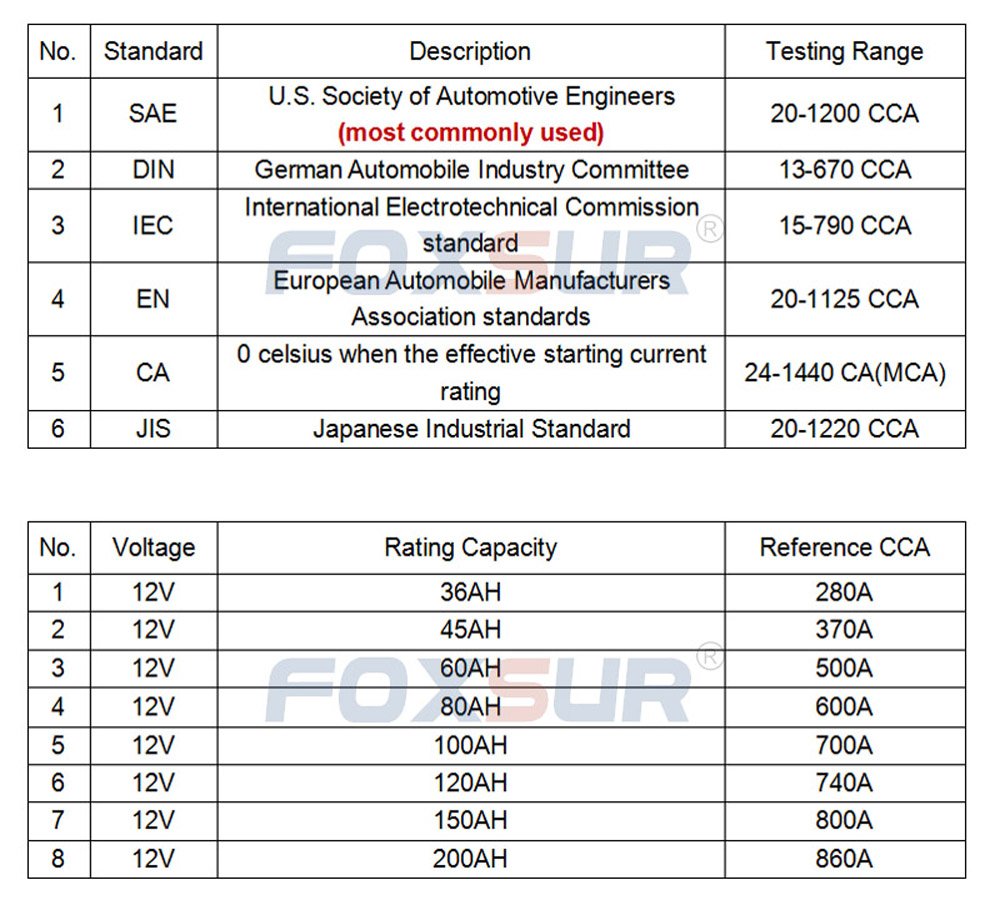
Figure 8: Table detailing supported test standards and their corresponding CCA testing ranges.
6. Specifications
| Specification | Value |
|---|---|
| Model | FBT1201 |
| Usage Scope | 12V car lead-acid starter batteries (Flooded, EFB, AGM tablet, AGM winding, GEL, WET, SLA) |
| Test Range (CCA) | 20-1200 CCA |
| Test Range (AH) | 30AH - 200Ah |
| Test Standards | SAE, DIN, IEC, EN, CA, JIS |
| Voltage Measure Range | 7-15V DC |
| Housing Material | ABS Plastic |
| Color | Green |
| Item Weight | 200 g (0.44 lb) |
| Parcel Dimensions | 22.2 x 18.4 x 3.5 cm |

Figure 9: Physical dimensions and weight of the FOXSUR FBT1201 battery tester.
7. Maintenance
To ensure the longevity and accuracy of your FOXSUR battery tester, follow these simple maintenance guidelines:
- Cleaning: Wipe the unit with a soft, dry cloth after each use. Do not use abrasive cleaners or solvents.
- Storage: Store the tester in a cool, dry place away from direct sunlight and extreme temperatures.
- Cable Care: Avoid bending or kinking the test leads excessively. Inspect the cables and clamps regularly for any signs of damage or wear.
- Terminal Cleanliness: Always ensure the battery terminals are clean before connecting the tester to get accurate readings.
8. Troubleshooting
| Problem | Possible Cause | Solution |
|---|---|---|
| Tester does not power on. | Poor connection to battery terminals; Battery voltage too low. | Ensure clamps are securely connected to clean battery terminals. Check if battery voltage is above 7V. |
| Inaccurate readings. | Corroded battery terminals; Incorrect battery type/CCA input. | Clean battery terminals thoroughly. Verify correct battery type and CCA value are entered. |
| "Error" message displayed. | Battery fault; Connection issue; Tester malfunction. | Re-check connections. Test another battery if possible. If problem persists, contact support. |
9. Warranty and Support
For warranty information and technical support, please refer to the official FOXSUR website or contact your point of purchase. Keep your purchase receipt as proof of purchase for warranty claims.
Manufacturer: FOXSUR
Date First Available: March 23, 2018


