
CLEANmaxx 02243
Contents
CLEANmaxx Anti-Mite Vacuum Cleaner with UV-C Light and EPA Filters User Manual
Model: 02243
1. Introduction
This manual provides essential information for the safe and effective operation, maintenance, and troubleshooting of your CLEANmaxx Anti-Mite Vacuum Cleaner, Model 02243. Please read these instructions carefully before first use and retain them for future reference.
The CLEANmaxx Anti-Mite Vacuum Cleaner is designed to remove dust mites, bacteria, pet hair, and household dust from various textile surfaces using powerful suction, vibration, and UV-C light technology. It is particularly beneficial for individuals with allergies.

Figure 1: The CLEANmaxx Anti-Mite Vacuum Cleaner utilizes UV-C light (max 280 nm wavelength) for effective mite and bacteria removal.
2. Safety Instructions
Always observe the following safety precautions to reduce the risk of fire, electric shock, injury, or damage to the appliance.
- Read all instructions before using the appliance.
- This appliance is for household use only. Do not use outdoors or for commercial purposes.
- Do not handle the plug or appliance with wet hands.
- Ensure the voltage indicated on the appliance matches your local mains voltage before connecting.
- Unplug the appliance from the power outlet when not in use, before cleaning, or before performing any maintenance.
- Keep the appliance away from heat sources, direct sunlight, humidity, and sharp edges.
- Do not use the appliance to vacuum water or other liquids, hot ashes, sharp objects, or flammable/explosive substances.
- The UV-C light activates only when the appliance is in contact with a surface. Avoid direct exposure to the UV-C light.
- Do not allow children to operate the appliance. Keep it out of reach of children and pets.
- If the power cord is damaged, it must be replaced by the manufacturer, its service agent, or similarly qualified persons to avoid a hazard.
- Use only original accessories and spare parts.
3. Package Contents
Carefully unpack the contents and ensure all items are present and undamaged. If any items are missing or damaged, contact your retailer.
- 1x CLEANmaxx Anti-Mite Vacuum Cleaner (Motor Unit)
- 1x Dust Container
- 1x Dust Filter (pre-installed)
- 1x Fine Dust Filter (pre-installed)
- 1x UV-C Lamp (integrated)
- 2x Replacement EPA Filters
- 1x Instruction Manual

Figure 2: CLEANmaxx Anti-Mite Vacuum Cleaner with included replacement EPA filters.
4. Product Overview
Familiarize yourself with the components of your anti-mite vacuum cleaner.
- Main Unit with Handle
- Power Button
- Dust Container Release Button
- Dust Container
- 3-Stage Cyclone Filtration System (Nylon pre-filter, Fine dust filter, EPA filter)
- UV-C Lamp (underside)
- Vibration Pad (underside)
- Safety Sensors for UV-C Light Activation
- Power Cord
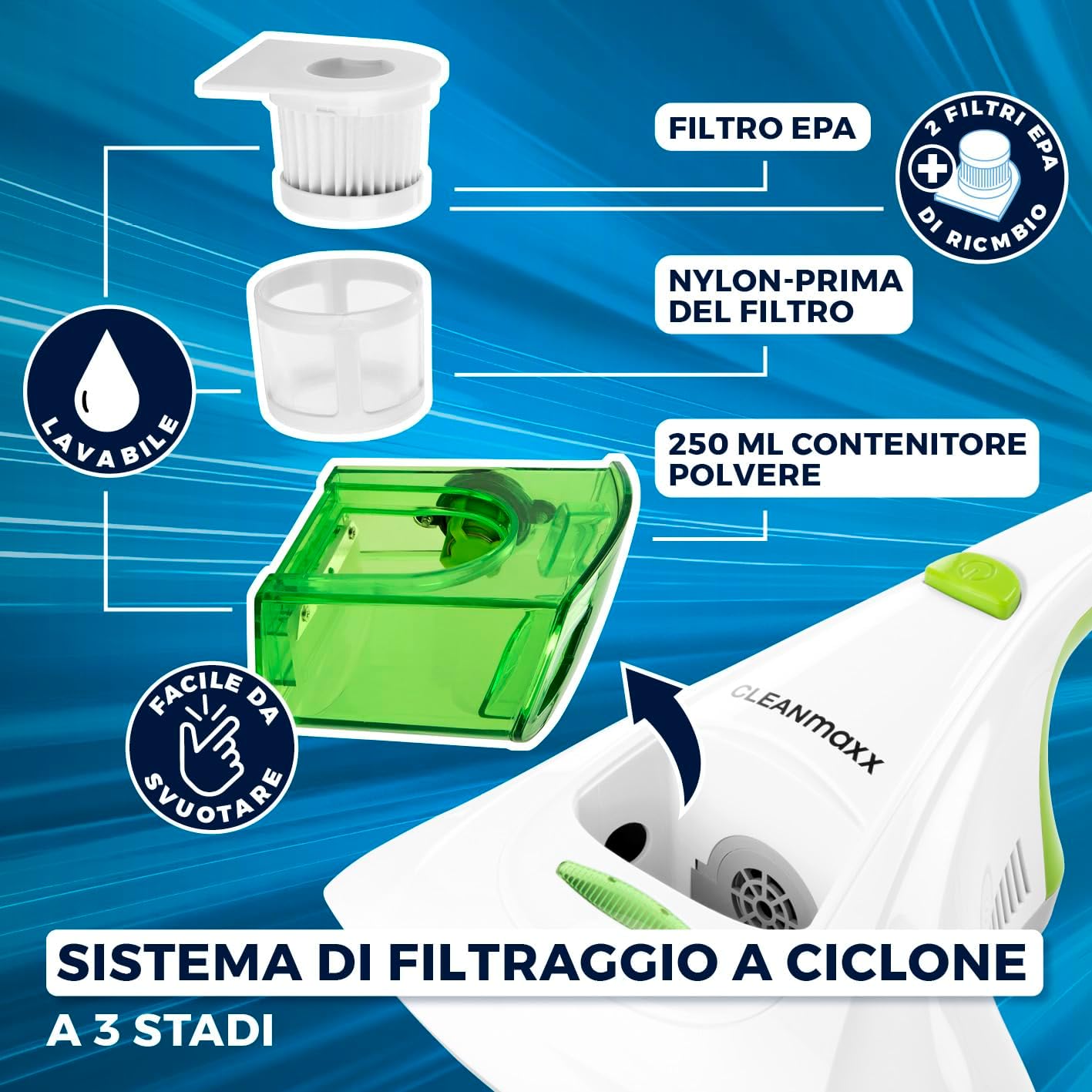
Figure 3: Illustration of the 3-stage cyclone filtration system and easy-to-empty dust container.
5. Setup
The CLEANmaxx Anti-Mite Vacuum Cleaner comes pre-assembled. Before first use, ensure all packaging materials are removed.
- Check Filters: Ensure the dust container and filters (nylon pre-filter, fine dust filter, and EPA filter) are correctly installed inside the appliance. Refer to the "Maintenance" section for filter installation details.
- Power Connection: Plug the power cord into a suitable electrical outlet (220-240V, 50 Hz).
- Ready for Use: The appliance is now ready for operation.
6. Operating Instructions
The CLEANmaxx Anti-Mite Vacuum Cleaner is designed for cleaning various textile surfaces.
6.1 General Operation
- Power On: Press the power button located on the handle to turn on the appliance. The vacuum function and vibration pad will activate.
- UV-C Light Activation: The integrated UV-C light will only activate when the appliance's underside is pressed firmly against a flat surface (e.g., a mattress). Safety sensors prevent the UV-C light from operating when lifted, ensuring user safety.
- Cleaning Motion: Move the vacuum cleaner slowly and evenly over the surface to be cleaned. The wide cleaning path (135 mm) allows for efficient coverage. Ensure consistent contact with the surface for optimal UV-C light exposure and mite removal.
- Power Off: Press the power button again to turn off the appliance.
6.2 Recommended Usage Areas
This appliance is suitable for:
- Mattresses
- Beds and cribs
- Bedding and pillows
- Sofas and upholstered furniture
- Carpets and rugs
- Pet beds

Figure 4: Examples of suitable surfaces for cleaning with the CLEANmaxx Anti-Mite Vacuum Cleaner.
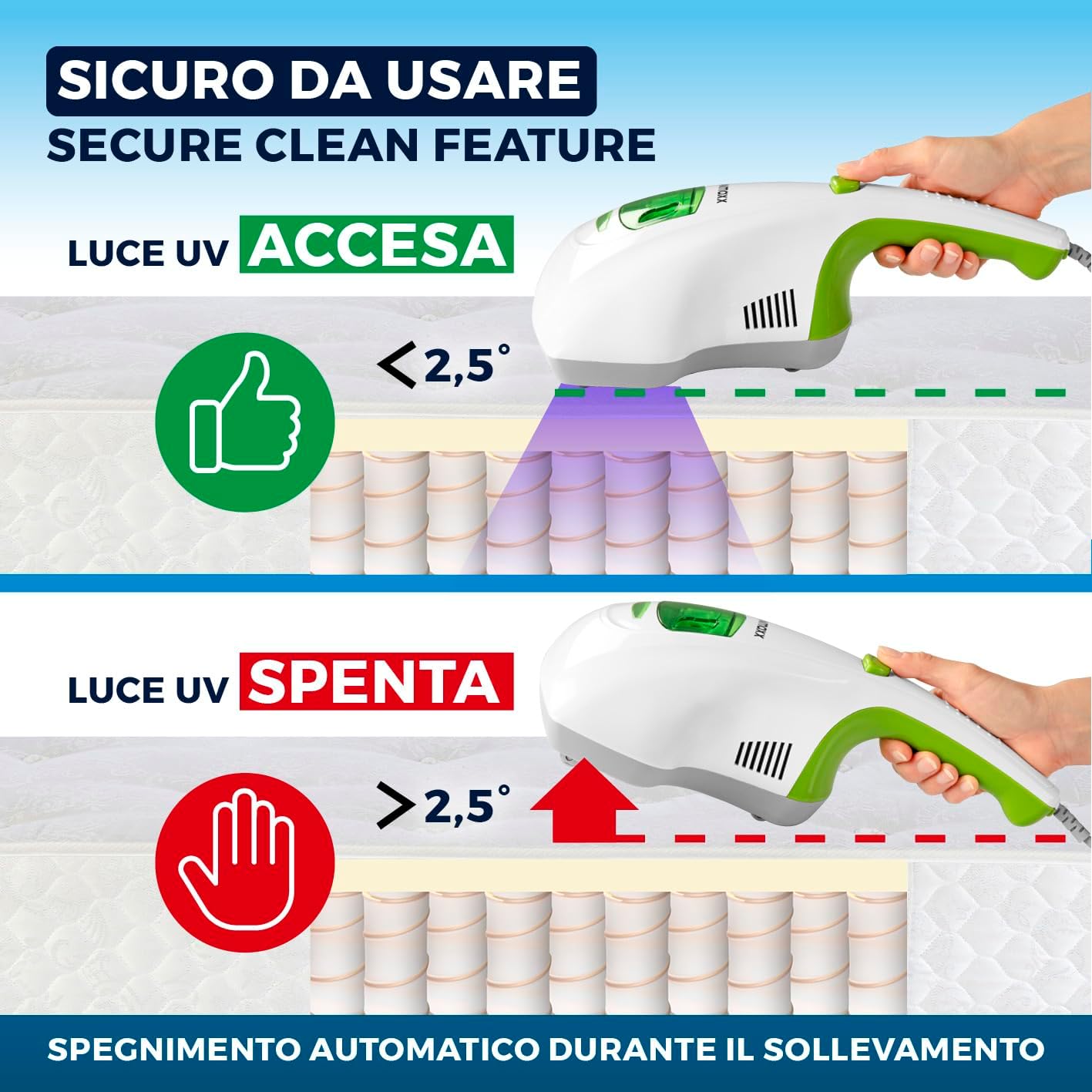
Figure 5: Safe operation of the UV-C light, which activates only upon contact with a surface.

Figure 6: The wide cleaning area (135 mm) for efficient cleaning without chemicals.
7. Maintenance
Regular cleaning and maintenance will ensure optimal performance and extend the lifespan of your appliance.
7.1 Emptying and Cleaning the Dust Container
- Disconnect Power: Always unplug the appliance from the power outlet before cleaning.
- Remove Dust Container: Press the dust container release button and carefully pull the dust container away from the main unit.
- Empty Contents: Open the dust container and empty its contents into a waste bin.
- Clean Container: The dust container can be rinsed with water. Ensure it is completely dry before reattaching.
7.2 Cleaning and Replacing Filters
The appliance features a 3-stage cyclone filtration system with a washable nylon pre-filter and EPA filters. Regular cleaning of filters is crucial for maintaining suction power.
- Access Filters: Once the dust container is removed, the filters are accessible. Carefully remove the nylon pre-filter and the EPA filter.
- Clean Filters:
- Nylon Pre-filter: This filter can be rinsed under running water.
- EPA Filter: Gently tap the EPA filter to dislodge dust. If heavily soiled, it can be carefully rinsed with water.
- Dry Filters: Allow all filters to air dry completely for at least 24 hours before reinstallation. Do not use a hairdryer or other heating devices.
- Reinstall Filters: Once dry, place the EPA filter back into its housing, followed by the nylon pre-filter. Ensure they are seated correctly.
- Replace Filters: The EPA filters should be replaced every 3-6 months, or sooner depending on usage, to maintain optimal performance. Two replacement EPA filters are included with your appliance.

Figure 7: The vacuum's effectiveness in removing various allergens, emphasizing the importance of filter maintenance.
7.3 Cleaning the UV-C Lamp and Vibration Pad
- UV-C Lamp: Periodically wipe the UV-C lamp with a soft, dry cloth to ensure maximum effectiveness. Do not use abrasive cleaners.
- Vibration Pad: Check the vibration pad for any accumulated debris or fibers and clean as necessary.
8. Troubleshooting
If you encounter issues with your appliance, refer to the following table before contacting customer support.
| Problem | Possible Cause | Solution |
|---|---|---|
| Appliance does not turn on. | Not plugged in; power outlet faulty; power button not pressed. | Ensure power cord is securely plugged in. Test the outlet with another device. Press the power button firmly. |
| Low suction power. | Dust container full; filters clogged; blockage in suction inlet. | Empty the dust container. Clean or replace filters. Check for and remove any blockages. |
| UV-C light does not activate. | Appliance not in contact with surface; safety sensors obstructed. | Ensure the appliance is pressed firmly against a flat surface. Check if safety sensors on the underside are clean and unobstructed. |
| Unusual noise during operation. | Blockage in the suction path; foreign object in vibration pad. | Turn off and unplug the appliance. Check for and remove any blockages or foreign objects. |
9. Specifications
- Model: 02243
- Brand: CLEANmaxx
- Color: Green
- Dimensions (L x W x H): 32.5 x 25 x 12 cm
- Weight: 1.3 kg
- Power: 300 W
- Voltage: 220-240 V, 50 Hz
- Suction Power: 10 kPa
- Vibrations: Up to 5000 vibrations/minute
- Material: ABS
- Noise Level: 70 dB
- Dust Container Capacity: 0.25 liters
- Filter Type: HEPA filter (3-stage cyclone filtration)
- UV-C Light Wavelength: Max 280 nm
- Cordless: No

Figure 8: Key performance specifications of the CLEANmaxx Anti-Mite Vacuum Cleaner.
10. Warranty and Support
For warranty information, please refer to the terms and conditions provided at the point of purchase or contact your retailer. For technical support or inquiries regarding spare parts, please contact CLEANmaxx customer service.
Note: The manufacturer reserves the right to make minor changes to the product design and technical specifications without prior notice.
Ask a question about this manual
Ask about setup, troubleshooting, compatibility, parts, safety, or missing instructions. Manuals+ will review the question and use this page’s manual context to help answer it.