1. Introduction
This instruction manual provides essential information for the proper use and care of your co2CREA Hard Case. This case is specifically designed to provide robust protection and portability for your OMRON Bronze Blood Pressure Monitor BP5100 and OMRON 5 Series Upper Arm Blood Pressure Monitor BP742N. It is engineered to safeguard your device from physical damage, dust, and splashes, ensuring its longevity and readiness for use.

Image 1.1: The co2CREA hard case, open and ready to store an OMRON blood pressure monitor and its cuff. The case features a dedicated compartment for the monitor and a mesh pocket for the cuff and other small accessories.
2. Setup and Storage
The co2CREA hard case is designed for straightforward setup and secure storage.
- Opening the Case: Unzip the case completely using the smooth, dual zippers. The case will open flat, revealing two main compartments.
- Placing the Monitor: Carefully place your OMRON Bronze Blood Pressure Monitor (BP5100) or OMRON 5 Series Upper Arm Blood Pressure Monitor (BP742N) into the molded compartment designed to fit its shape. Ensure it sits snugly to prevent movement during transport.
- Storing the Cuff and Accessories: The opposite side of the case features a mesh pocket. Fold your blood pressure cuff neatly and place it inside this mesh pocket. The pocket is also suitable for storing small accessories such as power adapters or extra batteries.
- Closing the Case: Once all items are securely placed, gently close the case and zip it shut. Ensure the zippers are fully closed to provide maximum protection.
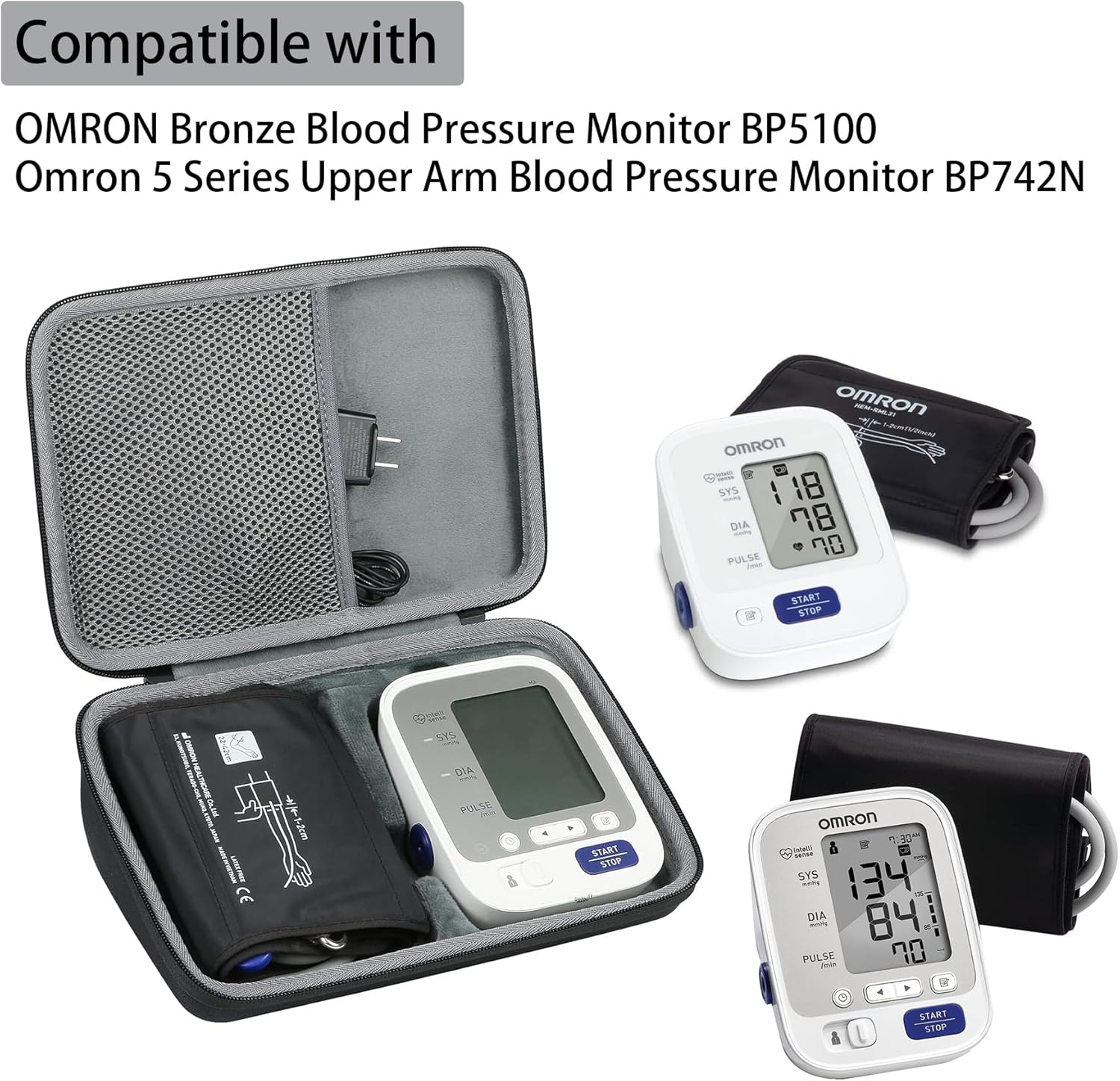
Image 2.1: This image illustrates the compatibility of the co2CREA hard case with both the OMRON Bronze Blood Pressure Monitor BP5100 and the OMRON 5 Series Upper Arm Blood Pressure Monitor BP742N. The case is shown alongside the monitors it is designed to protect.
3. Operating the Case
The co2CREA hard case is designed for simple and effective operation, focusing on portability and protection.
- Portability: Utilize the comfortable hand strap for easy carrying. The compact design allows the case to be stored in larger bags or luggage without occupying excessive space.
- Protection: The hard EVA shell provides shockproof, dustproof, and water-resistant properties. This protects your blood pressure monitor from accidental drops, impacts, dust accumulation, and light splashes.
- Access: The smooth, strong zipper allows for quick and easy access to your blood pressure monitor whenever needed.

Image 3.1: This image highlights key operational features of the co2CREA case, including the smooth zippers for easy opening and closing, the comfortable handle for convenient transport, and the internal mesh pocket for accessory storage.
4. Maintenance
Proper maintenance ensures the longevity and effectiveness of your co2CREA hard case.
- Cleaning: To clean the exterior, wipe with a soft, damp cloth. For stubborn dirt, a mild soap solution can be used, followed by wiping with a clean, damp cloth. Allow the case to air dry completely before closing or storing. Do not use harsh chemicals or abrasive cleaners.
- Interior Care: The soft anti-static lining can be gently wiped with a dry, soft cloth to remove dust or debris.
- Storage: Store the case in a cool, dry place away from direct sunlight and extreme temperatures when not in use.
- Water Resistance: While the case offers water resistance (IP X3), it is not fully waterproof. Avoid submerging the case in water or exposing it to heavy rain for extended periods. If the case gets wet, wipe it dry immediately.
5. Troubleshooting
This section addresses common issues you might encounter with your co2CREA hard case.
| Problem | Possible Cause | Solution |
|---|---|---|
| Zipper is stiff or stuck. | Dust or debris in zipper teeth; lack of lubrication. | Clean zipper teeth with a small brush. Apply a small amount of zipper lubricant (e.g., beeswax or silicone spray) to the teeth. |
| Case appears dirty or stained. | Surface dirt or minor stains. | Wipe with a soft, damp cloth. For tougher stains, use a mild soap solution and then wipe clean with a damp cloth. Air dry. |
| Items inside are not secure. | Incorrect placement or incompatible item. | Ensure the blood pressure monitor is placed in its designated molded slot. Use the mesh pocket for the cuff and smaller accessories. This case is designed for OMRON BP5100 and BP742N models specifically. |
6. Specifications
Detailed specifications for the co2CREA Hard Case:
- Product Dimensions: Approximately 11 x 8 x 4 inches (28 x 20 x 10 cm)
- Item Weight: Approximately 7.05 ounces (200 grams)
- Material: Hard EVA shell with soft anti-static lining
- Special Features: Heavy Duty Protection, Water Resistant (IP X3), Shockproof, Dustproof, Portable, Comfortable Hand Strap, Smooth Zipper, Internal Mesh Pocket
- Compatibility: Designed for OMRON Bronze Blood Pressure Monitor BP5100 and OMRON 5 Series Upper Arm Blood Pressure Monitor BP742N.

Image 6.1: A diagram illustrating the external dimensions of the co2CREA hard case, providing measurements in both inches and centimeters.

Image 6.2: Visual representation of the case's key features, including its IP X3 water resistance rating, tough construction, light fire resistance, and portable design.
7. Warranty and Support
Information regarding product warranty and customer support for the co2CREA Hard Case.
7.1. Warranty Information
Specific warranty details for the co2CREA Hard Case are not provided in this manual. For information regarding warranty coverage, terms, and conditions, please refer to the product packaging or contact co2CREA customer service directly.
7.2. Customer Support
For any questions, concerns, or assistance with your co2CREA Hard Case, please contact the manufacturer, co2CREA. You may find contact information on their official website or through the retailer where the product was purchased.
You can visit the co2CREA Store on Amazon for more information: co2CREA Amazon Store.


