
GME TX3510S
GME TX3510S 5 Watt CB Radio User Manual
Model: TX3510S | Brand: GME
Introduction
The GME TX3510S is a compact, fully-featured 5 Watt UHF CB radio designed for reliable communication. It incorporates advanced DSP technology and ScanSuite digital scanning, offering a comprehensive set of features for both standard and advanced users. This manual provides essential information for the proper installation, operation, and maintenance of your TX3510S radio.
Product Features
- 80 Channel UHF CB Service
- ScanSuite Digital Scanning for uninterrupted communication
- Full Spectrum Back-Lit LCD Display
- Advanced Signal Management
- 95 Receive-Only Programmable Channels
- Front and Rear Microphone Input for flexible installation
- Latest DSP Technology for enhanced performance
- Rugged Construction for durability
- Ease of Installation
Setup and Installation
Proper installation is crucial for optimal performance of your GME TX3510S radio. It is recommended to have the radio installed by a qualified technician.
Mounting the Radio
Select a secure and accessible location in your vehicle, ensuring it does not obstruct airbags or driving controls. Use the supplied mounting bracket and hardware to firmly attach the radio.
Power Connection
Connect the radio's red wire to a positive (+12V DC) power source (e.g., vehicle battery) and the black wire to a negative (ground) point. Ensure the connection is fused appropriately (typically 2A fuse, check product specifications for exact rating).
Antenna Connection
Connect a suitable UHF CB antenna to the antenna socket on the rear of the radio. Ensure the antenna is correctly tuned for the UHF CB band to prevent damage to the radio and ensure maximum range.
Microphone Connection
Plug the supplied microphone into the designated RJ45 socket on the front of the radio. The TX3510S also supports a rear microphone input for custom installations.
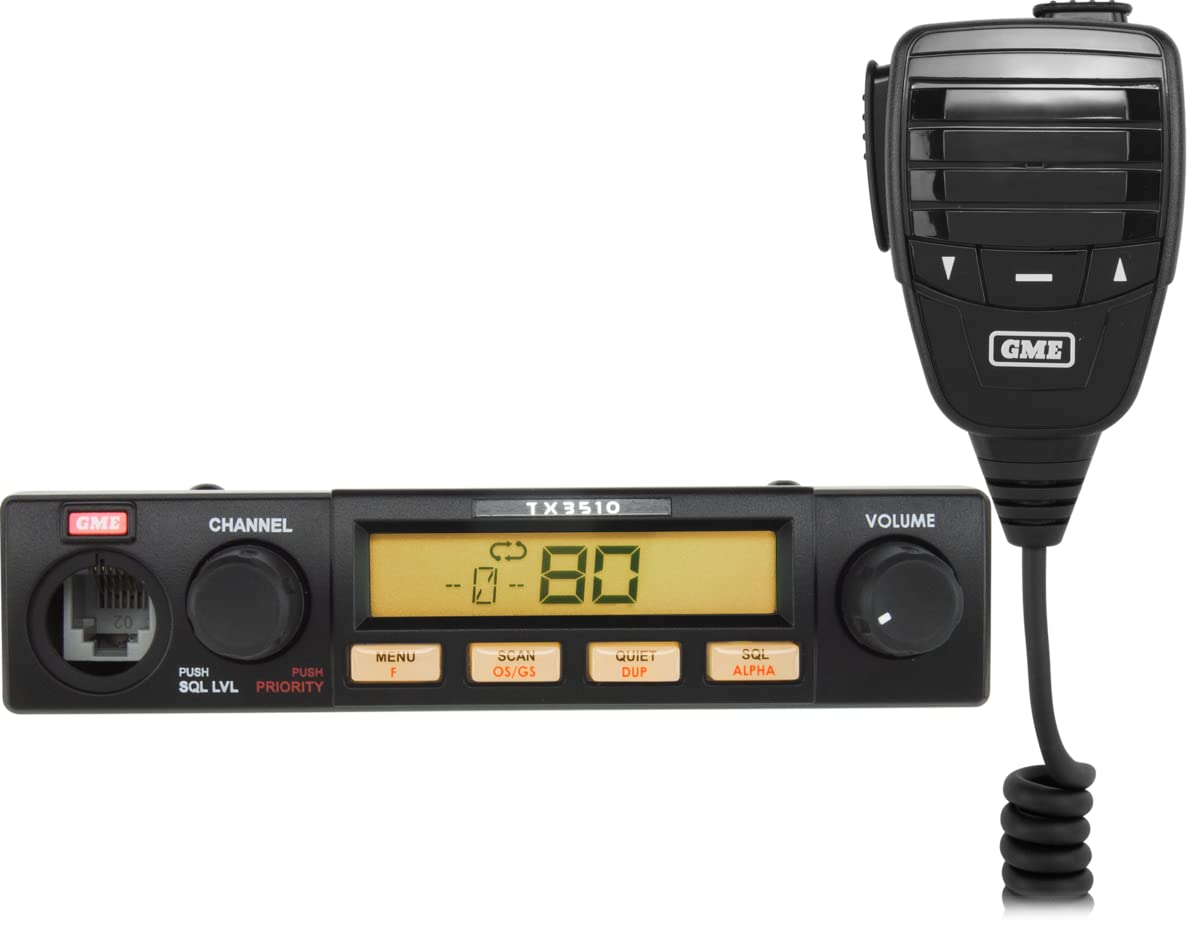
An image showing the GME TX3510S 5 Watt CB Radio unit and its attached microphone. The radio unit features a digital display showing '80' for channels, a channel knob, a volume knob, and buttons for 'MENU F', 'SCAN OS/GS', 'QUIET DUP', and 'SQL ALPHA'. The microphone has control buttons and the GME logo.
Operating Instructions
Power On/Off and Volume
To turn the radio on, rotate the VOLUME knob clockwise. Continue rotating to adjust the listening volume. Rotate counter-clockwise until it clicks to turn the radio off.
Channel Selection
Rotate the CHANNEL knob to select the desired UHF CB channel (1-80). The selected channel number will be displayed on the LCD.
Squelch Adjustment (SQL LVL)
The squelch control eliminates background noise when no signal is present. Press the PUSH SQL LVL button (located on the CHANNEL knob) and rotate the knob to adjust the squelch level. Adjust it just past the point where background noise disappears.
Scanning (SCAN OS/GS)
Press the SCAN OS/GS button to activate the scanning function. The radio will scan through programmed channels or all available channels, stopping on active ones. Press again to stop scanning.
Duplex Function (QUIET DUP)
The Duplex function allows communication through repeater stations, extending your range. Press the QUIET DUP button to activate or deactivate Duplex mode for the current channel.
Menu Functions (MENU F)
Press the MENU F button to access the radio's menu system for advanced settings and configurations. Use the CHANNEL knob to navigate and select options.
Priority Channel (PUSH PRIORITY)
The radio allows setting a priority channel. Press the PUSH PRIORITY button (located on the CHANNEL knob) to quickly switch to or monitor your designated priority channel.
Alpha Tagging (SQL ALPHA)
The SQL ALPHA button may be used for specific squelch settings or to display alpha tags for channels, depending on the radio's configuration.
Maintenance
The GME TX3510S is designed for durability and requires minimal maintenance.
- Cleaning: Use a soft, damp cloth to clean the exterior of the radio. Do not use abrasive cleaners or solvents.
- Connections: Periodically check all cable connections (power, antenna, microphone) to ensure they are secure and free from corrosion.
- Antenna: Ensure your antenna is in good condition and properly mounted. A damaged antenna can affect performance and potentially harm the radio.
- Storage: If storing the radio for an extended period, disconnect it from power and store in a dry, cool place.
Troubleshooting
If you experience issues with your TX3510S radio, refer to the following common problems and solutions before seeking professional service.
| Problem | Possible Cause | Solution |
|---|---|---|
| Radio does not power on. | No power supply; Blown fuse; Loose connection. | Check power connections; Replace fuse; Secure all connections. |
| No reception or poor reception. | Squelch set too high; Antenna issue; Out of range. | Adjust squelch level; Check antenna connection and condition; Move closer to transmitting station. |
| Poor audio quality. | Volume too low/high; Microphone issue; Interference. | Adjust volume; Check microphone connection; Identify and reduce sources of interference. |
| Cannot transmit. | Microphone not connected; Antenna issue; Radio in receive-only mode. | Ensure microphone is fully plugged in; Check antenna; Verify radio is not in a receive-only mode. |
Specifications
| Feature | Specification |
|---|---|
| Manufacturer | GME |
| Model Number | TX3510S |
| Channels | 80 UHF CB Channels |
| Output Power | 5 Watts |
| Tuner Technology | UHF |
| Water Resistance Level | Waterproof |
| Item Weight | 5 kg |
| Package Dimensions | 5 x 5 x 5 cm |
Warranty and Support
For warranty information, please refer to the documentation provided with your purchase or visit the official GME website. GME offers customer support for product inquiries, technical assistance, and service. Contact details can typically be found on the GME website or in your product packaging.
Related documentsTX3510S


Ask a question about this manual
Ask about setup, troubleshooting, compatibility, parts, safety, or missing instructions. Manuals+ will review the question and use this page’s manual context to help answer it.