
1. Introduction
Thank you for purchasing the SHARP FP-GM50E-B Air Purifier. This manual provides essential information for the safe and effective use of your air purifier. Please read it thoroughly before operation and keep it for future reference.
This air purifier is designed to improve indoor air quality by removing airborne particles, odors, and certain microorganisms using a multi-stage filtration system and Plasmacluster Ion technology. It also features a mosquito catching function.
2. Important Safety Information
To reduce the risk of electric shock, fire, or injury, always follow basic safety precautions when using electrical appliances. Read all instructions before using this appliance.
- Do not operate the unit with a damaged power cord or plug.
- Do not block air inlets or outlets.
- Keep the unit away from water and other liquids.
- Do not insert fingers or foreign objects into the air inlets or outlets.
- Ensure the unit is placed on a stable, level surface.
- Unplug the unit before cleaning or performing any maintenance.
- This appliance is not intended for use by persons (including children) with reduced physical, sensory, or mental capabilities, or lack of experience and knowledge, unless they have been given supervision or instruction concerning use of the appliance by a person responsible for their safety.
3. Product Overview
3.1 Components
The SHARP FP-GM50E-B Air Purifier consists of the main unit, a set of filters, and a mosquito catcher mechanism.

Figure 3.1: Front view of the SHARP FP-GM50E-B Air Purifier.
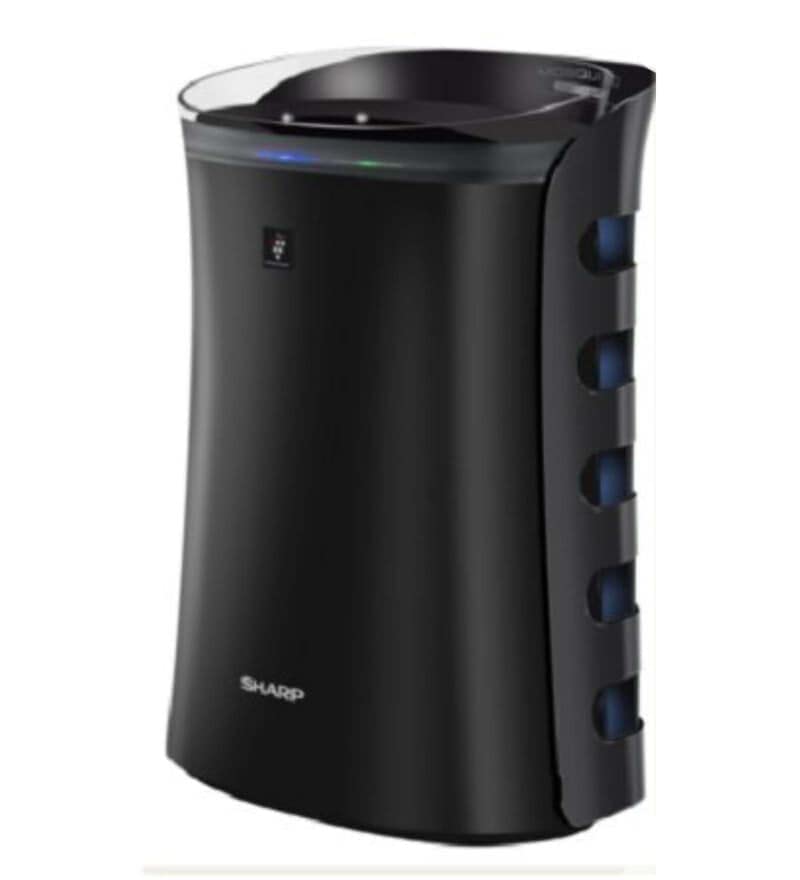
Figure 3.2: Side view of the SHARP FP-GM50E-B Air Purifier with dimensions (28.1D x 39.4W x 54H Centimeters).
3.2 Key Features
- Plasmacluster Ion Technology: SHARP's patented technology for air purification, certified by various laboratories.
- Dual Purification System: Combines Plasmacluster Ions with a multi-filter system.
- Three-Step Passive Filtration:
- Advanced Pre-Filter: Captures larger particles like P10 and pet hair. Designed for lifelong functioning.
- Active Carbon Filter: Deodorizes air, removes Volatile Organic Compounds (VOCs), cigarette odor, and pet odor. Standard life up to 2 years.
- True HEPA Filter: Traps 99.97% of allergens and microscopic dust as small as 0.3 microns. Standard life up to 2 years.
- Mosquito Catcher: Utilizes UV light, black color, and strong suction with a glue sheet to trap mosquitoes.
- Operating Modes: Auto Mode, Anti-Dust Mode, Haze Mode, Sleep Mode.
- Sensors: Odour Sensor, Dust Sensor.
- Airflow: 20° airflow for efficient room cleaning.
- Low Noise Level: Designed for quiet operation.
- Low Power Consumption.
- Auto Restart Function.

Figure 3.3: Illustration of the three-step passive filtration system, showing the Advanced Pre-Filter, Activated Carbon Filter, and True HEPA Filter.

Figure 3.4: Overview of key features including HEPA filter, deodorizing filter, Haze Mode, Dust & Odour Sensor, Sleep Mode, Low Power Consumption, Low Noise Level, and Auto Restart.

Figure 3.5: Explanation of Plasmacluster Ion technology, showing ions released, action on airborne microbes, and breakdown into water.

Figure 3.6: Detailed diagram of the mosquito catcher, illustrating UV light attraction, black color, ideal entrance design, powerful airflow and suction, and strong glue sheet.

Figure 3.7: Illustration of additional features including 20° airflow, Haze Mode, Dust/Odour Sensor, and Sleep Mode for peaceful operation.
4. Setup and Installation
- Unpacking: Carefully remove the air purifier from its packaging. Retain packaging materials for future transport or storage.
- Filter Installation:
- Open the rear panel of the unit.
- Remove all filters (Pre-filter, Carbon filter, HEPA filter) from their protective plastic bags.
- Install the filters in the correct order: Pre-filter first, followed by the Carbon filter, and then the HEPA filter. Ensure they are securely seated.
- Close the rear panel.
- Placement:
- Place the air purifier on a firm, level surface.
- Ensure there is adequate space around the unit (at least 20 cm) for proper airflow.
- Avoid placing the unit near heat sources, direct sunlight, or areas with high humidity.
- Power Connection: Plug the power cord into a suitable electrical outlet.
5. Operating Instructions
The SHARP FP-GM50E-B Air Purifier features a touch control panel and can also be operated via remote control.
5.1 Control Panel Overview
Familiarize yourself with the buttons and indicators on the top panel of the unit.

Figure 5.1: Top view of the control panel, showing various buttons and indicators.
5.2 Basic Operation
- Power On/Off: Press the Power button to turn the unit on or off.
- Mode Selection: Press the Mode button to cycle through available operating modes:
- Auto Mode: The unit automatically adjusts fan speed based on detected air quality (dust and odor levels).
- Anti-Dust Mode: Optimizes airflow to quickly remove dust and other particles.
- Haze Mode: Designed for high pollutant levels, releasing high-density Plasmacluster ions and adjusting fan speed for rapid purification.
- Sleep Mode: Operates at a low fan speed with reduced light indicators for quiet operation during sleep.
- Fan Speed Adjustment: In manual modes, use the Fan Speed button to select desired fan speed (Low, Medium, High).
- Plasmacluster On/Off: Press the Plasmacluster button to activate or deactivate the Plasmacluster Ion generator.
- Mosquito Catcher: Activate the mosquito catcher function as needed. Ensure the glue sheet is properly installed.
5.3 Air Quality Indicators
The unit features a color LED indicator for dust and odor levels:
- Green: Good air quality.
- Yellow: Moderate air quality.
- Red: Poor air quality.
6. Maintenance
Regular maintenance ensures optimal performance and extends the lifespan of your air purifier. Always unplug the unit before cleaning or performing maintenance.
6.1 Cleaning the Pre-Filter
- Frequency: Approximately once a month, or more often depending on usage and environment.
- Procedure:
- Remove the rear panel.
- Carefully detach the Pre-filter.
- Use a vacuum cleaner to remove dust and debris from the Pre-filter. Do not wash the Pre-filter with water.
- Reinstall the clean Pre-filter and close the rear panel.
6.2 Replacing the HEPA and Carbon Filters
- Frequency: Approximately every 2 years, or when the filter replacement indicator illuminates. Filter life may vary based on usage and environmental conditions.
- Procedure:
- Remove the rear panel.
- Remove the old HEPA and Carbon filters.
- Dispose of used filters properly.
- Install new filters, ensuring they are correctly oriented and seated.
- Close the rear panel.
- Reset the filter replacement indicator (refer to the control panel section for specific instructions, if available).
6.3 Mosquito Catcher Maintenance
- Glue Sheet Replacement: Replace the glue sheet when it is full of insects or loses its stickiness.
- UV Light: The UV light is designed for long-term use. If it malfunctions, contact customer support.
6.4 Exterior Cleaning
- Wipe the exterior of the unit with a soft, damp cloth.
- Do not use abrasive cleaners, solvents, or harsh chemicals.
7. Troubleshooting
Before contacting customer service, please refer to the following table for common issues and their solutions.
| Problem | Possible Cause | Solution |
|---|---|---|
| Unit does not turn on. | Power cord not properly plugged in. No power at outlet. | Check power cord connection. Test outlet with another device. |
| Weak airflow. | Filters are clogged. Air inlets/outlets blocked. | Clean the Pre-filter. Check for obstructions around the unit. Consider replacing HEPA/Carbon filters if due. |
| Unpleasant odor from unit. | Carbon filter is saturated. Unit is new (initial odor). | Replace the Carbon filter. New unit odors typically dissipate within a few days of use. |
| Air quality indicator always green despite poor air. | Dust/Odor sensor is dirty or malfunctioning. | Gently clean the sensor area (refer to specific cleaning instructions for sensors in the full manual, if available). If issue persists, contact support. |
| Mosquito catcher not effective. | Glue sheet is full or lost stickiness. UV light not working. | Replace the glue sheet. Ensure the mosquito catcher function is activated. |
8. Specifications
| Feature | Specification |
|---|---|
| Model Number | FP-GM50E-B |
| Brand | SHARP |
| Color | Black |
| Product Dimensions (D x W x H) | 28.1D x 39.4W x 54H Centimeters |
| Item Weight | 6.1 Kilograms |
| Power Source | Electric |
| Control Method | Touch, Remote Control |
| Filter Type | Pre-Filter (Mesh Type), HEPA Filter, Active-Carbon Filter, UV Light |
| Floor Area Coverage | 450 Square Feet |
| Noise Level | 49 Decibels (Max) |
| Particle Retention Size | 0.3 Micrometer (HEPA) |
| Contaminant Filtration Capability | Dust, Odors, Pet Dander, Pollen, Volatile Organic Compounds (VOCs), Bacteria, Viruses, Mold |
| Special Features | Plasmacluster Ion Technology, Mosquito Catcher |
| Country of Origin | Thailand |
9. Warranty and Support
9.1 Warranty Information
This SHARP Air Purifier comes with a 2 Years Comprehensive Warranty from the date of purchase. Please retain your purchase receipt as proof of warranty.
The warranty covers manufacturing defects and malfunctions under normal use. It does not cover damage caused by misuse, accidents, unauthorized repairs, or normal wear and tear of consumable parts like filters.
9.2 Customer Support
For any queries, service requests, or technical assistance, please contact SHARP customer support:
- Toll-Free Numbers: 1800-419-4322, 9804-763-763
- Email Support: support@sharp-oa.com
Please have your model number (FP-GM50E-B) and purchase details ready when contacting support.