1. Introduction
This manual provides comprehensive instructions for the safe and effective use of your WORX Xceed EX52BC 4-in-1 Gasoline Multi-Tool. This versatile tool combines a brush cutter, pole saw, hedge trimmer, and string trimmer into a single unit, powered by a robust 52 cm³ 2-stroke engine. Please read this manual thoroughly before assembly, operation, or maintenance to ensure proper function and user safety. Keep this manual for future reference.
2. Important Safety Warnings
WARNING: Failure to follow these safety instructions can result in serious injury or death. Always exercise extreme caution when operating power tools.
- Always wear appropriate personal protective equipment (PPE), including safety glasses, hearing protection, gloves, and sturdy footwear.
- Be aware of flying debris. Ensure bystanders and pets are kept at a safe distance (at least 15 meters / 50 feet) from the work area.
- Do not operate the tool in wet conditions or in the presence of flammable liquids or gases.
- Before performing any maintenance, cleaning, or attachment changes, always turn off the engine and ensure all moving parts have stopped.
- Inspect the tool for damage before each use. Do not operate if any parts are damaged or missing.
- Use only the fuel mixture specified (1:40 gasoline to 2-stroke oil).
- Keep hands and feet away from cutting attachments while the engine is running.
- Never modify the tool or use non-approved attachments.
3. Package Contents
Verify that all items listed below are present and undamaged. If any parts are missing or damaged, contact customer support immediately.

Figure 3.1: Overview of the WORX Xceed EX52BC 4-in-1 Multi-Tool and its attachments. This image displays the main engine unit, pole saw, hedge trimmer, brush cutter with blade, string trimmer head, shoulder strap, and assembly tools.

Figure 3.2: The core engine unit with the main shaft and D-handle attached. This is the power source for all attachments.

Figure 3.3: The pole saw attachment, featuring a chainsaw bar and chain for pruning branches at height.

Figure 3.4: The hedge trimmer attachment, designed for shaping and trimming hedges and shrubs.
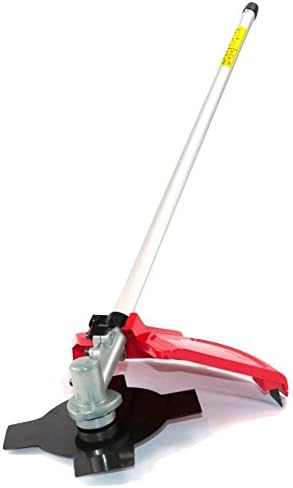
Figure 3.5: The brush cutter attachment, equipped with a durable 4-tooth metal blade for clearing dense brush and thick weeds.
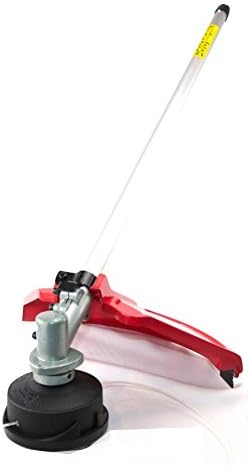
Figure 3.6: The string trimmer attachment, featuring a dual-line spool for trimming grass and light vegetation.
- Main Engine Unit with Handle
- Pole Saw Attachment
- Hedge Trimmer Attachment
- Brush Cutter Attachment (with 4-tooth metal blade)
- String Trimmer Attachment (with dual-line spool)
- Shoulder Strap with Hip Protection
- Tool Kit (for assembly and maintenance)
- Fuel Mixing Bottle (not explicitly shown but implied for 2-stroke engine)
- User Manual (this document)
4. Assembly and Setup
The WORX Xceed EX52BC is designed for quick assembly. Follow these steps to prepare your multi-tool for use.
4.1 Attaching the Handle
- Loosen the bolts on the D-handle clamp.
- Position the D-handle on the main shaft at a comfortable operating height.
- Tighten the bolts securely using the provided tool.
4.2 Attaching the Desired Tool Head
All tool heads attach to the main engine unit via a quick-release coupling system.
- Ensure the engine is off and cool.
- Align the shaft of the desired attachment (e.g., pole saw, hedge trimmer) with the coupling on the main engine unit.
- Push the attachment shaft into the coupling until it clicks into place.
- Secure the attachment by tightening the quick-release knob or lever.
- To remove, loosen the quick-release knob/lever and pull the attachment shaft out.
4.3 Fuel Mixture Preparation
This tool uses a 2-stroke engine. It requires a specific mixture of unleaded gasoline and 2-stroke engine oil.
- Mixing Ratio: 1 part 2-stroke oil to 40 parts unleaded gasoline (1:40).
- Use a clean, approved fuel container.
- Pour the correct amount of 2-stroke oil into the container, then add the gasoline.
- Shake the container gently to ensure thorough mixing.
- Always use fresh fuel mixture. Do not store mixed fuel for more than 30 days.
4.4 Filling the Fuel Tank
- Ensure the engine is off and cool.
- Move the tool to a well-ventilated outdoor area, away from ignition sources.
- Carefully open the fuel tank cap.
- Pour the prepared fuel mixture into the tank, being careful not to overfill. Leave a small air gap.
- Securely close the fuel tank cap. Wipe up any spilled fuel immediately.
5. Operating Instructions
5.1 Starting the Engine
- Place the tool on a flat, stable surface.
- Press the primer bulb several times until fuel is visible in the return line.
- Set the choke lever to the "START" or "CLOSED" position.
- Pull the starter cord firmly and smoothly until the engine attempts to start (usually 1-3 pulls). Do not pull the cord to its full extension.
- Once the engine "pops" or attempts to start, move the choke lever to the "RUN" or "OPEN" position.
- Pull the starter cord again until the engine starts and runs smoothly.
- Allow the engine to warm up for a few moments before engaging the throttle.
5.2 Stopping the Engine
To stop the engine, release the throttle trigger and press the engine stop switch to the "OFF" position.
5.3 Using the Attachments
Always ensure the correct attachment is securely fastened before operation.
5.3.1 String Trimmer
- Ideal for trimming grass and light weeds around obstacles.
- Hold the tool firmly with both hands.
- Maintain a steady pace, swinging the trimmer head from side to side.
- To advance the line, tap the trimmer head gently on the ground while the engine is running at full throttle.
5.3.2 Brush Cutter
- Use the 4-tooth metal blade for cutting thicker weeds, brush, and small saplings.
- Always wear heavy-duty gloves and leg protection.
- Cut with a sweeping motion, allowing the blade to do the work. Avoid forcing the blade.
- Be aware of kickback, especially when cutting thicker material.
5.3.3 Pole Saw
- Designed for pruning overhead branches.
- Ensure the chain is properly tensioned and lubricated before use.
- Always stand on a stable surface. Do not overreach.
- Make relief cuts to prevent pinching and control the fall of the branch.
- Keep the chain away from the ground to prevent dulling.
5.3.4 Hedge Trimmer
- Use for shaping and trimming hedges and shrubs.
- Inspect the hedge for hidden objects (wires, fences) before cutting.
- Cut with a smooth, even motion. Avoid cutting branches thicker than the blade's capacity.
- Keep the blades clean and sharp for optimal performance.
6. Maintenance
Regular maintenance ensures the longevity and safe operation of your multi-tool. Always ensure the engine is off and cool before performing any maintenance.
6.1 Air Filter Cleaning
- Remove the air filter cover.
- Carefully remove the air filter element.
- Clean the filter with warm, soapy water, rinse thoroughly, and allow it to dry completely. For heavily soiled filters, replace with a new one.
- Reinstall the dry air filter and cover.
6.2 Spark Plug Inspection
- Remove the spark plug cap and then the spark plug using the provided wrench.
- Inspect the spark plug for carbon buildup or damage. Clean with a wire brush or replace if necessary.
- Ensure the electrode gap is correct (refer to specifications).
- Reinstall the spark plug and cap, tightening securely.
6.3 Fuel Filter
The fuel filter is located inside the fuel tank. Inspect and replace it annually or if fuel delivery issues occur.
6.4 Attachment Maintenance
- String Trimmer: Replace the trimmer line as needed. Refer to the specific instructions for spool replacement.
- Brush Cutter: Keep the metal blade sharp. Sharpen or replace the blade when it becomes dull or damaged.
- Pole Saw: Regularly check chain tension and lubricate the chain with bar and chain oil. Sharpen or replace the chain when dull.
- Hedge Trimmer: Keep blades clean and sharp. Apply a light coat of oil to the blades after each use to prevent rust.
7. Troubleshooting
This section addresses common issues you might encounter with your multi-tool.
| Problem | Possible Cause | Solution |
|---|---|---|
| Engine does not start | No fuel or incorrect fuel mix Choke in wrong position Spark plug fouled or damaged Air filter clogged | Fill with correct 1:40 fuel mix Adjust choke as per starting instructions Clean or replace spark plug Clean or replace air filter |
| Engine runs, but attachment does not cut effectively | Dull or damaged blade/line Incorrect attachment installation | Sharpen or replace blade/line Ensure attachment is securely fastened |
| Engine loses power or stalls | Clogged fuel filter Incorrect fuel mix Overheating | Replace fuel filter Use correct 1:40 fuel mix Allow engine to cool; check for obstructions around cooling fins |
| Excessive vibration | Loose components Damaged or unbalanced blade | Check and tighten all fasteners Inspect blade for damage; replace if necessary |
If you encounter issues not covered here, or if troubleshooting steps do not resolve the problem, please contact WORX customer support.
8. Technical Specifications
| Feature | Specification |
|---|---|
| Model Number | EX52BC |
| Engine Type | 2-stroke, Air-cooled |
| Displacement | 52 cm³ |
| Power Output | 1.7 kW (2.3 HP) |
| Fuel Mixture Ratio | 1:40 (Gasoline : 2-stroke oil) |
| Starting System | Cord Start |
| Brush Cutter Blade Diameter | 23 cm (4-tooth metal blade) |
| String Trimmer Line Diameter | 2.5 mm (dual line) |
| Product Dimensions (L x W x H) | 98.5 x 31 x 29.5 cm |
| Item Weight | 9.5 kg |
| Power Source | Fuel-operated |
| Assembly Required | Yes |
9. Warranty and Customer Support
For warranty information, please refer to the warranty card included with your product or visit the official WORX website. For technical assistance, spare parts, or any questions regarding your WORX Xceed EX52BC multi-tool, please contact WORX customer support.
Manufacturer: WORX
Website: Visit the WORX Store on Amazon
Please have your model number (EX52BC) and purchase date available when contacting support.


