
MENGQI-CONTROL 4door-k-infrared-usb em
MENGQI-CONTROL 4-Door Access Control System User Manual
Model: 4door-k-infrared-usb em
1. Introduction and System Overview
The MENGQI-CONTROL 4-Door Access Control System is an advanced security solution designed for comprehensive door management. It offers multiple entry methods including RFID card/key fob, PIN code, or a combination of both, and features an infrared no-touch exit button. The system provides robust control over who can access specific doors at designated times, with detailed record-keeping capabilities.
This system is ideal for managing access across multiple doors in various environments, providing both security and convenience. The programming and management are handled via dedicated Windows-based software, allowing for detailed user and access privilege configuration.
2. Package Contents
Please verify that all components listed below are included in your package:
- 1 x Power Supply Box (110-240V input, 5A output)
- 1 x 4 Doors Wiegand Access Control Panel
- 4 x Electric Magnetic Lock (600 LBS Force)
- 4 x RFID Keypad/PIN Pad Reader
- 4 x Infrared Exit Button
- 1 x Enroll RFID USB Reader
- 50 x RFID Cards
- 50 x RFID Key Fobs
- 1 x User Manual (this document) with Detail Instruction/Wire Diagram/Video Guide

Figure 2.1: Overview of all components included in the MENGQI-CONTROL 4-Door Access Control System kit.
3. System Setup and Installation
Proper installation is crucial for the optimal performance and security of your access control system. It is recommended that installation be performed by a qualified technician.
3.1 System Components Overview

Figure 3.1.1: The 4-Door Wiegand Access Control Panel, the central processing unit for door access.

Figure 3.1.2: The Metal Power Supply Box, providing stable power to the entire system.

Figure 3.1.3: A 600lbs Electric Magnetic Lock, designed for secure door locking.

Figure 3.1.4: RFID Keypad/PIN Pad Reader, used for card swipe or PIN entry.
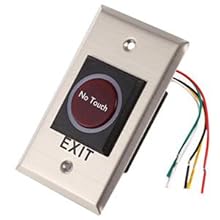
Figure 3.1.5: Infrared No Touch Exit Button, for convenient egress.

Figure 3.1.6: Enroll RFID USB Reader, for registering new RFID cards and key fobs with the system software.
3.2 Wiring Diagram and Connections
A detailed wiring diagram is provided in the physical user manual. Ensure all connections are secure and follow local electrical codes. Incorrect wiring can damage the system or pose safety risks.
The system utilizes TCP/IP for network communication. Multiple control panels can be connected to the same router and managed by a single central software application.
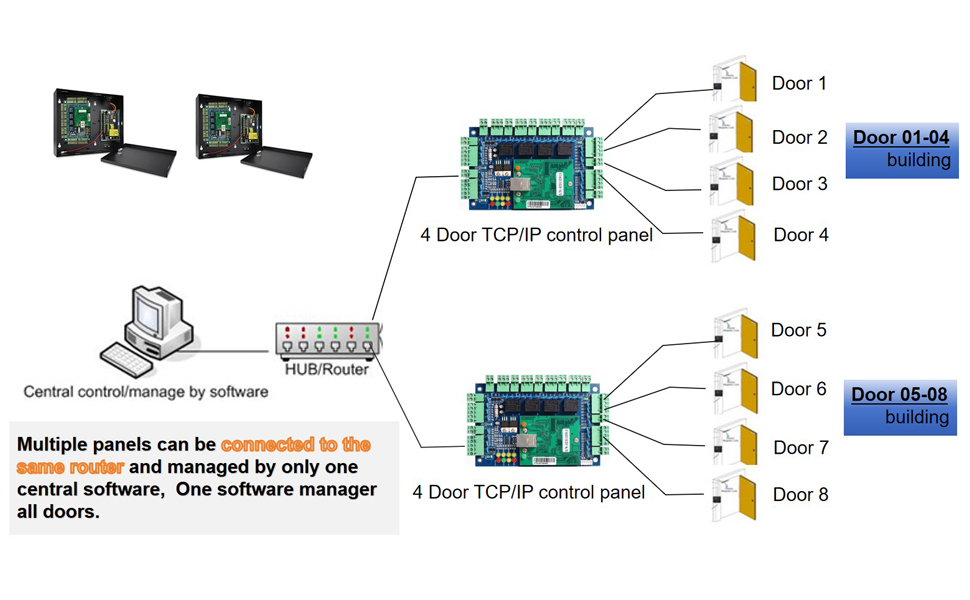
Figure 3.2.1: Example system diagram illustrating how multiple 4-door control panels can be integrated and managed centrally.
3.3 Software Installation and Initial Programming
The system's advanced features are managed through dedicated Windows-based software. This software is compatible with Windows 7, 8, 10, and 11 (both 32-bit and 64-bit versions). Please note: Mac operating systems are not supported. Ensure you have a compatible Windows computer or laptop for programming.
Initial programming is a one-time job. Once programmed, the system operates as a fully standalone unit, requiring no continuous connection to a computer or internet/network for daily operation.
Video 3.3.1: A quick instruction video demonstrating initial programming and operation of the access control system. This video shows how to program the system using the software and how to open the lock using an RFID card.
4. Operating the System
The MENGQI-CONTROL Access Control System offers flexible and secure methods for door entry and exit.
4.1 Entry Methods
- RFID Card/Key Fob: Present a registered RFID card or key fob to the RFID Keypad/PIN Pad Reader. A successful read will trigger the lock to open.
- PIN Code: Enter a valid PIN code on the keypad and press 'ENT'. The lock will open upon correct entry.
- Card + PIN: For enhanced security, configure the system to require both a registered RFID card/key fob and a valid PIN code. Present the card/fob, then enter the PIN.
Video 4.1.1: This video demonstrates various entry methods including PIN code entry, RFID key fob swipe, and RFID card swipe to open the door lock.
4.2 Exit Method
- Infrared No Touch Exit Button: To exit, simply wave your hand in front of the infrared exit button. The sensor will detect your presence and trigger the lock to open.
Video 4.2.1: This video demonstrates the use of the infrared no-touch exit button to open the door lock from the inside.
4.3 Advanced Access Control Features (Software-Managed)
- Detailed History Records: The system can check, download, and export detailed history entry records, showing who opened which door at what time. This data can be downloaded at any time.
- Time-Based Access: Allow access for certain doors at specific times for different users. For example, a user or group can be restricted to opening an entrance door only during business hours (e.g., 09:00 AM – 18:00 PM, Monday to Friday).
- Auto Open/Close: Configure doors to automatically open during business hours and close outside of them. For example, a main door can auto-open at 09:00 AM and remain open, then auto-close at 17:30 PM from Monday to Friday. Weekends and holidays will not auto-open.
- User Management: Easily add, delete, activate, or deactivate users who can open doors using the Windows management software.
- Set Expiry Date/Time: Set an expiry date/time for a user's access privileges. After this time, the user will automatically lose open privilege.
- Lost Card/Key Fob Processing: Easily process lost cards or key fobs to deactivate them from the system.
- Phone App Remote Open: Support for a smartphone application (iOS & Android) to open the lock locally or remotely, even from another city or country.
5. Maintenance
To ensure the longevity and reliable operation of your MENGQI-CONTROL Access Control System, follow these maintenance guidelines:
- Regular Cleaning: Keep keypads, readers, and exit buttons clean using a soft, dry cloth. Avoid abrasive cleaners or solvents.
- Software Updates: Periodically check for software updates from MENGQI-CONTROL to ensure optimal performance and security.
- Cable Inspection: Regularly inspect all wiring and connections for any signs of wear, damage, or loose connections.
- Magnetic Lock Check: Ensure the magnetic locks are free from obstructions and that the armature plate is clean and securely attached to the door.
- Power Supply: Verify the power supply box is well-ventilated and free from dust accumulation.
- Backup Data: Regularly back up your system's user data and access logs from the management software.
6. Troubleshooting
This section addresses common issues you might encounter with your access control system.
| Problem | Possible Cause | Solution |
|---|---|---|
| Door does not unlock with valid card/PIN. |
|
|
| Exit button not working. |
|
|
| Software not connecting to control panel. |
|
|
| System logs not updating. |
|
|
For issues not covered here, please refer to the detailed wire diagram and video guides provided with your purchase, or contact MENGQI-CONTROL customer support.
7. Specifications
| Feature | Detail |
|---|---|
| Brand | MENGQI-CONTROL |
| Model Number | 4door-k-infrared-usb em |
| Color | Black |
| Power Source | Corded Electric |
| Voltage | 110 Volts (Power Supply Box input: 110-240V) |
| Compatible Devices | Smartphone (for APP control) |
| Connectivity Technology | Wireless (for APP), TCP/IP (for software management) |
| Installation Type | Screw-In |
| Alert Type | Motion (via infrared exit button) |
| Item Weight | 8 Pounds |
| Control Method | App, Keypad, RFID Card/Fob |
| Recommended Uses | Home Security, Commercial Access Control |
| Sensor Technology | Infrared (for exit button) |
| Magnetic Lock Holding Force | 600 LBS |
| Card Type | EM-ID card |
| Response Speed | Less than 0.2 second |
| User Capacity | Up to 20,000 users |
| Log Capacity | Up to 100,000 logs |
| Software Compatibility | Windows 7/8/10/11 (32 & 64 bit) |
| Supported Databases | Access & SQL Server |
8. Warranty and Support
MENGQI-CONTROL is committed to providing quality products and service. For specific warranty details, please refer to the documentation included with your purchase or contact SecureLife4you Security Control, the seller, directly.
For technical support, including detailed wire diagrams and video guides, please utilize the resources provided with your system. The seller, SecureLife4you Security Control, offers ongoing technical support.
Important Note: This is a heavy kit with metal locks. Please double-check if it can really meet your requirements before purchase. Returns for this type of product can incur significant losses due to the nature of security systems.
Ask a question about this manual
Ask about setup, troubleshooting, compatibility, parts, safety, or missing instructions. Manuals+ will review the question and use this page’s manual context to help answer it.