
Amazon Basics FZ10-9LR
Amazon Basics Digital Oscillating 3 Speed Tower Fan User Manual
Model: FZ10-9LR
1. Introduction
This manual provides important information regarding the safe operation, assembly, and maintenance of your Amazon Basics Digital Oscillating 3 Speed Tower Fan. Please read this manual thoroughly before using the product and retain it for future reference.
2. Safety Information
WARNING: This product can expose you to chemicals including lead, which is known to the State of California to cause cancer and birth defects or other reproductive harm. For more information go to www.P65Warnings.ca.gov.
Always follow basic safety precautions when using electrical appliances to reduce the risk of fire, electric shock, and injury to persons.
For detailed safety guidelines, please refer to the "Safety Information (PDF)" document available for download from the product's Amazon page.
3. Package Contents
- Tower Fan Unit
- Two-piece Base
- Base Fastening Nut
- Remote Control
- User Manual (this document)
4. Setup
Follow these steps to assemble your tower fan:
- Carefully remove all components from the packaging.
- Assemble the two-piece base by aligning the halves and snapping them together.
- Place the tower fan unit onto the assembled base, ensuring the power cord passes through the designated opening in the base.
- Secure the fan to the base using the large plastic fastening nut located at the bottom of the fan unit. Twist the nut clockwise until it is firmly tightened. No tools are required for assembly.
- Insert two AAA batteries (not included) into the remote control.
- Place the fan on a flat, stable surface.

Figure 4.1: Assembled Amazon Basics Digital Oscillating Tower Fan.
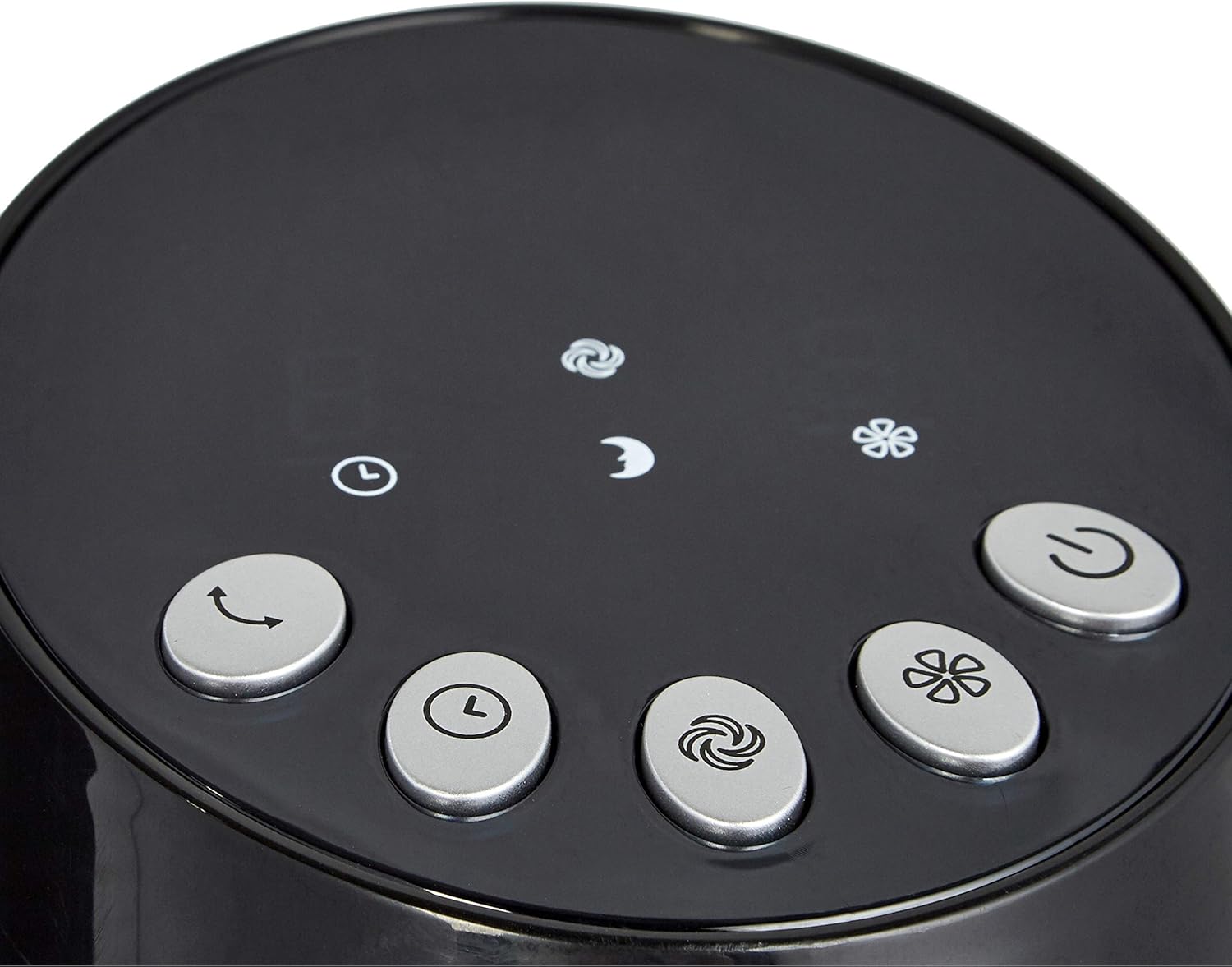
Figure 4.2: The two-piece base of the tower fan before assembly.
5. Operating Instructions
Your tower fan can be operated using the digital control panel on top of the unit or the included remote control.
5.1 Control Panel and Remote Functions

Figure 5.1: Digital control panel with various function buttons.

Figure 5.2: Remote control for convenient operation.
- Power Button: Turns the fan On or Off.
- Speed Settings: Cycle through 3 speed levels (Low, Medium, High). The display will show the current speed (1, 2, or 3).
- Modes: Select from different airflow modes:
- Normal Mode: Provides a consistent airflow.
- Natural Mode: Simulates a natural breeze by varying fan speed.
- Sleep Mode: Offers a softer, quieter airflow, ideal for nighttime use.
- Oscillation Button: Activates or deactivates the oscillating function, allowing the fan to rotate and distribute air across a wider area.
- Timer Function: Set the fan to automatically turn off after a specified period, up to 8 hours. Repeatedly press the timer button to cycle through available time settings.
6. Maintenance
Regular maintenance ensures optimal performance and longevity of your fan.
- Always unplug the fan before cleaning.
- Use a soft, damp cloth to wipe down the exterior surfaces. Do not use abrasive cleaners or solvents.
- Periodically clean the air intake and exhaust vents with a vacuum cleaner or a soft brush to prevent dust buildup, which can affect performance.
- Store the fan in a cool, dry place when not in use.
7. Troubleshooting
If you encounter issues with your fan, refer to the following common problems and solutions:
| Problem | Possible Cause | Solution |
|---|---|---|
| Fan does not turn on. | No power supply. | Ensure the power cord is securely plugged into a working electrical outlet. |
| Remote control not working. | Dead or incorrectly inserted batteries. | Replace batteries (2 AAA) and ensure they are inserted with correct polarity. |
| Reduced airflow. | Dust buildup in vents. | Clean the air intake and exhaust vents as described in the Maintenance section. |
| Fan is noisy. | Fan not on a stable surface or internal issue. | Ensure the fan is on a flat, stable surface. If noise persists, contact customer support. |
If the problem persists after trying these solutions, please contact Amazon Basics customer support.
8. Specifications
| Feature | Detail |
|---|---|
| Brand | Amazon Basics |
| Model Number | FZ10-9LR |
| Color | Black |
| Product Dimensions | 11.81"D x 11.81"W x 35.91"H |
| Item Weight | 8.18 pounds |
| Power Source | Corded Electric |
| Wattage | 35 watts |
| Voltage | 110-120 Volts |
| Special Feature | Oscillating |
| Control Method | Remote |
| Number of Power Levels | 3 (Speeds) |
9. Warranty & Support
For warranty information and customer support, please refer to the "Warranty (PDF)" document available for download from the product's Amazon page or visit the official Amazon Basics Store.
Related documentsFZ10-9LR


Ask a question about this manual
Ask about setup, troubleshooting, compatibility, parts, safety, or missing instructions. Manuals+ will review the question and use this page’s manual context to help answer it.