
Carbest BSD-L
Carbest Ultrasonic Blind Spot Detection System
Model: BSD-L
1. Introduction
This manual provides detailed instructions for the installation, operation, and maintenance of your Carbest Ultrasonic Blind Spot Detection (BSD) System. This system is designed to enhance driving safety by alerting you to vehicles or objects in your blind spots, particularly during lane changes or when reversing.
2. Product Overview
The Carbest BSD system includes high-speed frequency sensors, warning indicators, and an audible buzzer to provide comprehensive blind spot monitoring.
2.1. Components
- BSA Sensors (2)
- Control Box (1)
- Buzzer (1)
- Warning LEDs (Left & Right)
- Main Harness
- Rear Sensor Harness
- Extension Wire
- Installation Kit
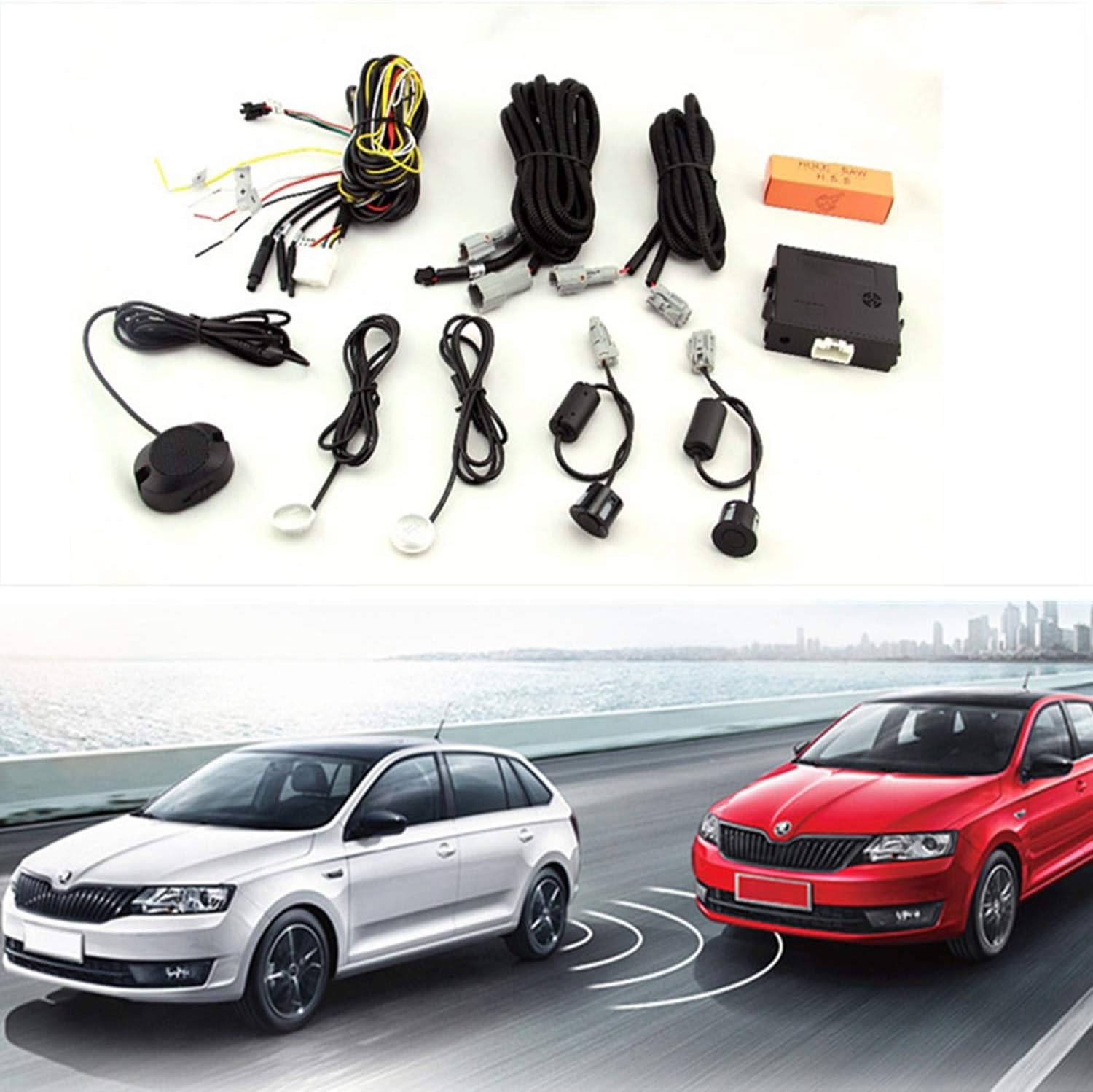
Figure 2.1: Overview of the Carbest BSD system components, including sensors, control box, wiring harnesses, and warning indicators.

Figure 2.2: Another view of the complete Carbest BSD system kit.
3. Setup and Installation
Proper installation is critical for the optimal performance of the BSD system. This product is applied to 12V battery early vehicles. Please validate the function before installation.
3.1. Sensor Installation
- Sensor Placement: Ensure the 2 sensors of 7 degrees are fixed at 0.60m high on the left and right side of the vehicle. The other 2 sensors of 0 degrees should be in the middle at 0.5-0.65m. Incorrect warning signals may occur if not positioned correctly.
- Drilling and Cleaning: After drilling, clear any scraps to ensure the hole size is matchable. The sensor surface must be far away from sponge, metal plate, and plastic to avoid errors.
- Sensor Orientation: Ensure sensors are installed with the "UP" mark facing upward. Sensor installation height should be 0.5-0.7m. If the sensor surface faces the ground or the system gives out false alarms, adjust the position.

Figure 3.1: Diagram illustrating recommended sensor placement and detection zones for both BSD and reversing functions.

Figure 3.2: Visual representation of sensor placement on a vehicle's rear bumper.
3.2. Wiring Connection
- Connect Power: Connect the red wire to the IGN/ACC power wire (+12V). Power will be controlled by ignition ON/OFF.
- Connect Turn Signal Wires: Connect the yellow wire to the right turn light wire and the white wire to the left turn light wire.
- Connect Ground: Connect the black wire to a metal part on the vehicle body (GND).
- Connect Control Box and Sensors: Connect the BSA sensors and buzzer to the control box using the provided harnesses.
- Warning LED Installation: Install the warning LEDs on the left and right side of the vehicle, typically near the side mirrors or A-pillars, where they are easily visible to the driver.

Figure 3.3: Detailed wiring diagram and installation guide for the BSD system.

Figure 3.4: Close-up of the wiring connections for the control box, sensors, and warning LEDs.
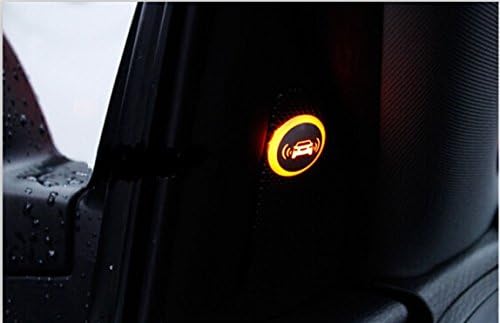
Figure 3.5: Example of the warning indicator light, which illuminates to alert the driver.
4. Operating Instructions
The Carbest BSD system operates based on microwave sensor technology to detect objects in your vehicle's blind spots.
4.1. Blind Spot Detection (BSD) Function
- When a car approaches within the detected zone (typically 0.5m to 3m from the side of your vehicle) while driving, the system will monitor its presence.
- If you activate your turn signal (left or right) and a vehicle is detected in the corresponding blind spot, the warning LED on that side will illuminate.
- An audible buzzer will also sound to provide an additional warning, prompting the driver not to change lanes.

Figure 4.1: Visual representation of the blind spot detection system identifying a vehicle in the adjacent lane.
4.2. Reversing Function
- When reversing, the system utilizes microwave sensors to detect obstacles behind the vehicle.
- Upon detection of an obstacle, the audible buzzer will sound to warn the driver.
5. Maintenance
To ensure the longevity and optimal performance of your Carbest BSD system, follow these maintenance guidelines:
- Sensor Cleaning: Regularly clean the surface of the sensors to remove dirt, mud, snow, or ice. A clean sensor surface ensures accurate readings. Use a soft, damp cloth.
- Wiring Inspection: Periodically check all wiring connections for any signs of wear, damage, or loose connections. Ensure wires are securely fastened and not exposed to excessive heat or moisture.
- Component Check: Ensure the control box, buzzer, and warning LEDs are securely mounted and free from physical damage.
- Avoid Harsh Chemicals: Do not use abrasive cleaners or harsh chemicals on any part of the system, as this may damage the components or their finishes.
6. Troubleshooting
If you encounter issues with your Carbest BSD system, refer to the following common problems and solutions:
| Problem | Possible Cause | Solution |
|---|---|---|
| Sensors provide inconsistent or inaccurate readings. | Incorrect sensor angle/position; dirty sensors; interference from vehicle parts (sponge, metal, plastic). | Verify sensor installation angle and height (0.5-0.7m, "UP" mark upward). Clean sensor surfaces. Ensure no obstructions near sensors. |
| Warning lights are stuck on or flash erratically. | Faulty wiring; control box malfunction; continuous false detection. | Check all wiring connections for shorts or damage. Ensure sensors are clean and unobstructed. If problem persists, contact support. |
| Audible buzzer has no volume adjustment. | System design limitation. | The system's buzzer does not feature volume adjustment. This is a standard design. |
| Warning indicator tape does not stick. | Weak adhesive; improper surface preparation. | Clean the installation surface thoroughly before applying. Use a stronger automotive-grade adhesive tape if necessary. |
| System does not activate or power on. | No power supply; blown fuse; incorrect wiring. | Check power connection to 12V IGN/ACC. Inspect the 2A fuse. Verify all wiring connections are correct and secure. |
If the issue persists after attempting these solutions, please contact Carbest customer support for further assistance.
7. Specifications
| Feature | Specification |
|---|---|
| Item Weight | 1.46 pounds |
| Product Dimensions | 7.09 x 3.54 x 2.76 inches |
| Item Model Number | BSD-L |
| Compatible Devices | Passenger Car |
| Maximum Range | 3 Meters |
| Manufacturer | CarBest |
8. Warranty and Support
Specific warranty details for the Carbest Ultrasonic Blind Spot Detection System are not provided in this manual. For warranty information, technical support, or service inquiries, please contact the manufacturer directly or refer to the product's original packaging and purchase documentation.
You may also visit the official Carbest website or contact their customer service department for assistance.
Ask a question about this manual
Ask about setup, troubleshooting, compatibility, parts, safety, or missing instructions. Manuals+ will review the question and use this page’s manual context to help answer it.