1. Introduction
Thank you for choosing the Prodipe M850 DSP Duo Vocal Dynamic Microphone System. This professional wireless microphone system is engineered to deliver exceptional sound quality and reliable performance for various applications, including live performances, karaoke, and presentations. Featuring advanced Digital Signal Processor (DSP) technology and Ultra High Frequency (UHF) transmission, the M850 DSP Duo provides a clear, precise audio experience comparable to wired systems.
The system includes two high-quality handheld UHF microphones, each with a channel display screen and an easily accessible mute button. The robust all-metal receiver unit is equipped with BNC antenna connectors, balanced XLR outputs, and an unbalanced jack output for versatile connectivity. Its infrared automatic transmitter synchronization ensures seamless setup with 100 available UHF frequencies.
2. Package Contents
Please inspect the package contents carefully. If any items are missing or damaged, contact your dealer immediately.
- 1 x Prodipe M850 DSP Duo Receiver Unit
- 2 x Prodipe M850 DSP Handheld UHF Microphones
- 2 x BNC Antennas
- 1 x Power Adapter for Receiver
- 1 x Audio Cable (e.g., 1/4-inch Jack to Jack)
- User Manual (this document)
3. Setup Guide
3.1 Receiver Placement and Connection
- Placement: Position the receiver unit on a stable, flat surface, away from potential sources of interference such as computers, Wi-Fi routers, or other wireless devices. Ensure there is a clear line of sight to the area where the microphones will be used.
- Antenna Installation: Screw the two BNC antennas securely onto the corresponding connectors at the rear of the receiver. Adjust them vertically for optimal signal reception.
- Power Connection: Connect the provided power adapter to the DC IN port on the receiver and then plug it into a suitable power outlet. Do not power on the unit yet.
- Audio Output: Connect the receiver to your mixer, amplifier, or sound system using either the balanced XLR outputs (for individual microphone channels) or the unbalanced 1/4-inch jack mix output (for a combined signal).
3.2 Microphone Preparation
- Battery Installation: Unscrew the lower part of each microphone handle. Insert two fresh AA batteries (not included) into each microphone, observing the correct polarity (+/-). Securely re-attach the handle.
- Power On: Press and hold the power button on each microphone until the display illuminates.
3.3 System Synchronization
The M850 DSP Duo features automatic infrared (IR) synchronization for easy setup.
- Power on the receiver unit by pressing the POWER button. The LCD screen will light up.
- On the receiver, select the desired channel (A or B) you wish to synchronize. Press the 'SET' button for that channel. The IR indicator on the receiver will flash.
- Hold the microphone with its IR sensor (usually a small window near the display) approximately 10-20 cm (4-8 inches) in front of the receiver's IR window.
- The microphone and receiver will automatically synchronize their frequencies. The microphone display will show the new frequency, and the receiver's IR indicator will stop flashing.
- Repeat this process for the second microphone and its corresponding channel (A or B) on the receiver.

Image: The Prodipe M850 DSP Duo system, showing the receiver unit with two antennas and two handheld microphones. This illustrates the complete setup of the wireless microphone system.
4. Operating Instructions
4.1 Powering On/Off
- Receiver: Press the 'POWER' button on the front panel to turn the unit on or off.
- Microphones: Press and hold the power button on the microphone handle for a few seconds to turn it on or off.
4.2 Frequency Selection
The system automatically searches and selects from 2 x 100 available UHF frequencies during the IR synchronization process. If interference is encountered, you can re-synchronize the microphones to find a clearer frequency.
4.3 Volume Control
- Receiver: Use the 'VOL A' and 'VOL B' knobs on the receiver's front panel to adjust the output volume for each individual microphone channel.
- Mixer/Amplifier: Further volume adjustments should be made on your connected audio equipment.
4.4 Microphone Mute Function
Each handheld microphone features an easily accessible 'MUTE' button. Press this button briefly to mute or unmute the microphone. The microphone's display will indicate its mute status.
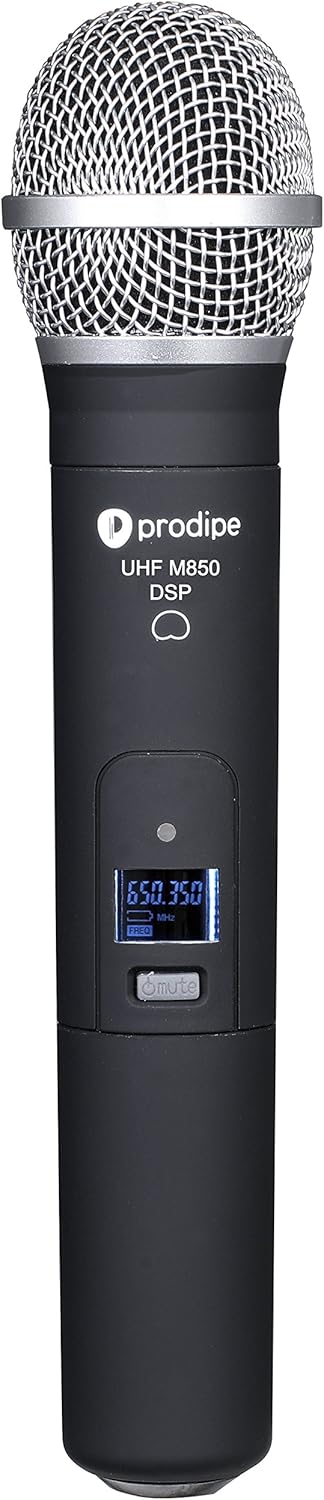
Image: A close-up view of the Prodipe M850 DSP handheld microphone, highlighting the display screen showing frequency and the mute button. This illustrates the user interface on the microphone.
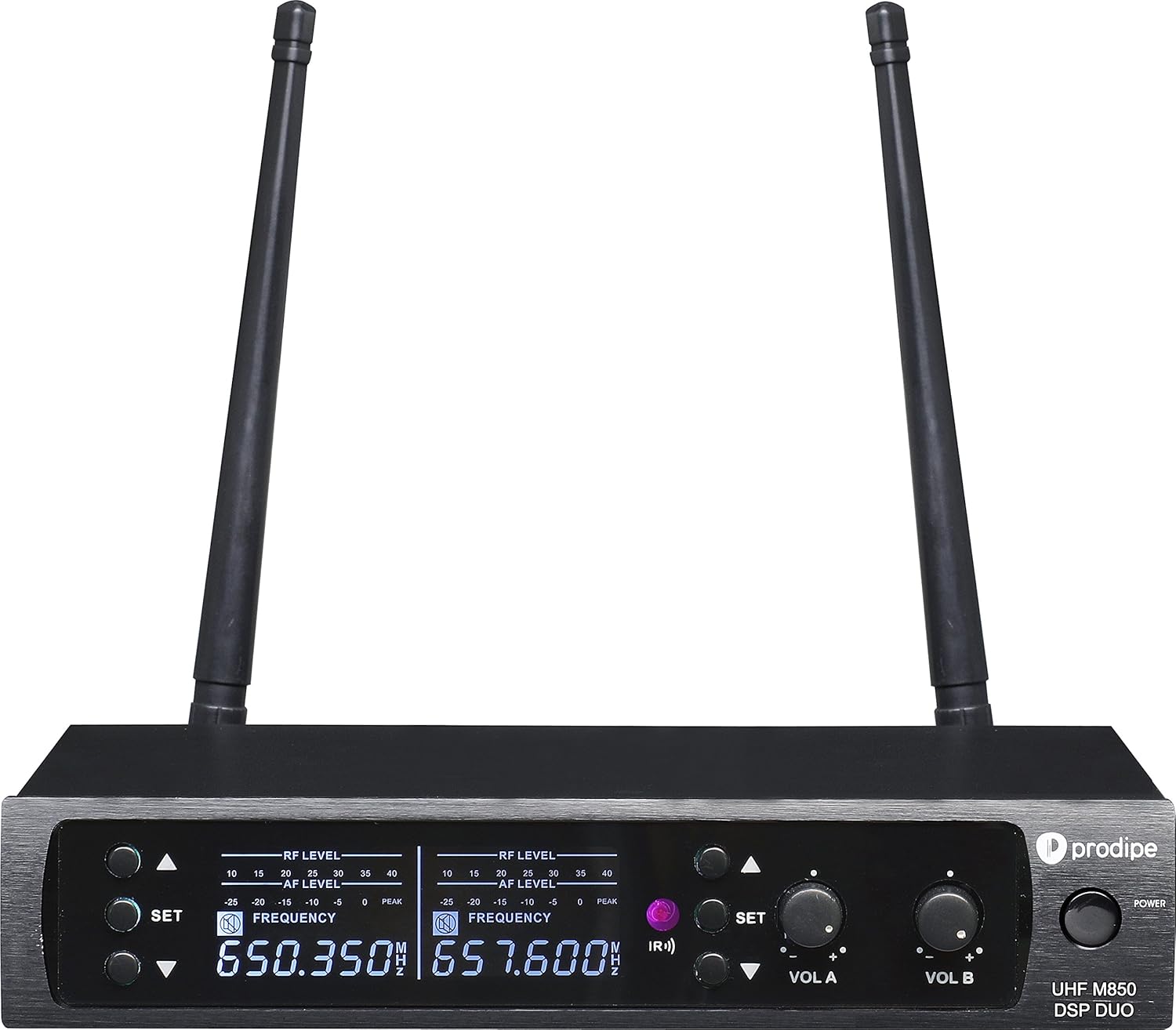
Image: A detailed view of the Prodipe M850 DSP Duo receiver's front panel, showing the RF/AF level indicators, frequency displays, SET buttons, and volume controls for channels A and B. This provides a clear look at the receiver's controls and indicators.
4.5 Usage Tips
- Microphone Technique: Hold the microphone approximately 2-6 inches from your mouth for optimal vocal clarity. Avoid covering the grille with your hand.
- Feedback Prevention: Position speakers in front of the microphones, not behind them. Avoid pointing microphones directly at speakers.
- Range: Maintain a reasonable distance between the microphones and the receiver for stable signal transmission. Obstacles can reduce the effective range.
- Battery Life: Always have spare batteries on hand, especially for extended use.
5. Maintenance
5.1 Cleaning
- Wipe the exterior surfaces of the microphones and receiver with a soft, dry cloth.
- For stubborn dirt, use a slightly damp cloth and then dry thoroughly.
- Do not use abrasive cleaners, solvents, or harsh chemicals, as these can damage the finish or internal components.
- Periodically clean the microphone grille to remove any debris.
5.2 Battery Care
- Remove batteries from the microphones if they will not be used for an extended period to prevent leakage and damage.
- Dispose of used batteries responsibly according to local regulations.
5.3 Storage
Store the system in a cool, dry place, away from direct sunlight, extreme temperatures, and high humidity. Keep it in its original packaging or a protective case to prevent physical damage.
6. Troubleshooting
| Problem | Possible Cause | Solution |
|---|---|---|
| No sound output |
|
|
| Interference or dropouts |
|
|
| Low volume or distorted sound |
|
|
| Feedback (howling sound) |
|
|
7. Specifications
| Feature | Specification |
|---|---|
| Model Number | M850 DSP DUO |
| Microphone Form Factor | Handheld |
| Polar Pattern | Unidirectional |
| Connectivity Technology | Wireless (UHF) |
| Connector Type (Receiver Output) | XLR (Balanced), 1/4-inch Jack (Unbalanced) |
| Number of Channels | 2 (Dual Channel System) |
| Frequency Selection | Automatic IR Search (2 x 100 available UHF frequencies) |
| Signal-to-Noise Ratio | 80 dB |
| Power Source (Receiver) | Corded Electric |
| Power Source (Microphone) | AA Batteries (not included) |
| Material | Metal (Receiver and Microphones) |
| Item Dimensions (L x W x H) | 10 x 11 x 14 inches (Product Dimensions) |
| Item Weight | 3 Pounds |
| Recommended Uses | Karaoke, Live Performance, Presentations |
| Special Features | Wireless, DSP Circuit, LCD Screen, Mute Button |
8. Warranty and Support
For warranty information and technical support, please refer to the documentation provided with your purchase or visit the official Prodipe website. Keep your proof of purchase for any warranty claims.
If you encounter any issues not covered in this manual, please contact Prodipe customer service or your authorized dealer for assistance.


