
LDOPTO LD-8117
LDOPTO LD-8117 Battery Operated Wireless Under Cabinet LED Closet Lighting (3 Pack) Instruction Manual
Introduction
Thank you for choosing the LDOPTO LD-8117 Battery Operated Wireless Under Cabinet LED Closet Lighting. This manual provides detailed instructions for the safe and efficient use of your new lighting system. Please read this manual thoroughly before installation and operation, and retain it for future reference.
Package Contents
Verify that all items listed below are included in your package:
- 3 x LDOPTO LED Under Cabinet Lights
- 1 x Wireless Remote Control
- 3 x 3M Adhesive Magnetic Strips
- 1 x User Manual (this document)
Important Safety Information
- This product is designed for indoor use only. Do not expose to water or high humidity.
- Use only AAA batteries (1.5V or above) for both the lights and the remote control. Batteries are not included.
- Ensure batteries are inserted with correct polarity (+/-). Incorrect insertion can damage the device.
- Replace all batteries in a unit simultaneously. Do not mix old and new batteries, or different types of batteries.
- Remove batteries if the device will not be used for an extended period to prevent leakage.
- Keep out of reach of children.
- Do not attempt to disassemble or modify the product.
Setup Instructions
1. Battery Installation
- Each LED light requires 4 AAA batteries. The remote control requires 2 AAA batteries.
- Locate the battery compartment on the back of each LED light and the remote control.
- Open the compartment cover and insert the batteries, ensuring correct polarity.
- Close the battery compartment cover securely.
2. Mounting the Lights
The lights feature magnetic adsorption for easy installation and removal.
- Clean the desired installation surface thoroughly. Ensure it is smooth, dry, and dust-free.
- Peel off the protective film from one side of a 3M adhesive magnetic strip.
- Adhere the magnetic strip firmly to the cleaned surface. Press for 30 seconds to ensure good adhesion.
- Align the back of the LED light with the magnetic strip on the surface. The light will magnetically attach.
- Repeat for all lights. The lights can be easily removed from the magnetic strip for battery replacement or portable use.
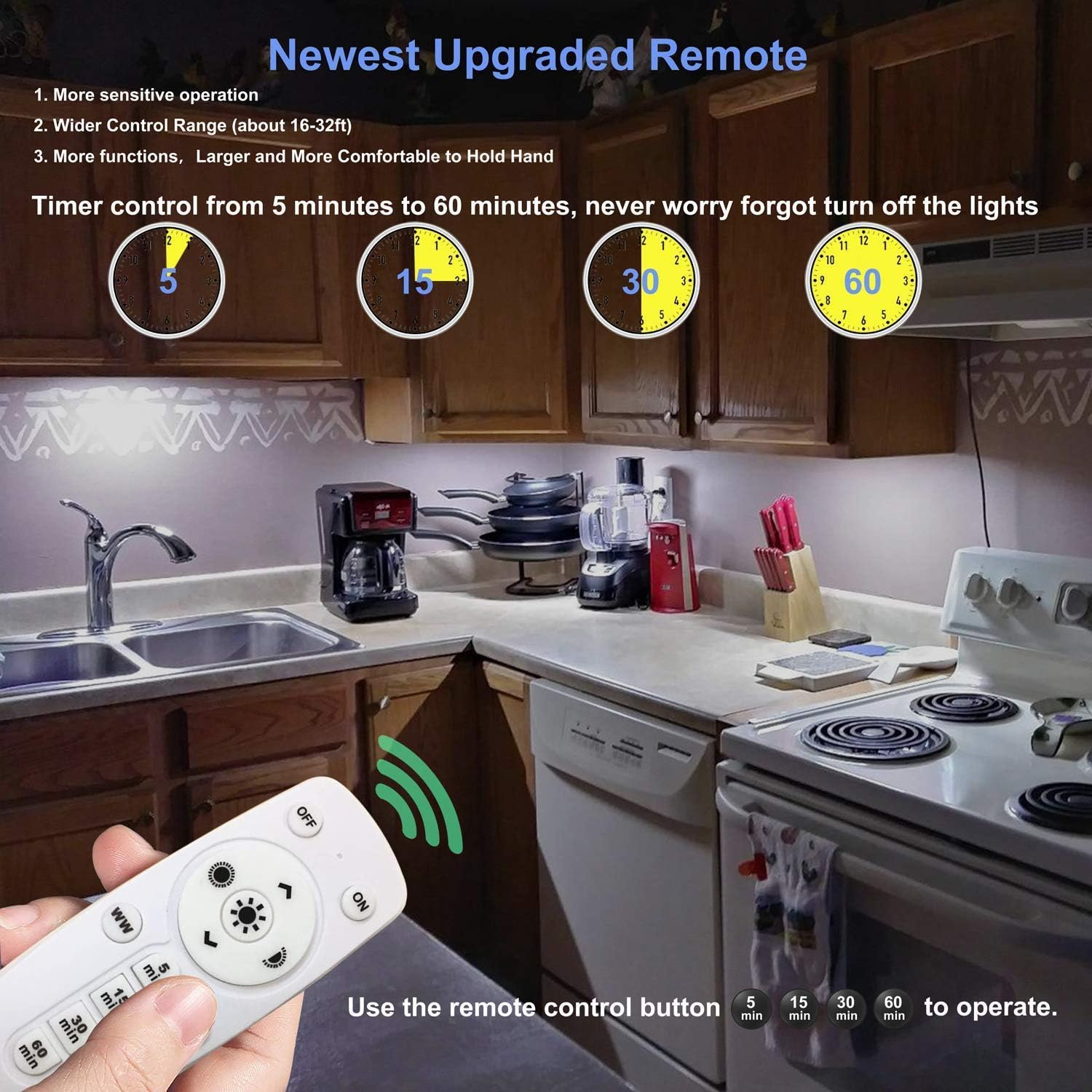
Image: Installation steps for the LDOPTO under cabinet lights. Step 1 shows peeling the adhesive, Step 2 shows attaching the strip to a surface, Step 3 shows attaching the light magnetically, and Step 4 shows the light installed in a cabinet.

Image: The LDOPTO under cabinet LED lights and their accompanying remote control.
Operating Instructions
The LDOPTO lights can be controlled via the included remote or by touching the light unit directly.
Remote Control Functions

Image: An illustration detailing the functions of each button on the remote control and the physical dimensions of the LED light unit.
- ON/OFF: Press the 'ON' button to turn on the lights. Press 'OFF' to turn them off. The lights will remember the last setup mode (brightness and color) when turned on again.
- Brightness Adjustment:
- Use the '+' or '-' buttons to adjust brightness in 10% increments (10%, 20%, ..., 100%).
- Use the shortcut buttons (sun icon with 50% or 100%) for quick brightness settings.
- Color Temperature Adjustment:
- Press 'WW' to set the light to Warm White (3000K).
- Press 'CW' to set the light to Pure White (Cool White).
- Timer Function: Press the '5 min', '15 min', '30 min', or '60 min' buttons to set an automatic shut-off timer. The lights will turn off after the selected duration. Press 'CANCEL' to deactivate the timer.

Image: Visual representation of the adjustable brightness and color temperature features of the LDOPTO lights, shown in a kitchen environment.
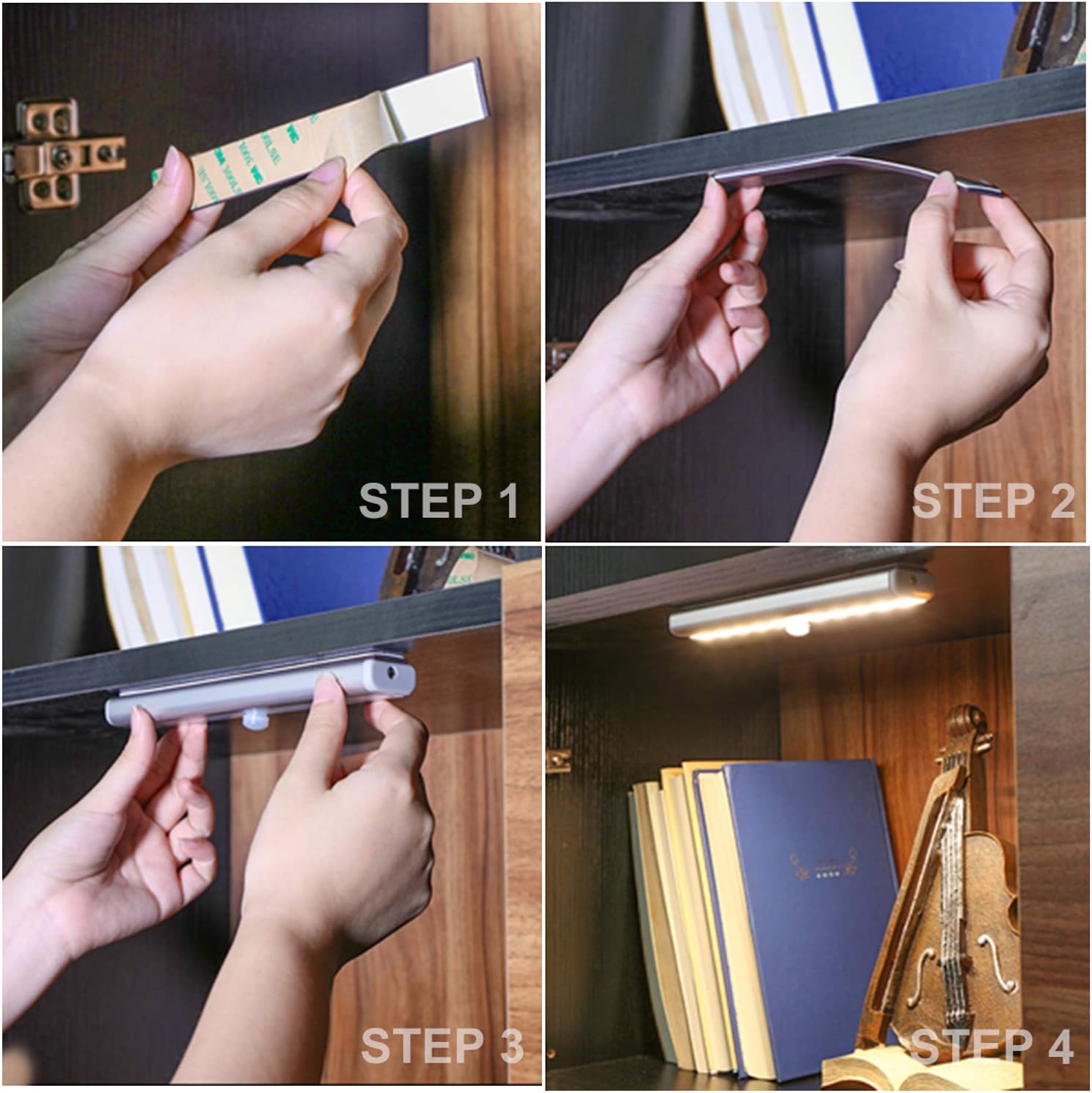
Image: Demonstration of different brightness levels (100%, 50%, 10%) of the LDOPTO lights when installed under shelves, controlled by the remote.
Touch Control
When the remote is not accessible, you can use the touch button on each light unit:
- Short Touch: A short touch on the power symbol button on the light unit will turn the light ON or OFF.
- Long Touch: Press and hold the power symbol button for 3 seconds to adjust the brightness.

Image: Examples of the LDOPTO lights in use, highlighting their versatility in different areas like kitchens, shelves, and stairways, and indicating both remote and touch control options.
Maintenance
Battery Replacement
When the lights dim significantly or stop responding, it is time to replace the batteries. For optimal performance, replace all 4 AAA batteries in each light unit and 2 AAA batteries in the remote control simultaneously.
- Gently pull the light unit off the magnetic strip.
- Open the battery compartment.
- Remove old batteries and dispose of them properly.
- Insert new AAA batteries, observing correct polarity.
- Close the compartment and reattach the light to the magnetic strip.
Cleaning
Wipe the light units with a soft, dry cloth. Do not use abrasive cleaners or immerse the units in water.
Troubleshooting
| Problem | Possible Cause | Solution |
|---|---|---|
| Light does not turn on. | Dead or incorrectly inserted batteries. | Check battery polarity. Replace all batteries with new ones. |
| Light is dim or flickers. | Low battery power. | Replace all batteries with new ones. |
| Remote control not working. | Dead remote batteries; remote too far or obstructed. | Replace remote batteries. Ensure remote is within 15-32 ft range and has a clear line of sight to the lights. |
| Lights turn off automatically too soon. | Timer function is active. | Press the 'CANCEL' button on the remote to deactivate the timer. |
| Light turns on/off randomly. | Internal component issue or sensitive touch sensor. | Ensure the light is not being accidentally touched. If the issue persists, contact customer support. |
Specifications
| Feature | Detail |
|---|---|
| Model Number | LD-8117 |
| Power | 1 Watt per light |
| LED Quantity | 20 LEDs (10 Warm White, 10 Pure White) |
| Dimensions (each light) | 7.48" L x 1.26" W x 0.59" H (190 x 32 x 15 mm) |
| Material | Aluminum + ABS |
| LED Life | >50,000 hours |
| Remote Control Range | Approx. 15-32 feet (5-10 meters) |
| Luminous Flux | 80 lumens |
| Color Temperature | Warm White (3000K), Pure White (Cool White) |
| Color Rendering Index (CRI) | 82 |
| Battery Type (Lights) | 4 x AAA batteries (not included) |
| Battery Type (Remote) | 2 x AAA batteries (not included) |
| Control Methods | Wireless Remote Control, Touch Control |
| Special Features | Dimmable, Adjustable Color Temperature, Timer Function, Memory Function, Magnetic Installation |
| Indoor/Outdoor Usage | Indoor Use Only |
Warranty and Support
Warranty Information
This product is covered by a seller warranty. For specific details regarding the warranty period and coverage, please refer to your purchase documentation or contact the seller directly.
Customer Support
If you encounter any issues or have questions regarding your LDOPTO LD-8117 lighting system that are not addressed in this manual, please contact LDOPTO customer support through the buyer center on the platform where you made your purchase. We are committed to providing a satisfactory resolution.
Ask a question about this manual
Ask about setup, troubleshooting, compatibility, parts, safety, or missing instructions. Manuals+ will review the question and use this page’s manual context to help answer it.