
NETVUE bullet camera1080p
Contents
Netvue Outdoor Security Camera User Manual
Model: bullet camera1080p
1. Introduction
This manual provides detailed instructions for the installation, operation, and maintenance of your Netvue Outdoor Security Camera. This 1080P Full HD camera offers advanced features such as smart motion detection, two-way audio, and robust weather resistance, ensuring comprehensive surveillance for your home or property.

Figure 1: Netvue Outdoor Security Camera Overview
2. Product Features
- Smart Motion Detect & Alert: Schedulable motion detection, real-time alerts via app, and AI-powered human detection to reduce false alarms.
- FHD 1080P & 60 Feet Night Vision: Provides clear 1080P recordings with a 100° viewing angle and infrared LEDs for night vision up to 60 feet.
- Compatible with Wi-Fi / Ethernet & Alexa: Supports 2.4GHz Wi-Fi or Ethernet connection and integrates with Alexa, Echo Show, Echo Spot, or Fire TV.
- Cloud Storage & Privacy Protection: Offers up to 30 days of cloud storage via AWS or continuous recording to a MicroSD card (up to 128GB). Features bank-level AES 256-bit encryption.
- 2-Way Audio & IP66 Waterproof: Enables real-time conversation and is designed to withstand rough weather conditions with an IP66 rating.

Video 1: Overview of Netvue Outdoor Security Camera Features. This video demonstrates the key functionalities and benefits of the camera, including its robust design and smart capabilities.
3. Setup Guide
3.1 Package Contents
Please ensure all components are present before beginning installation:
- Netvue Outdoor Security Camera
- Power Adapter
- Mounting Screws and Anchors
- User Manual (this document)
3.2 Initial Setup Steps
- Power Connection: Connect the camera to a power outlet using the provided power adapter. The camera requires a constant power supply and is not battery-powered.
- Download Netvue App: Download the official Netvue app from the App Store (for iOS) or Google Play Store (for Android).
- Account Registration: Open the app and register for a new account or log in if you already have one.
- Add Device: Follow the in-app instructions to add your new camera. This typically involves scanning a QR code displayed on your phone screen with the camera's lens. Ensure the phone screen is 4-12 inches (10-30 cm) from the camera lens. You will hear a "Ding Dong" sound upon successful scan.
- Wi-Fi Connection: Connect the camera to your 2.4GHz Wi-Fi network. 5.0GHz networks are not supported. An Ethernet cable connection is also an option.
- Live View: Once connected, you can access the live view of your camera through the Netvue app.

Figure 2: Visual Guide to Initial Camera Setup
4. Operating the Camera
4.1 Smart Motion Detection and Alerts
The camera features advanced motion detection with AI capabilities to distinguish between humans, pets, and environmental factors like wind or leaves, minimizing false alarms. When motion is detected, the camera triggers a motion video recording and sends real-time alerts to your Netvue app. You can adjust motion sensitivity and define specific detection zones within the app.

Figure 3: Motion Detection and Two-Way Audio in Action
4.2 Full HD 1080P and Night Vision
The camera captures video in 1080P Full HD resolution, providing clear and crisp images. Its 36mm lens offers a 100° viewing angle. For nighttime surveillance, built-in infrared LEDs enable clear vision up to 60 feet (18 meters) even in complete darkness.

Figure 4: Comparison of Day and Night Vision Capabilities
4.3 Two-Way Audio
Equipped with clear two-way audio, the camera allows you to have real-time conversations with individuals near the camera, similar to a phone call. This feature is useful for communicating with visitors or deterring unwanted activity.
4.4 Storage Options
Your recordings can be stored in two ways:
- Cloud Storage: Netvue utilizes AWS (Amazon Web Services) Cloud, offering up to 30 days of cloud storage. Both motion-triggered and continuous recordings can be replayed for 14 days.
- MicroSD Card: You can continuously record to a MicroSD card (not included) up to 128GB.
All data storage is secured with bank-level AES 256-bit encryption and TLS Encryption Protocol to protect your privacy.

Figure 5: Flexible Storage Options for Your Recordings
4.5 Alexa Integration
The Netvue camera is compatible with Amazon Alexa, including Echo Show, Echo Spot, and Fire TV. You can use voice commands to view live feeds from your camera on compatible devices.

Figure 6: Alexa Integration for Voice Control and Live View

Video 2: How to Set Up Netvue Camera with Alexa. This video provides a step-by-step guide on connecting your camera to Amazon Alexa for voice-controlled monitoring.
5. Maintenance
To ensure optimal performance and longevity of your Netvue Outdoor Security Camera, consider the following maintenance tips:
- Regular Cleaning: Periodically wipe the camera lens and body with a soft, damp cloth to remove dust and debris. Avoid abrasive cleaners.
- Firmware Updates: Check the Netvue app regularly for firmware updates. Keeping your camera's firmware up-to-date ensures you have the latest features and security enhancements.
- Power Supply Check: Ensure the power adapter and cable are free from damage and securely connected.
- Weather Protection: While the camera is IP66 waterproof, ensuring it is installed in a location that minimizes direct exposure to extreme weather (e.g., under an overhang) can further extend its lifespan.

Figure 7: IP66 Waterproof Rating, indicating resistance to dust and strong jets of water.
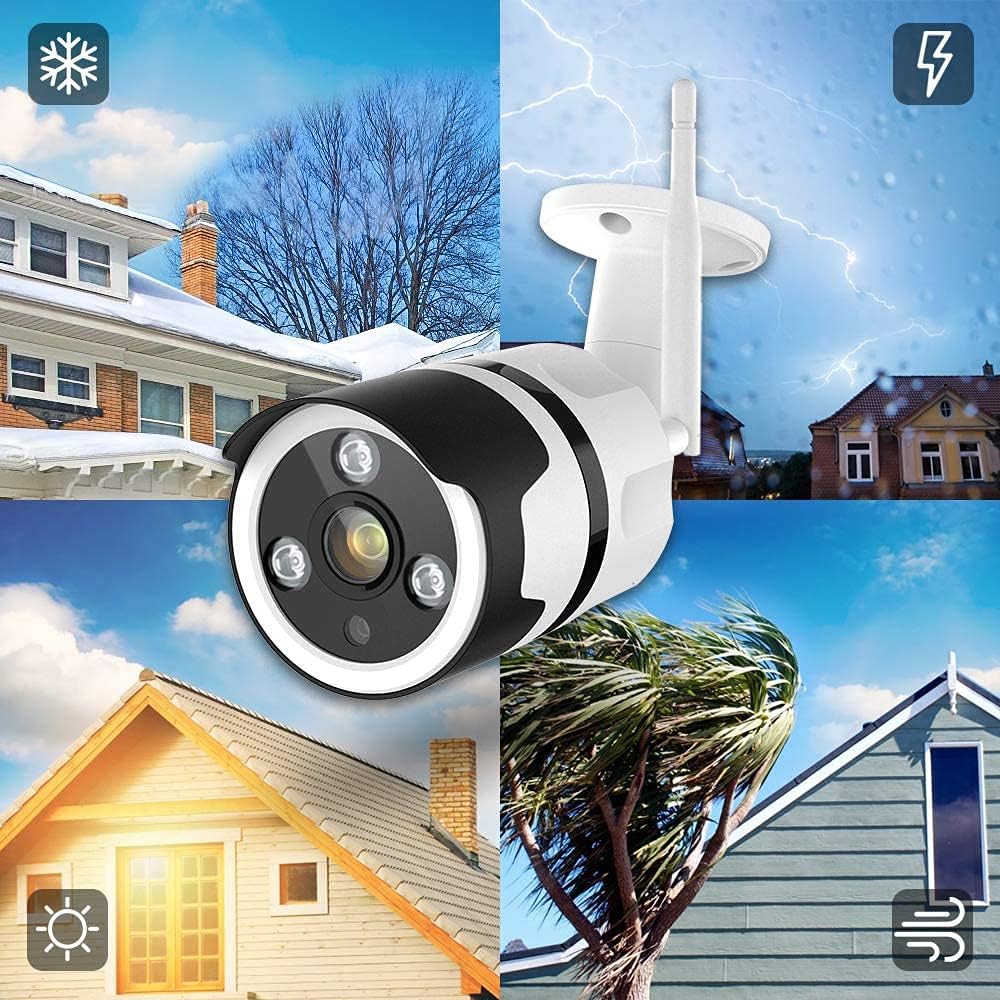
Figure 8: Netvue Camera designed to withstand various weather conditions, including snow, rain, and wind.
6. Troubleshooting
If you encounter issues with your Netvue camera, refer to the following common troubleshooting steps:
- Camera Offline:
- Check power connection and ensure the adapter is working.
- Verify Wi-Fi signal strength at the camera's location.
- Restart the camera by unplugging and re-plugging it.
- Ensure your router is functioning correctly and the 2.4GHz band is enabled.
- Motion Detection Not Working:
- Check motion detection settings in the Netvue app (enabled, sensitivity, detection zones).
- Ensure there are no obstructions blocking the camera's view.
- Verify the camera's firmware is up to date.
- Poor Video Quality:
- Clean the camera lens.
- Check your internet connection speed.
- Ensure the camera is receiving adequate power.
- Cannot Connect to Wi-Fi:
- Confirm you are connecting to a 2.4GHz Wi-Fi network.
- Double-check your Wi-Fi password.
- Move the camera closer to the Wi-Fi router during setup.
7. Specifications
| Feature | Specification |
|---|---|
| Brand | NETVUE |
| Model Name | NI-1901 |
| Indoor/Outdoor Usage | Outdoor |
| Connectivity Technology | Wireless (Wi-Fi), Wired (Ethernet) |
| Video Capture Resolution | 1080p Full HD |
| Viewing Angle | 100 Degrees |
| Night Vision Range | 60-65 Feet |
| Power Source | Corded Electric (12 Volts, 12 watts) |
| Water Resistance Level | IP66 Waterproof |
| Compatible Devices | Alexa, Echo Show, Echo Spot, Fire TV |
| Storage Options | Cloud Storage (AWS), MicroSD Card (up to 128GB) |
| Operating Temperature | -4°F to 122°F (-20°C to 50°C) |
| Item Dimensions (L x W x H) | 12 x 4 x 4.7 inches |
| Item Weight | 14.1 ounces (400 Grams) |
8. Warranty and Support
For detailed warranty information and customer support, please refer to the official Netvue website or contact their customer service. You can also find additional resources, including a comprehensive user guide, at the following link:
Netvue provides 24/7 online customer support to assist with any inquiries or issues you may have.
Documents and downloads
Ask a question about this manual
Ask about setup, troubleshooting, compatibility, parts, safety, or missing instructions. Manuals+ will review the question and use this page’s manual context to help answer it.