
1. Introduction
This manual provides essential information for the safe and efficient operation of your TOPCHANCES HSPY 400-01 Adjustable 400V/1A Programmable DC Power Supply. This device combines the advantages of both switching and linear power supplies, offering high accuracy, low ripple, high stability, and high efficiency without high-frequency radiation interference. It is designed for use in scientific research, laboratories, automatic test equipment, and various electronic component testing applications.
Key features include continuous adjustment of voltage and current, automatic conversion between steady flow and regulator modes, and a high-precision DC stable power supply. The output voltage and current settings are displayed simultaneously on an LCD screen. The unit also features improved overload, short circuit, and overheat protection circuits, a fanless design for quiet operation, and microcomputer control for setting values via PC connection.
2. Safety Information
- Always connect the power supply to a grounded outlet.
- Do not operate the device in wet or damp conditions.
- Ensure proper ventilation around the unit to prevent overheating.
- Do not open the casing; there are no user-serviceable parts inside. Refer servicing to qualified personnel.
- Verify the input voltage matches the device's requirements (220V).
- Avoid short-circuiting the output terminals.
- Disconnect power before making or changing connections.
3. Product Overview
The HSPY 400-01 is a compact and robust DC power supply featuring an LCD display for voltage and current readings, control buttons, and output terminals.
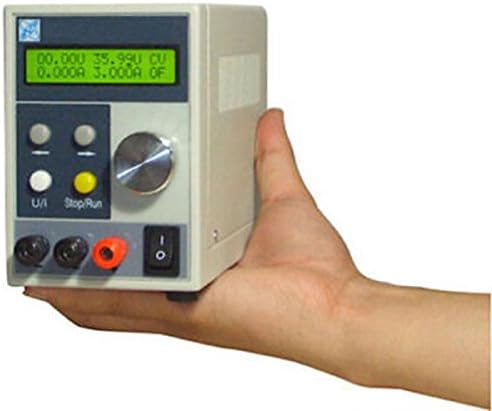
Figure 3.1: Front view of the TOPCHANCES HSPY 400-01 DC Power Supply. This image shows the compact design, the LCD display, control buttons, rotary encoder, power switch, and output terminals.

Figure 3.2: The TOPCHANCES HSPY 400-01 DC Power Supply in operation, connected to a strip of LEDs. This demonstrates the unit's ability to power external loads, with the display showing active voltage and current output.
4. Setup
- Unpacking: Carefully remove the power supply and all accessories from the packaging. Verify that all components listed in the package contents are present: 1 x Adjustable DC Power Supply, 1 x Power line, 1 x Communication Serial Line, 1 x Tester line.
- Placement: Place the unit on a stable, level surface with adequate ventilation. Ensure that the air vents are not obstructed.
- Power Connection: Connect the provided power line to the AC input on the rear of the power supply and then to a grounded 220V AC power outlet.
- Initial Check: Before connecting any load, ensure the power switch on the front panel is in the OFF position.
5. Operating Instructions
5.1 Powering On/Off
- To power on, flip the power switch on the front panel to the ON position. The LCD display will illuminate.
- To power off, flip the power switch to the OFF position.
5.2 Setting Voltage and Current
- Ensure no load is connected or the load is safely disconnected before adjusting settings.
- Use the rotary encoder (shuttle design) to adjust the desired voltage and current values. The LCD display will show the set values.
- The power supply allows continuous adjustment of both voltage (0-400V) and current (0-1A) within its rated range.
- Connect your load to the output terminals (red for positive, black for negative).
- The display will show the actual output voltage and current.
5.3 Programmable Control (PC/PLC)
This power supply supports external control via a PC or PLC. Use the provided Communication Serial Line to connect the unit to a computer. With the dedicated software, you can remotely set output voltage and current values and monitor the power supply's working status in real-time. This feature is useful for automated testing and precise load characteristic analysis.
6. Maintenance
- Cleaning: Disconnect the power supply from the AC outlet before cleaning. Use a soft, dry cloth to wipe the exterior. Do not use liquid cleaners or solvents.
- Ventilation: Regularly check that the ventilation openings are clear of dust and debris to ensure proper airflow and prevent overheating.
- Storage: When not in use for extended periods, store the power supply in a cool, dry place, away from direct sunlight and extreme temperatures.
7. Troubleshooting
| Problem | Possible Cause | Solution |
|---|---|---|
| No power/Display off | Power cord disconnected; Power switch off; No AC power from outlet. | Check power cord connection; Turn power switch ON; Check AC outlet with another device. |
| No output voltage/current | Output terminals not connected; Voltage/current set to zero; Overload protection active. | Ensure load is properly connected; Adjust voltage/current settings; Reduce load or check for short circuit. |
| Incorrect voltage/current reading | Faulty connection; Calibration issue. | Check all connections; If problem persists, contact support. |
| Unit overheats | Blocked ventilation; Excessive ambient temperature; Prolonged operation at maximum load. | Ensure clear ventilation; Operate in a cooler environment; Reduce load or operating time. |
If the problem persists after attempting these solutions, please contact TOPCHANCES customer support.
8. Specifications
| Parameter | Value |
|---|---|
| Input Voltage | 220V |
| Output Voltage Range | 0-400V (adjustable) |
| Output Current Range | 0-1A (continuously adjustable) |
| Power | 400W |
| Voltage / Current Display | LCD display (four digits) |
| Load Regulation (Voltage) | 0.02% + 2mV |
| Load Regulation (Current) | 0.02% + 2mA |
| Setting Accuracy (Voltage) | 0.1% |
| Setting Accuracy (Current) | 0.1% |
| Display Accuracy (Voltage) | 0.1% |
| Display Accuracy (Current) | 0.1% |
| Setting Resolution (Voltage) | 10mV |
| Setting Resolution (Current) | 1mA |
| Display Resolution (Voltage) | 10mV |
| Display Resolution (Current) | 1mA |
| Ripple and Noise (Voltage) | ≤ 2mVrms |
| Ripple and Noise (Current) | ≤ 3mArms |
| Readback Value Temperature Coefficient | 50PPM |
| Dimensions | 185 x 85 x 120mm |
| Weight | 1.45Kg |
9. Warranty and Support
For warranty information, technical support, or service inquiries, please contact TOPCHANCES customer service. You can find more information and contact details on the official TOPCHANCES store page: