
Introduction
Thank you for choosing the Limit 5695 Digital Chronograph Watch. This manual provides detailed instructions for setting up, operating, and maintaining your watch. Please read it carefully to ensure proper use and to maximize the lifespan of your timepiece.

Figure 1: Front view of the Limit 5695 Digital Chronograph Watch. The watch features a grey case with orange accents, a black silicone strap, and a clear digital display showing time, date, and day of the week.
Product Features
- Digital display with silicone strap.
- Water resistant up to 100 meters (330 feet).
- Day, Date, and Month display.
- Functions include Alarm, Chronograph (Stopwatch), and Timer.
- Backlight for low-light visibility.
Watch Components and Buttons
Familiarize yourself with the watch's buttons and their functions:
- MODE Button (Bottom Left): Used to cycle through different modes (Time, Alarm, Chronograph, Timer).
- SET Button (Top Left): Used to enter and exit setting modes.
- ST/STP Button (Top Right): Used to start/stop functions in Chronograph and Timer modes, and to adjust values in setting modes.
- RST/EL Button (Bottom Right): Used to reset functions in Chronograph and Timer modes, and to activate the backlight.
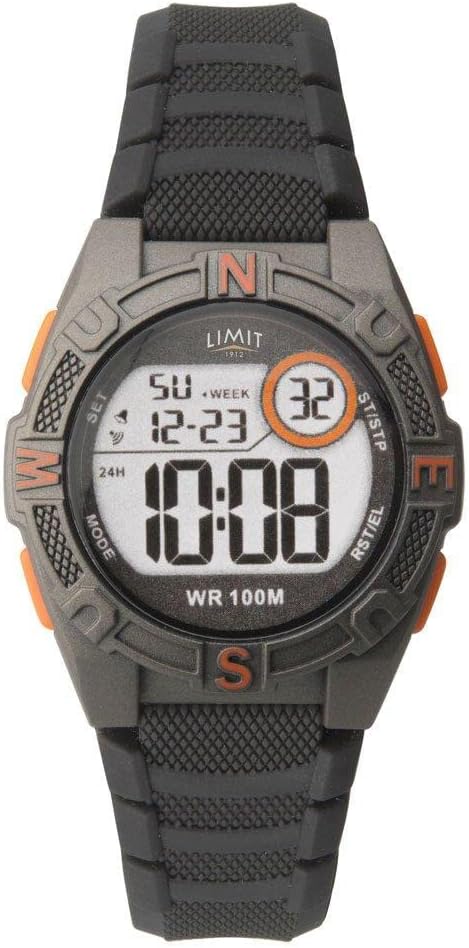
Figure 2: Close-up view of the Limit 5695 watch face, highlighting the labels for the four control buttons: MODE, SET, ST/STP, and RST/EL.
Setup and Initial Configuration
Setting Time and Date
- From the normal time display, press the MODE button repeatedly until the seconds start flashing. This indicates you are in time setting mode.
- Press the ST/STP button to adjust the seconds to zero.
- Press the SET button to move to the next setting item (e.g., hour, minute, year, month, day).
- Use the ST/STP button to increase the value of the flashing item. Hold the button to rapidly advance.
- Use the RST/EL button to decrease the value of the flashing item (if applicable, or to cycle through options like 12/24 hour format).
- Repeat steps 3-5 until all desired settings (hour, minute, 12/24 hour format, year, month, day) are configured.
- Once all settings are complete, press the MODE button to exit the setting mode and return to the normal time display.
Operating Instructions
Using the Alarm
- From the normal time display, press the MODE button until "AL" (Alarm) appears on the display.
- Press the SET button. The alarm hour will start flashing.
- Use the ST/STP button to set the desired alarm hour.
- Press the SET button again. The alarm minute will start flashing.
- Use the ST/STP button to set the desired alarm minute.
- Press the MODE button to exit the alarm setting mode.
- To turn the alarm ON/OFF, press the ST/STP button while in the Alarm mode (without pressing SET). An alarm icon will appear/disappear on the display.
Using the Chronograph (Stopwatch)
- From the normal time display, press the MODE button until "ST" (Stopwatch) appears on the display, and the time shows "00:00:00".
- Press the ST/STP button to start the stopwatch.
- Press the ST/STP button again to stop the stopwatch.
- Press the RST/EL button to reset the stopwatch to "00:00:00".
- To measure split times, press RST/EL while the stopwatch is running. The display will freeze, showing the split time. Press RST/EL again to return to the running stopwatch.
- Press the MODE button to exit the stopwatch mode.
Using the Timer
- From the normal time display, press the MODE button until "TR" (Timer) appears on the display.
- Press the SET button. The timer hour will start flashing.
- Use the ST/STP button to set the desired timer hour.
- Press the SET button again. The timer minute will start flashing.
- Use the ST/STP button to set the desired timer minute.
- Press the SET button again. The timer second will start flashing.
- Use the ST/STP button to set the desired timer second.
- Press the MODE button to exit the timer setting mode.
- To start the countdown, press the ST/STP button while in Timer mode.
- To pause/resume the countdown, press the ST/STP button.
- To reset the timer to its initial set value, press the RST/EL button while the timer is paused.
Activating the Backlight
To illuminate the display in low-light conditions, press the RST/EL button. The backlight will remain on for a few seconds.
Maintenance and Care
- Cleaning: Wipe the watch regularly with a soft, dry cloth. For stubborn dirt, use a slightly damp cloth and mild soap, then dry thoroughly. Avoid harsh chemicals.
- Water Resistance: This watch is water resistant up to 100 meters (10 ATM). It is suitable for swimming and snorkeling, but not for diving. Do not operate buttons underwater. Ensure the crown (if applicable) is pushed in completely before exposing to water.
- Temperature: Avoid exposing the watch to extreme temperatures (hot or cold) for prolonged periods, as this can affect battery life and accuracy.
- Battery Replacement: When the display becomes dim or functions become erratic, the battery may need replacement. It is recommended to have the battery replaced by a qualified watch technician to ensure water resistance is maintained.
Troubleshooting
| Problem | Possible Cause | Solution |
|---|---|---|
| Display is blank or dim. | Low battery. | Replace the battery. |
| Buttons do not respond. | Watch is frozen or in an unusual state. | Try pressing all buttons simultaneously for a few seconds to attempt a soft reset. If problem persists, remove and reinsert battery (professional service recommended). |
| Time is inaccurate. | Incorrect time setting; extreme temperature exposure; low battery. | Re-set the time. Avoid extreme temperatures. Replace battery if needed. |
| Water inside the watch. | Buttons operated underwater; seal compromised. | Immediately take to a qualified watch technician for inspection and repair. Do not attempt to dry it yourself. |
Specifications
- Brand: Limit
- Model: 5695
- Display Type: Digital
- Water Resistance: 100 meters (10 ATM)
- Strap Material: Silicone
- Functions: Time (12/24H), Date (Day/Month/Year), Alarm, Chronograph, Timer, Backlight
- Package Dimensions: 25.4 x 6 x 3.6 cm
- Weight: 80 g
Warranty and Support
This Limit 5695 Digital Chronograph Watch comes with a 2-year limited warranty provided by Limit Time Products. This warranty covers manufacturing defects under normal use.
For warranty claims, technical support, or service inquiries, please refer to the contact information provided with your purchase documentation or visit the official Limit Time Products website. Please retain your proof of purchase for warranty validation.

