
1. Introduction
This manual provides essential instructions for the installation, operation, and maintenance of your Osculati Sphera III Inox Red LED Navigation Light, Model 11.062.21. Please read this manual thoroughly before installation and use to ensure proper function and safety.
The Sphera III is a high-quality LED navigation light designed for marine vessels up to 20 meters in length. It features a mirror-polished stainless steel cap and a durable polycarbonate lens, ensuring full waterproofing and compliance with COLREG '72 and NMEA standards.
2. Safety Information
- Always disconnect power before installation or maintenance.
- Ensure all electrical connections are secure and properly insulated to prevent short circuits and corrosion.
- Installation should be performed by a qualified marine technician if you are unsure about electrical wiring.
- Verify that the light is correctly positioned and visible according to international navigation rules (COLREG '72).
- Do not modify the light in any way, as this may compromise its waterproof integrity and compliance.
3. Package Contents
Verify that all items are present in the package:
- 1 x Osculati Sphera III Inox Red LED Navigation Light (Model 11.062.21)
- Mounting hardware (screws, washers - may vary)
- This User Manual
4. Setup and Installation
The Osculati Sphera III Red LED Navigation Light is designed for surface mounting. Follow these steps for proper installation:
- Choose Mounting Location: Select a flat, stable surface on your vessel that allows for clear, unobstructed visibility of the light according to COLREG '72 regulations. This red light is typically used as a port (left) side navigation light.
- Mark Drilling Points: Use the light fixture as a template to mark the positions for mounting screws. Ensure the light is oriented correctly.
- Drill Pilot Holes: Drill pilot holes appropriate for your mounting screws. Be careful not to drill too deep.
- Wiring: Connect the light's wires to your vessel's 12V DC electrical system. The red wire is typically positive (+), and the black wire is negative (-). Ensure connections are watertight using marine-grade connectors and heat shrink tubing.
- Mount the Light: Secure the light to the marked surface using the provided mounting hardware. Do not overtighten screws, as this may damage the housing.
- Test Functionality: Once installed, apply power to the circuit and verify that the LED navigation light illuminates correctly.
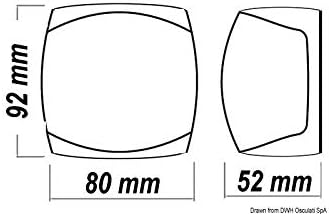
Figure 1: Dimensions of the Sphera III Navigation Light. The light measures 80mm in width, 92mm in height, and 52mm in depth. These measurements are crucial for selecting an appropriate mounting location.
5. Operating Instructions
The Osculati Sphera III Inox Red LED Navigation Light operates simply:
- Power On/Off: The light is controlled by your vessel's main navigation light switch. Activate the switch to turn the light on, and deactivate it to turn the light off.
- Visibility: Ensure the light is always clean and free from obstructions to maintain maximum visibility as required by maritime regulations.
- Usage: This red light serves as a port (left) side navigation light, indicating the presence and direction of your vessel to other marine traffic during periods of restricted visibility or at night.
6. Maintenance
The Sphera III LED Navigation Light requires minimal maintenance due to its durable construction and LED technology. However, regular checks are recommended:
- Cleaning: Periodically clean the polycarbonate lens with fresh water and a soft cloth to remove salt, dirt, and grime. Avoid abrasive cleaners or solvents that could damage the lens material.
- Inspection: Regularly inspect the light for any signs of physical damage, corrosion on the stainless steel cap, or loose mounting screws.
- Wiring Check: Annually inspect the wiring connections for corrosion or wear. Ensure all connections remain watertight.
- LED Longevity: The integrated LED unit is designed for long life and does not require bulb replacement. If the light fails, the entire unit may need to be replaced.
7. Troubleshooting
| Problem | Possible Cause | Solution |
|---|---|---|
| Light does not illuminate. | No power supply. Loose or corroded wiring. Faulty switch. Internal LED failure. | Check vessel's battery and fuse. Inspect all wiring connections for tightness and corrosion. Clean or re-secure as needed. Test the navigation light switch. Replace if faulty. If all else fails, the unit may need replacement. |
| Light flickers or is dim. | Low voltage. Poor electrical connection. Partial internal LED failure. | Check battery voltage. Ensure it is within the 12V DC operating range. Inspect wiring for loose connections or corrosion. Consider replacing the unit if flickering persists after checking power and connections. |
| Water inside the lens. | Compromised waterproof seal. Improper installation. | Immediately disconnect power. Remove the light and inspect the seals. Reinstall carefully, ensuring all seals are intact and screws are tightened appropriately. If damage is present, the unit may need replacement. |
8. Specifications
- Model: Osculati Sphera III Inox Red LED Navigation Light
- Part Number: 11.062.21
- Light Type: LED Navigation Light
- Color: Red (Port Side)
- Voltage: 12 Volts DC
- Material: Mirror-polished Stainless Steel (cap), Polycarbonate (lens)
- Weight: Approximately 310 grams
- Dimensions (W x H x D): 80 mm x 92 mm x 52 mm
- Vessel Length: Up to 20 meters
- Features: Fully Waterproof, Compliant with COLREG '72 and NMEA standards
9. Warranty and Support
Osculati products are manufactured to high-quality standards. For specific warranty terms and conditions, please refer to the documentation provided at the time of purchase or visit the official Osculati website. Keep your proof of purchase for any warranty claims.
For technical support or inquiries regarding your Sphera III navigation light, please contact your authorized Osculati dealer or the Osculati customer service department.