
Introduction
This manual provides essential information for the safe and effective use of your Retevis H-777 Charger Adapter. This 5V 1A USB adapter is designed to provide reliable power for a wide range of compatible devices, including Retevis walkie-talkies, Retekess FM radios, and Retekess tour guide systems. Please read this manual thoroughly before use and retain it for future reference.
Safety Information
To ensure safe operation and prevent damage, please observe the following precautions:
- Use the adapter only with devices that require 5V 1A input.
- Do not expose the adapter to water, moisture, or extreme temperatures.
- Avoid dropping or subjecting the adapter to severe impact.
- Do not attempt to disassemble or modify the adapter. This will void the warranty and may cause electrical shock or fire.
- Unplug the adapter from the wall outlet when not in use or during electrical storms.
- Keep out of reach of children.
- Ensure the wall outlet is easily accessible for quick disconnection.
- The adapter features built-in over-power protection, output over-voltage protection, and short-circuit protection for enhanced safety.
Product Overview
The Retevis H-777 Charger Adapter is a compact and portable USB wall charger designed for convenience and efficiency. It features a standard USB Type-A output port and foldable US prongs for easy storage and travel.

Figure 1: Front view of the Retevis H-777 Charger Adapter, showing the USB-A output port.

Figure 2: Angled view of the charger adapter, highlighting the foldable US prongs.

Figure 3: Side view of the adapter, illustrating its compact width of 21mm (0.83 inches) and depth of 34mm (1.34 inches).

Figure 4: Front view of the adapter, showing its height of 48mm (1.89 inches).
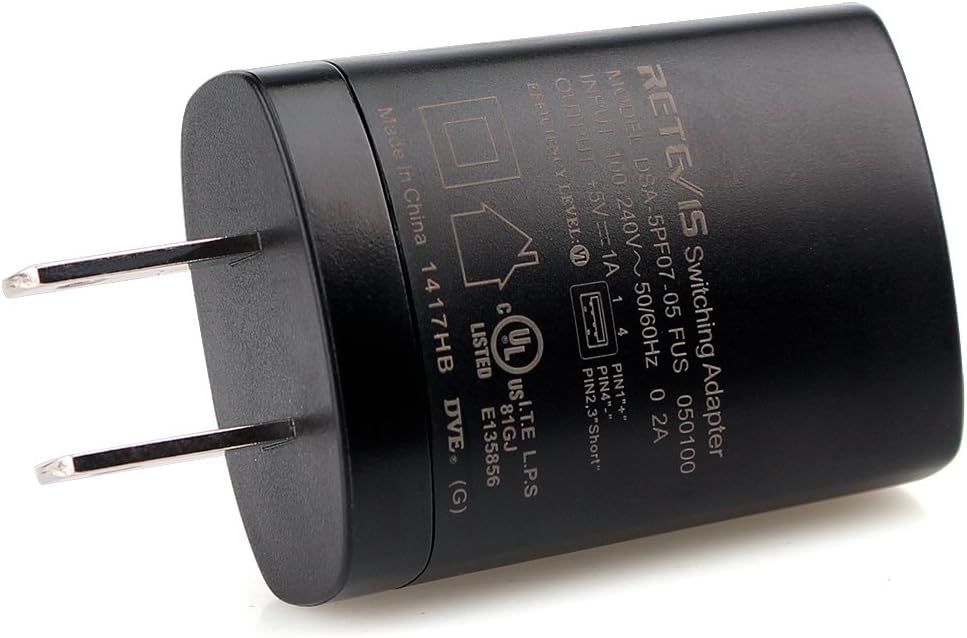
Figure 5: Top view of the adapter, displaying the product label with input/output specifications and certifications.
Setup
Setting up your Retevis H-777 Charger Adapter is straightforward:
- Unpack: Carefully remove the charger adapter from its packaging.
- Connect USB Cable: Insert the USB charging cable (not included) of your device into the USB Type-A port on the charger adapter.
- Plug into Outlet: Plug the charger adapter into a standard 100-240V AC wall outlet.
- Connect Device: Connect the other end of the USB charging cable to your compatible device (e.g., walkie-talkie charging base, FM radio).

Figure 6: The charger adapter plugged into a power strip, connected to a walkie-talkie charging base. Note: The package includes only the wall plug; radio and cord are not included.

Figure 7: Angled view of the charger adapter connected to a walkie-talkie charging base, ready for use.

Figure 8: Side view of the charger adapter connected to a walkie-talkie charging base, demonstrating its compact fit.
Operating Instructions
Once connected, the Retevis H-777 Charger Adapter will automatically begin providing power to your device. The adapter is designed for continuous use as needed for charging or powering compatible electronics. There are no buttons or indicators on the adapter itself; operation is automatic upon connection to a power source and a device.
Maintenance
Proper maintenance ensures the longevity and optimal performance of your charger adapter:
- Cleaning: Disconnect the adapter from the power outlet and your device before cleaning. Use a soft, dry cloth to wipe the surface. Do not use liquid cleaners or abrasive materials.
- Storage: When not in use, store the adapter in a cool, dry place away from direct sunlight and extreme temperatures. The foldable prongs make it easy to store.
- Inspection: Periodically inspect the adapter for any signs of damage, such as frayed cables (if applicable to your USB cable), cracked casing, or bent prongs. If damage is found, discontinue use immediately.
Troubleshooting
If you encounter issues with your charger adapter, refer to the following table:
| Problem | Possible Cause | Solution |
|---|---|---|
| Device not charging/powering on. | Adapter not properly plugged in. USB cable is faulty. Device is not compatible or faulty. Power outlet is not working. | Ensure the adapter is fully inserted into the wall outlet. Try a different USB cable. Verify device compatibility and test with another charger if possible. Test the outlet with another appliance. |
| Adapter feels unusually hot. | Overload or internal fault. | Immediately unplug the adapter. Ensure the connected device does not exceed the 5V 1A output. If the issue persists, discontinue use and contact customer support. |
| No power output from USB port. | Internal fault. | Try plugging into a different wall outlet. If still no output, the adapter may be faulty. Contact customer support. |
Specifications
| Feature | Detail |
|---|---|
| Brand | Retevis |
| Model Number | DSA-5PF07-05-FUS 050 100 |
| Input Voltage | 100-240V AC, 50/60Hz |
| Output Voltage/Current | 5V DC, 1A |
| Connectivity Technology | USB |
| Connector Type | USB Type A |
| Product Dimensions | 1.89 x 1.34 x 0.83 inches (48 x 34 x 21 mm) |
| Item Weight | 0.9 ounces (26 grams) |
| Mounting Type | Wall Mount |
| Color | Black |
| Compatible Devices |
|
Warranty Information
Retevis provides a 1-year warranty for accessories, including this charger adapter. Additionally, a 30-day no-reason return policy is offered. Beyond the warranty period, maintenance services are still available, with buyers responsible for corresponding costs. For any warranty claims or service inquiries, please contact Retevis customer support.
Customer Support
For technical assistance, troubleshooting not covered in this manual, or warranty service, please contact Retevis customer support through the platform where you purchased the product (e.g., Amazon). Retevis aims to reply to inquiries within 12 hours.
You can also visit the official Retevis store for more information and resources: Retevis Official Store


