
1. Introduction
This manual provides essential information for the proper use and care of your Tamron 70-210mm F/4 Di VC USD lens. Please read these instructions thoroughly before using the lens to ensure optimal performance and longevity. This lens is designed for Canon EF mount Digital SLR cameras.
Package Contents
- Tamron 70-210mm F/4 Di VC USD Lens
- Lens Hood
- Front Lens Cap
- Rear Lens Cap
- Instruction Manual (this document)
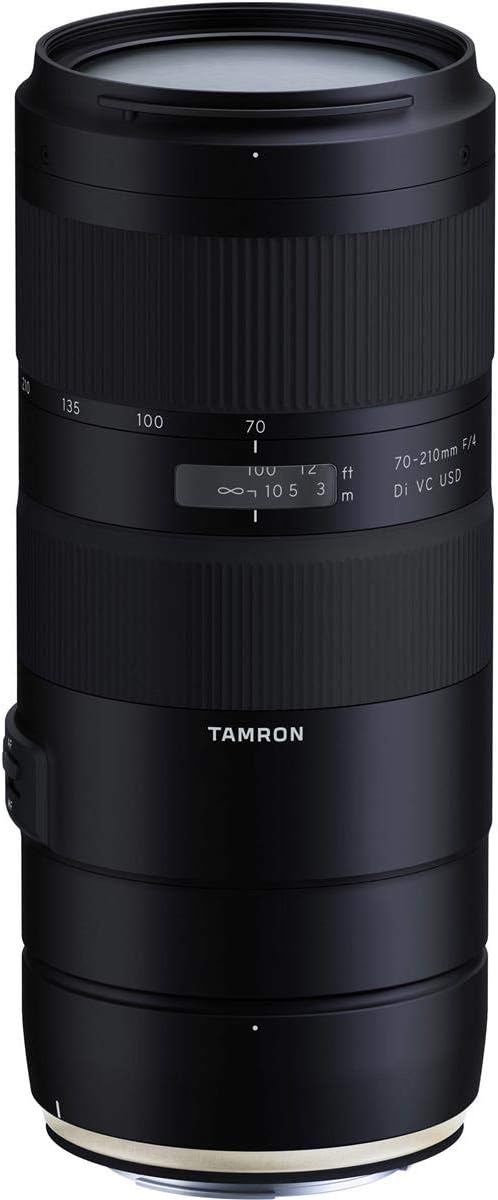
Figure 1: Tamron 70-210mm F/4 Di VC USD Lens, front-side view.
2. Product Features
The Tamron 70-210mm F/4 Di VC USD lens offers advanced optical and mechanical features for photographers:
- Constant F/4 Aperture: Maintains a bright F/4 aperture throughout the entire zoom range, providing consistent exposure and depth of field control.
- Vibration Compensation (VC): Integrated image stabilization system to reduce camera shake, enabling sharper images in low light or at slower shutter speeds.
- Ultrasonic Silent Drive (USD): Ring-type ultrasonic motor for fast, precise, and quiet autofocus performance.
- Internal Zoom Mechanism: The physical length of the lens does not change during zooming, maintaining balance and preventing "zoom creep."
- Moisture-Resistant Construction: Designed with seals to protect against moisture, enhancing durability in various shooting conditions.
- Optical Design: Features 20 elements in 14 groups, including 3 LD (Low Dispersion) glass elements to minimize chromatic aberrations.
- Close Focusing Capability: Achieves a maximum magnification ratio of 1:3.1 and a minimum object distance (MOD) of 37.4 inches (0.95m), allowing for detailed close-up photography.
3. Setup
Attaching the Lens to Your Camera
- Ensure both the camera and lens are powered off.
- Remove the rear lens cap from the lens and the body cap from the camera.
- Align the mounting index mark on the lens with the corresponding mark on the camera body.
- Insert the lens into the camera mount and rotate it clockwise until it clicks securely into place.
- Attach the lens hood by aligning its mark with the mark on the front of the lens, then rotate until it locks.

Figure 2: Rear lens mount with electronic contacts.
4. Operating the Lens

Figure 3: Lens switches for Autofocus/Manual Focus and Vibration Compensation.
Autofocus (AF) / Manual Focus (MF) Switch
This switch controls the focusing mode of the lens.
- AF (Autofocus): Set the switch to AF for automatic focusing. The camera will control the lens focus.
- MF (Manual Focus): Set the switch to MF to manually adjust focus using the focus ring. This lens supports Full-time Manual Focus override, allowing fine adjustments even in AF mode without switching to MF.
Vibration Compensation (VC) Switch
The VC mechanism helps reduce blur caused by camera shake.
- VC ON: Activates the Vibration Compensation system. Use this setting when shooting handheld to stabilize images.
- VC OFF: Deactivates the Vibration Compensation system. It is recommended to turn VC OFF when using a tripod or when shooting at very high shutter speeds where stabilization is not required.
Zoom Ring
Rotate the zoom ring to change the focal length between 70mm and 210mm. The internal zoom mechanism ensures the lens length remains constant.
Focus Ring
In MF mode, rotate this ring to adjust the focus manually. In AF mode, you can still make fine manual adjustments without switching to MF.
5. Maintenance
Cleaning the Lens
- Use a blower brush to remove dust from the lens surface.
- For smudges or fingerprints, use a clean, soft microfiber cloth specifically designed for optics. Apply a small amount of lens cleaning solution to the cloth, not directly to the lens.
- Never use harsh chemicals, solvents, or abrasive materials to clean the lens.
Storage
- Store the lens in a cool, dry place away from direct sunlight and extreme temperatures.
- When not in use, attach both the front and rear lens caps to protect the optical elements.
- If storing for extended periods, consider using a dehumidifying agent to prevent mold growth.
6. Troubleshooting
If you encounter issues with your lens, refer to the following common problems and solutions:
| Problem | Possible Cause / Solution |
|---|---|
| Lens not focusing (AF) |
|
| Images are blurry (not sharp) |
|
| Lens not recognized by camera |
|
7. Specifications
| Feature | Detail |
|---|---|
| Model Number | AFA034C700 |
| Focal Length | 70-210mm |
| Maximum Aperture | F/4 |
| Lens Type | Telephoto Zoom |
| Compatible Mountings | Canon EF |
| Optical Construction | 20 elements in 14 groups (including 3 LD elements) |
| Minimum Object Distance (MOD) | 37.4 inches (0.95m) |
| Maximum Magnification Ratio | 1:3.1 |
| Image Stabilization | Vibration Compensation (VC) |
| Autofocus System | Ultrasonic Silent Drive (USD) |
| Product Dimensions | 6.8 x 2.99 x 2.99 inches |
| Item Weight | 1.87 pounds |
| Manufacturer | Tamron |
| Date First Available | March 6, 2018 |
8. Warranty and Support
Warranty Information
This Tamron lens typically comes with a 6-Year Tamron Limited USA Warranty. Please refer to the warranty card included with your product or visit the official Tamron USA website for complete warranty terms and conditions, including registration requirements.
Customer Support
For technical assistance, service, or further inquiries, please contact Tamron customer support. Contact information can usually be found on the official Tamron website or in the warranty documentation.


