1. Product Overview
The Sony HVL-F60RM is a high-performance external flash unit designed for Sony cameras, offering advanced lighting capabilities and seamless integration. It features wireless radio control, a powerful guide number, and a durable, dust and moisture-resistant design.

Figure 1: Front view of the Sony HVL-F60RM External Flash.
Key Features:
- Powerful flash lighting at guide number 60 (GN60).
- Operates as an on-camera flash, radio wireless commander, or receiver.
- Fast recycling time of 1.7 seconds, or 0.6 seconds with optional FA-EBA1.
- Continuous shooting up to 220 emissions per set of batteries.
- Dust and moisture-resistant design for reliable operation in various conditions.
2. What's in the Box
Upon unpacking, ensure all the following items are present:
- Sony HVL-F60RM External Flash Unit
- Connector protect cap
- Mini-stand
- Case
- Bounce adaptor
- Color filter (amber)
- Color filter (green)
- Carrying pouch
3. Setup
3.1 Battery Installation
The HVL-F60RM flash unit requires four AA-size alkaline or Ni-MH batteries. To install, open the battery compartment cover, insert the batteries according to the polarity indicators, and close the cover securely.
3.2 Attaching to Camera
Slide the flash unit onto your camera's multi-interface shoe until it clicks into place. Secure it by rotating the lock lever. Ensure the flash is firmly attached to prevent accidental detachment during use.
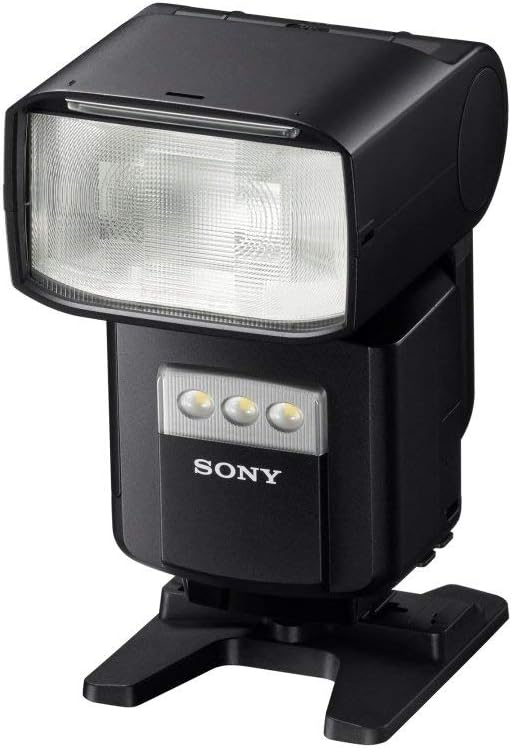
Figure 2: The HVL-F60RM flash unit on its mini-stand, ready for off-camera use.
4. Operating Instructions
4.1 Power On/Off
To power on the flash, slide the power switch to the 'ON' position. To power off, slide it to 'OFF'.
4.2 Quick Shift Bounce Mechanism
The flash head features a Quick Shift Bounce mechanism, allowing for smooth rotation between vertical and horizontal positions. This enables flexible light direction for bounce flash photography, optimizing lighting for both portrait and landscape orientations.

Figure 3: Illustration of the Quick Shift Bounce mechanism, showing the flash head's rotational capability.
4.3 Control Panel and Settings
The simplified interface provides intuitive control over flash settings. Use the 'LEVEL' buttons to adjust power output, 'ZOOM' to control flash coverage, and 'MODE' to select between various flash modes (e.g., TTL, Manual, Multi). The 'MENU' button accesses advanced settings, and the 'LOCK ON/OFF' switch prevents accidental changes.

Figure 4: Detailed view of the HVL-F60RM control panel and display.
4.4 Wireless Radio Control
The HVL-F60RM supports wireless radio control, allowing it to function as a commander or receiver for multi-flash setups. This enables flexible off-camera lighting without line-of-sight restrictions. Refer to your camera's manual for specific wireless flash setup procedures.
Video 1: Demonstrates the wireless radio control capabilities of the Sony HVL-F60RM flash, showcasing its use in various professional photography scenarios.
4.5 Built-in LED Video Light
The flash unit includes a built-in LED video light with 25 power levels, providing continuous illumination for video recording or as a modeling light for still photography.
5. Maintenance
To ensure optimal performance and longevity of your HVL-F60RM flash unit, follow these maintenance guidelines:
- Cleaning: Use a soft, dry cloth to clean the exterior of the flash. For stubborn dirt, lightly dampen the cloth with water. Avoid using harsh chemicals or abrasive materials.
- Dust and Moisture: While the unit is dust and moisture-resistant, it is not waterproof. Avoid exposing it to heavy rain or direct water spray. Clean off any dust or moisture promptly.
- Storage: When not in use for extended periods, remove the batteries to prevent leakage. Store the flash in its protective case in a cool, dry place away from direct sunlight.
6. Troubleshooting
If you encounter issues with your Sony HVL-F60RM flash, refer to the following common troubleshooting steps:
- Flash Not Firing: Check battery levels and ensure they are correctly inserted. Verify the flash is securely mounted on the camera or properly paired in wireless mode. Check camera and flash settings for compatibility.
- Incorrect Exposure: Adjust flash power settings (TTL or Manual). Ensure the flash head is positioned correctly for bounce or direct flash. Check camera ISO, aperture, and shutter speed settings.
- Wireless Connection Issues: Ensure both the commander and receiver units are set to the same channel and group. Check for obstructions between units. Verify battery levels in all units.
- Overheating: Continuous high-power flashes can cause the unit to overheat. Allow the flash to cool down if an overheating warning appears. Reduce flash power or frequency of use.
If problems persist, consult the official Sony support website or contact customer service.
7. Specifications
| Feature | Specification |
|---|---|
| Product Dimensions | 3.13 x 4.13 x 5.5 inches |
| Item Weight | 15 ounces |
| Item Model Number | HVLF60RM |
| Brand | Sony |
| Compatible Mountings | Sony Alpha |
| Camera Flash Type | Hotshoe |
| Flash Sync Speed | 1/400 |
| Power Source | Four AA-size Alkaline or Ni-MH Batteries |
| Guide Number | 60 (at ISO 100, 200mm) |
8. Warranty and Support
This product is covered by Sony's standard manufacturer's warranty. For detailed warranty information, please refer to the warranty card included with your product or visit the official Sony support website. For technical assistance, product registration, or service inquiries, please contact Sony customer support.
Online Support: Visit www.sony.com/electronics/support for FAQs, drivers, and software downloads.
Contact Information: Refer to your regional Sony website for local contact numbers and service centers.


