1. Introduction
The UNI-T UT315A is a portable LCD Vibration Tester designed for measuring acceleration, velocity, and displacement. It features a long and short external probe for versatile applications, USB connectivity for data transfer, a Max mode for peak value capture, and PC software for advanced analysis. This manual provides detailed instructions for the safe and effective use of your UT315A device.
2. Safety Information
Please read and understand all safety warnings and operating instructions before using this instrument. Failure to follow these instructions may result in injury or damage to the device.
- Do not operate the device in explosive atmospheres or in the presence of flammable gases or vapors.
- Ensure the probe is securely connected before taking measurements.
- Avoid dropping the instrument or subjecting it to severe impact.
- Do not attempt to open or modify the device; refer all servicing to qualified personnel.
- Dispose of batteries according to local regulations.
3. Product Overview
The UT315A Vibration Tester consists of a main unit with an LCD display and control buttons, and an external vibration probe connected via a cable. The device is powered by batteries and includes a USB interface for PC communication.
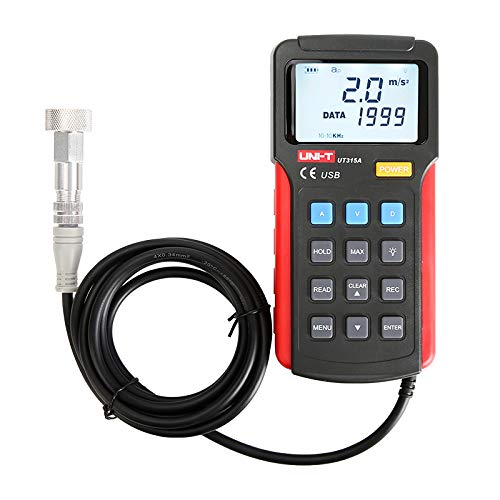
Figure 1: Front view of the UNI-T UT315A Vibration Tester with its external probe and cable. The LCD screen displays '2.0 m/s²' and 'DATA 1999'. Buttons for A, V, D, HOLD, MAX, READ, CLEAR, REC, MENU, and ENTER are visible.
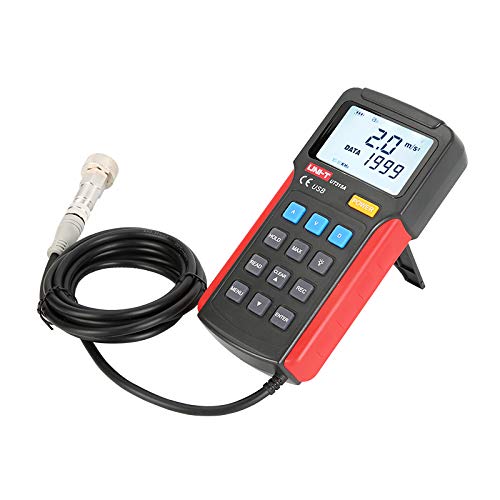
Figure 2: Side view of the UNI-T UT315A Vibration Tester, showing the integrated kickstand extended for desktop use. The external probe and cable are also visible.
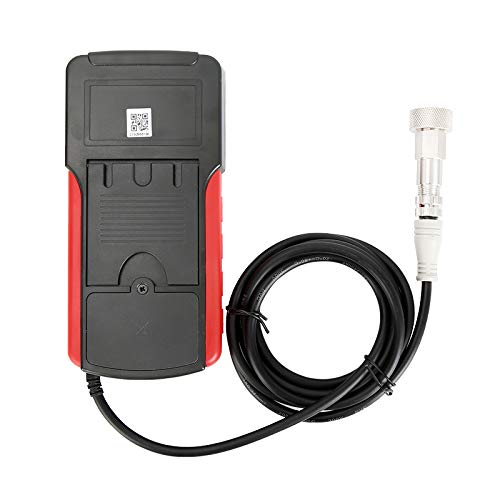
Figure 3: Back view of the UNI-T UT315A Vibration Tester, showing the battery compartment cover and a QR code. The external probe cable is connected to the top of the unit.
4. Setup
4.1 Unpacking
Carefully unpack the UNI-T UT315A Vibration Tester and check for any damage. The package should contain:
- UNI-T UT315A Main Unit
- External Vibration Probe (long and short options)
- USB Cable
- PC Software CD (or download link)
- User Manual
4.2 Battery Installation
The UT315A is battery-powered. To install or replace batteries:
- Locate the battery compartment on the back of the device (refer to Figure 3).
- Open the battery compartment cover.
- Insert the required batteries, ensuring correct polarity (+/-).
- Close the battery compartment cover securely.
4.3 Probe Connection
Connect the external vibration probe to the designated port on the top of the main unit. Ensure the connection is firm and secure to prevent inaccurate readings.
4.4 Power On/Off
Press the POWER button located on the front panel to turn the device on or off.
5. Operating Instructions
5.1 Selecting Measurement Mode
The UT315A can measure acceleration, velocity, and displacement. Use the dedicated buttons to switch between modes:
- Press A for Acceleration (m/s²).
- Press V for Velocity (cm/s).
- Press D for Displacement (mm).
5.2 Taking a Measurement
- Ensure the device is powered on and the probe is connected.
- Select the desired measurement mode (Acceleration, Velocity, or Displacement).
- Carefully place the tip of the external probe firmly against the surface of the object whose vibration you wish to measure.
- Read the measurement value displayed on the LCD screen.
5.3 HOLD Function
To freeze the current reading on the display, press the HOLD button. Press it again to release and resume live measurements.
5.4 MAX Mode
To capture the maximum vibration value during a measurement period, press the MAX button. The display will show the peak value detected. Press again to exit MAX mode.
5.5 Data Recording (REC)
The UT315A allows for data recording. Refer to the detailed instructions in the full user manual for specific steps on initiating, stopping, and reviewing recorded data using the REC button and navigation keys.
5.6 PC Software and USB Connection
To transfer data to a computer or perform advanced analysis:
- Install the provided PC software from the CD or download it from the UNI-T website.
- Connect the UT315A to your computer using the supplied USB cable.
- Launch the PC software and follow its instructions to establish communication with the device and manage data.
6. Maintenance
6.1 Cleaning
Wipe the device with a soft, damp cloth. Do not use abrasive cleaners or solvents. Ensure no liquid enters the device.
6.2 Storage
When not in use for extended periods, remove the batteries to prevent leakage. Store the device in a cool, dry place, away from direct sunlight and extreme temperatures.
6.3 Calibration
For optimal accuracy, periodic calibration by a qualified service center is recommended. Refer to UNI-T's official support for calibration services.
7. Troubleshooting
- Device does not power on: Check battery installation and ensure batteries are not depleted. Replace if necessary.
- Inaccurate readings: Ensure the probe is firmly in contact with the surface. Check for any damage to the probe or cable.
- USB connection issues: Verify the USB cable is correctly connected to both the device and the PC. Ensure PC software drivers are installed correctly.
- Display shows 'OL' or 'OVER': The measurement value exceeds the device's range for the selected mode.
If problems persist, contact UNI-T customer support.
8. Specifications
| Parameter | Value |
|---|---|
| Model Number | UT315A |
| Acceleration Measurement Range | 0.1 ~ 199.9 m/s² |
| Velocity Measurement Range | 0.01 ~ 19.99 cm/s |
| Displacement Measurement Range | 0.001 ~ 1.999 mm |
| Power Source | Battery Powered |
| Item Weight | 3.31 pounds |
| Manufacturer | UNI-T |
| UPC | 666354108580 |
9. Warranty and Support
For warranty information, technical support, or service inquiries, please contact UNI-T directly or refer to their official website. Keep your purchase receipt as proof of purchase.
Manufacturer: UNI-T
For further assistance, visit the UNI-T Store on Amazon.


