1. Introduction
This user manual provides essential information for the safe and efficient installation, operation, and maintenance of your NDS PowerService Plus 30 Amp Charger Booster. Please read this manual thoroughly before using the device to ensure proper function and to prevent damage or injury. Keep this manual for future reference.
2. Safety Instructions
Always observe the following safety precautions to prevent personal injury or damage to the device:
- Ensure the device is installed in a well-ventilated area, away from flammable materials.
- Do not expose the device to water, moisture, or extreme temperatures.
- Disconnect all power sources before performing any installation, maintenance, or troubleshooting.
- Only qualified personnel should perform electrical connections. Incorrect wiring can cause severe damage or fire.
- Verify that the input voltage and current ratings match your power source and battery specifications.
- Keep children and unauthorized persons away from the device during operation.
- Do not attempt to open or modify the device. This will void the warranty and may cause hazards.
3. Product Overview
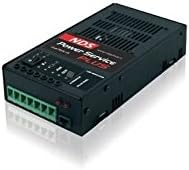
Figure 1: NDS PowerService Plus 30 Amp Charger Booster. This image shows the compact black rectangular unit with ventilation grilles on the top and sides, and a green terminal block for connections on the front face. Control indicators and buttons are visible on the top panel.
The NDS PowerService Plus 30 Amp Charger Booster is designed to efficiently charge and boost your auxiliary battery from your vehicle's alternator. It features advanced charging algorithms to optimize battery life and performance. The compact design allows for flexible installation in various applications, such as RVs, caravans, and marine vehicles.
4. Setup and Installation
Follow these general steps for installing the NDS PowerService Plus. Refer to the detailed wiring diagram provided with your product packaging for specific connections.
- Mounting: Choose a dry, well-ventilated location for mounting the charger booster. Ensure there is sufficient space around the unit for air circulation. Secure the unit firmly using appropriate fasteners.
- Wiring:
- Connect the input terminals to the vehicle's starter battery and alternator according to the wiring diagram. Use appropriately sized cables and fuses.
- Connect the output terminals to the auxiliary/service battery. Ensure correct polarity (positive to positive, negative to negative).
- Connect the ground wire to a suitable chassis ground point.
- Verify all connections are secure and properly insulated.
- Initial Check: Before applying power, double-check all wiring for correctness and security.
5. Operating Instructions
Once installed, the NDS PowerService Plus 30 Amp Charger Booster operates largely automatically.
- Automatic Operation: The device will detect when the vehicle's engine is running (via alternator voltage) and automatically begin charging the auxiliary battery.
- Charging Stages: The charger booster typically employs multi-stage charging (e.g., bulk, absorption, float) to optimize battery health and charge efficiency. Indicators on the unit may show the current charging status.
- Monitoring: Periodically check the status indicators on the unit to ensure proper operation. Refer to the product's specific LED indicator guide for detailed meanings.
6. Maintenance
The NDS PowerService Plus 30 Amp Charger Booster requires minimal maintenance:
- Cleaning: Keep the unit clean and free from dust and debris. Use a dry, soft cloth for cleaning. Do not use liquid cleaners or solvents.
- Connections: Periodically inspect all electrical connections to ensure they remain tight and free from corrosion.
- Ventilation: Ensure that the ventilation openings are not blocked to prevent overheating.
7. Troubleshooting
If you encounter issues, consult the following table before contacting support:
| Problem | Possible Cause | Solution |
|---|---|---|
| Charger not operating | No input voltage from alternator; Blown fuse; Loose connections. | Check alternator output; Inspect and replace fuses; Verify all wiring connections are secure. |
| Auxiliary battery not charging | Incorrect wiring; Faulty battery; Overload protection activated. | Review wiring diagram; Test auxiliary battery; Reduce load on auxiliary battery. |
| Overheating | Blocked ventilation; Excessive ambient temperature; Overload. | Clear ventilation openings; Ensure adequate airflow; Reduce load or check for short circuits. |
8. Specifications
| Brand | NDS |
| Model | PowerService Plus 30 Amp |
| Manufacturer Reference | 3663970003845 |
| Current Rating | 30 A |
| Item Weight | 1 Kilogram |
| ASIN | B07B68KC64 |
9. Warranty and Support
Specific warranty information for the NDS PowerService Plus 30 Amp Charger Booster is not available in this document. Please refer to the warranty card included with your product packaging or visit the official NDS website for detailed warranty terms and conditions.
For technical support or service inquiries, please contact your authorized NDS dealer or the NDS customer service department. Contact information can typically be found on the manufacturer's website or product packaging.


