
1. Introduction
This user manual provides detailed instructions for the installation, operation, and maintenance of your Airwell Genuine Remote Control Receiver, Model 664328296509. This receiver is designed to work seamlessly with Airwell air conditioning units, allowing for remote control functionality via an infrared signal. Please read this manual thoroughly before installation and use to ensure proper function and longevity of the device.
2. Product Overview
The Airwell Remote Control Receiver is a compact unit designed to receive infrared signals from your Airwell air conditioner's remote control. It features several indicator lights to display the current status of the air conditioning unit.
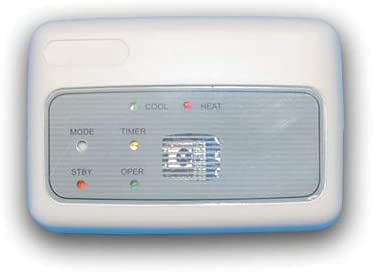
Figure 2.1: Front view of the Airwell Remote Control Receiver. This image shows the white rectangular unit with a grey central panel. The panel displays indicator lights for COOL, HEAT, MODE, TIMER, STBY (Standby), and OPER (Operation), along with an infrared sensor grille.
Indicator Lights:
- COOL: Indicates the air conditioner is operating in cooling mode.
- HEAT: Indicates the air conditioner is operating in heating mode.
- MODE: Indicates the current operating mode (e.g., Fan, Dry, Auto).
- TIMER: Indicates that a timer function is active.
- STBY (Standby): Indicates the unit is in standby mode.
- OPER (Operation): Indicates the unit is actively operating.

Figure 2.2: Another perspective of the Airwell Remote Control Receiver, highlighting the indicator lights and the infrared sensor. The unit is white with a grey control panel, showing the labels for COOL, HEAT, MODE, TIMER, STBY, and OPER.
3. Setup and Installation
Proper installation is crucial for the optimal performance of your remote control receiver. It is recommended that installation be performed by a qualified technician.
3.1. Choosing an Installation Location
- Select a location on a wall or surface that is within the line of sight of where the remote control will typically be used.
- Ensure the location is free from obstructions that could block the infrared signal.
- Avoid direct sunlight or heat sources, which can interfere with infrared reception.
- The receiver should be installed away from strong electromagnetic fields.
3.2. Mounting the Receiver
- Carefully open the receiver casing if necessary to access mounting holes.
- Mark the desired mounting points on the wall using the receiver as a template.
- Drill pilot holes if required, and insert wall anchors if mounting into drywall.
- Secure the receiver to the wall using appropriate screws. Ensure it is firmly attached.
3.3. Electrical Connection
The receiver requires an electrical connection to the indoor unit of your Airwell air conditioner. Refer to your air conditioner's service manual for specific wiring diagrams and ensure all connections are made according to local electrical codes and safety standards. Incorrect wiring can damage the unit or pose a safety hazard.
- Connect the receiver's wiring harness to the designated port on the indoor unit's PCB.
- Ensure all connections are secure and insulated.
- Once connected, close the receiver casing securely.

Figure 3.1: The Airwell Remote Control Receiver with some indicator lights active, suggesting operational status. This image shows the unit with a slightly different lighting, making the indicator lights appear to be glowing.
4. Operating Instructions
Once installed and powered, the Airwell Remote Control Receiver will be ready to receive commands from your Airwell air conditioner remote control.
4.1. Powering On/Off
- Ensure the air conditioner unit is connected to power.
- Use your Airwell remote control to turn the air conditioner ON or OFF. The receiver will relay this command to the indoor unit.
- The STBY light will illuminate when the unit is in standby, and the OPER light will illuminate when the unit is actively running.
4.2. Changing Modes and Settings
- Point your Airwell remote control towards the receiver.
- Press the desired function buttons on your remote (e.g., Mode, Temperature Up/Down, Fan Speed).
- The receiver will transmit these commands to the air conditioner.
- The COOL or HEAT indicator will light up according to the selected mode. The MODE light may also indicate specific sub-modes.
- If a timer is set on the remote, the TIMER indicator on the receiver will illuminate.
4.3. Infrared Signal Reception
The receiver operates using infrared technology. Ensure there is a clear line of sight between your remote control and the receiver for reliable communication. Obstacles such as furniture, curtains, or walls will block the signal.
5. Maintenance
Regular, simple maintenance can help ensure the longevity and optimal performance of your Airwell Remote Control Receiver.
5.1. Cleaning
- Before cleaning, ensure the air conditioner unit is powered off at the main breaker.
- Wipe the exterior of the receiver with a soft, dry, or slightly damp cloth.
- Do not use abrasive cleaners, solvents, or harsh chemicals, as these can damage the surface or internal components.
- Ensure no liquid enters the unit, especially the infrared sensor area.
5.2. General Care
- Avoid placing objects directly in front of the receiver that could block the infrared signal.
- Do not expose the receiver to extreme temperatures or high humidity.
- If the unit is not functioning correctly, do not attempt to repair it yourself. Contact a qualified technician.
6. Troubleshooting
If you experience issues with your Airwell Remote Control Receiver, refer to the following common problems and solutions before contacting service personnel.
| Problem | Possible Cause | Solution |
|---|---|---|
| Receiver not responding to remote control. |
|
|
| Indicator lights are off. |
|
|
| Air conditioner responds intermittently. |
|
|
7. Specifications
| Brand | Airwell |
| Manufacturer | ELECTRA |
| Model Number | 664328296509 |
| Compatible Devices | Air Conditioner |
| Connection Technology | Infrared |
| Item Weight | 60 g |
| Color | Black or Silver (unit shown in images is white) |
| ASIN | B07B4H1B3G |
| First Available Date | January 15, 2020 |
8. Warranty and Support
For warranty information, technical support, or service inquiries, please contact your Airwell dealer or the manufacturer directly. Keep your purchase receipt as proof of purchase for any warranty claims.
Manufacturer: ELECTRA
Please visit the official Airwell website for the most up-to-date support information and contact details.