
1. Introduction
This manual provides essential information for the safe and efficient operation of your BLACK+DECKER BXUP750PTE submersible pump. This pump is designed for pumping clear and dirty water from various sources such as flooded basements, swimming pools, ponds, and tanks. Please read these instructions carefully before use and keep them for future reference.
2. Safety Instructions
Always observe basic safety precautions to reduce the risk of fire, electric shock, and personal injury.
- Electrical Safety: Ensure the power supply matches the pump's specifications (230V). Do not operate the pump with a damaged power cord or plug. Always use a ground fault circuit interrupter (GFCI) for outdoor or wet location use.
- Water Immersion: Never operate the pump out of water. Ensure the pump is fully submerged before connecting to power.
- Personal Safety: Do not touch the pump or the water while the pump is connected to the power supply. Keep children and unauthorized persons away from the operating area.
- Maintenance: Disconnect the pump from the power supply before performing any maintenance, cleaning, or when not in use.
- Intended Use: This pump is designed for pumping water only. Do not use it for flammable, corrosive, or explosive liquids.
3. Product Overview
The BLACK+DECKER BXUP750PTE is a robust submersible pump featuring a 750W motor, capable of handling both clear and dirty water. It includes a float switch for automatic operation and a durable plastic housing.
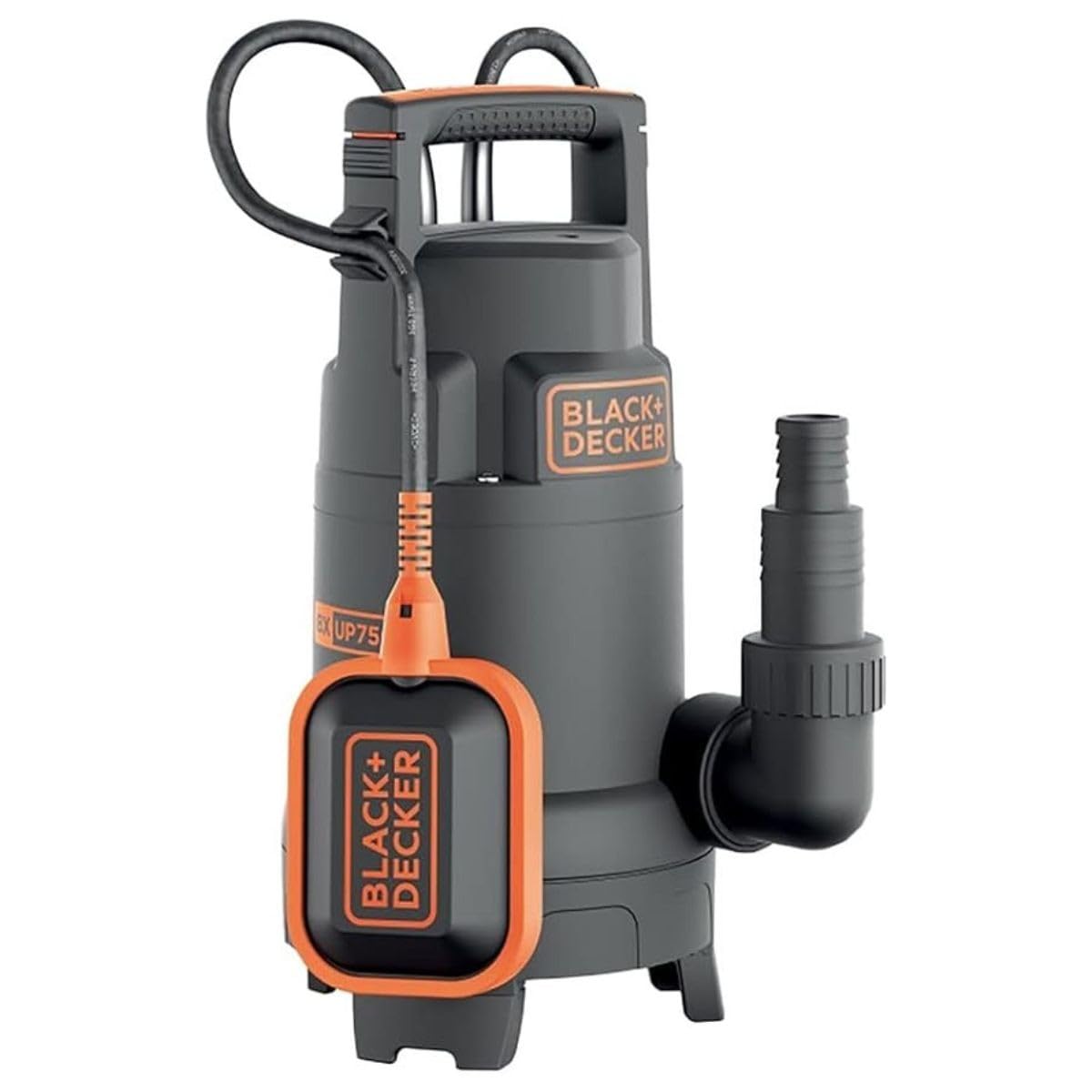
Image: The BLACK+DECKER BXUP750PTE submersible pump with its integrated float switch and handle.
Key Features:
- Submersible pump for clear and dirty water with float switch and foldable feet.
- Reliable, long-lasting motor with low consumption and high-temperature protection.
- Compact design and pump housing made of robust and resistant plastic.
- Integrated handle on the top of the pump for convenient carrying and transport.
4. Setup
Follow these steps to prepare your pump for operation.
4.1 Hose Connection
Connect a suitable discharge hose to the pump's outlet. The pump is compatible with various hose diameters. Ensure the connection is secure to prevent leaks.

Image: The hose adapter for connecting various hose sizes to the pump.
4.2 Pump Placement
Place the pump on a stable, flat surface in the water to be pumped. Ensure the pump is fully submerged and not resting on soft sediment that could block the intake.

Image: A person carefully placing the submersible pump into a pond for operation.

Image: The submersible pump operating in a pond, effectively moving water.
4.3 Float Switch Adjustment
The float switch controls the automatic on/off function of the pump. Adjust the cable length of the float switch to set the desired water levels for starting and stopping the pump. Ensure the float switch can move freely without obstruction.

Image: The pump positioned in a flooded garage, ready to remove excess water.

Image: The pump placed in a swimming pool, demonstrating its use for drainage.

Image: The pump operating within a stone basin, indicating its versatility for various water collection points.

Image: The pump in a flooded laundry room, illustrating its application for emergency water removal.
5. Operating Instructions
Once the pump is set up, operating it is straightforward.
5.1 Starting the Pump
After ensuring the pump is fully submerged and the hose is correctly attached, plug the pump into a suitable power outlet. The pump will start automatically once the water level rises and lifts the float switch to its 'on' position.
5.2 Stopping the Pump
The pump will automatically stop when the water level drops and the float switch falls to its 'off' position. To manually stop the pump, unplug it from the power outlet.
5.3 Continuous Operation
For continuous operation, ensure the float switch is secured in an upright position (always 'on'), but monitor the water level to prevent dry running, which can damage the pump. This pump is designed to handle dirty water with particles up to 30 mm in diameter.
6. Maintenance
Regular maintenance ensures the longevity and optimal performance of your pump.
6.1 Cleaning
After each use, especially when pumping dirty water, rinse the pump with clean water to remove any debris. Check the intake area for blockages and clear them carefully. Disconnect from power before cleaning.
6.2 Inspection
Periodically inspect the power cord, plug, and pump housing for any signs of damage. If any damage is found, do not use the pump and contact customer support for assistance.
6.3 Winter Storage
Before storing the pump for extended periods, especially during winter, ensure it is thoroughly cleaned and completely dry. Store it in a frost-free environment.
7. Troubleshooting
If you encounter issues with your pump, refer to the following common problems and solutions.
| Problem | Possible Cause | Solution |
|---|---|---|
| Pump does not start | No power supply; Float switch not activated; Impeller blocked. | Check power connection and GFCI; Adjust float switch position; Disconnect power and clear blockages. |
| Low flow rate | Hose kinked or too small; Intake blocked; Pump partially submerged. | Check hose for kinks or obstructions; Clean intake; Ensure pump is fully submerged. |
| Pump runs continuously | Float switch stuck in 'on' position; Water level not dropping below 'off' threshold. | Check float switch for obstructions; Ensure sufficient space for float switch movement. |
| Pump makes unusual noise | Debris in impeller; Dry running. | Disconnect power and clear debris from impeller; Ensure pump is always submerged during operation. |
8. Specifications
Detailed technical specifications for the BLACK+DECKER BXUP750PTE submersible pump.

Image: Technical drawing showing the dimensions of the BLACK+DECKER BXUP750PTE pump.
| Specification | Value |
|---|---|
| Model Number | BXUP750PTE |
| Power Consumption | 750 W |
| Max. Flow Rate | 13,000 Liters per Hour |
| Max. Head Height | 8 Meters |
| Operating Pressure | 0.8 Bar |
| Max. Water Temperature | 35 °C |
| Max. Immersion Depth | 7 Meters |
| Residual Water Level | 5/32 mm |
| Max. Particle Size | 30 mm |
| Cable Length | 10 Meters |
| Voltage | 230 Volts |
| Product Dimensions (L x W x H) | 16.7L x 16W x 35.7H cm |
| Item Weight | 5.24 Kilograms |
| Material | Plastic |
| Color | Black |
9. Warranty and Support
BLACK+DECKER products are manufactured to high-quality standards and are guaranteed against manufacturing defects. For warranty claims, technical support, or spare parts, please contact your local BLACK+DECKER service center or visit the official BLACK+DECKER website. Please have your model number (BXUP750PTE) and purchase information ready when contacting support.


