
Fitbit FB504GMBK
Fitbit Versa Smart Watch User Manual
Model: FB504GMBK
1. Introduction
This manual provides essential information for setting up, operating, and maintaining your Fitbit Versa Smart Watch. The Fitbit Versa is designed to help you track your health and fitness activities, monitor sleep, and receive notifications.
What's in the Box
- Fitbit Versa Smart Watch
- Small and Large Bands
- Charging Cable
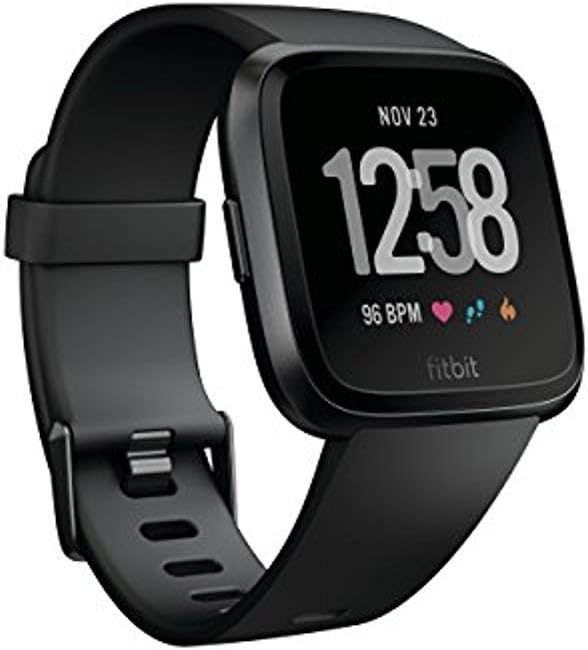
Image 1.1: The Fitbit Versa Smart Watch, featuring a black band and a digital display showing the time, date, and heart rate.
2. Setup and Pairing
To begin using your Fitbit Versa, you must first set it up with the Fitbit app on your smartphone or tablet.
2.1 Initial Setup
- Charge Your Device: Connect the charging cable to your Versa and a USB power source. Ensure the watch is fully charged before proceeding.
- Download the Fitbit App: Download and install the Fitbit app from your device's app store (Apple App Store for iOS, Google Play Store for Android).
- Create or Log In to Your Account: Open the Fitbit app and follow the on-screen instructions to create a new account or log in to an existing one.
- Pair Your Versa: In the Fitbit app, tap the Account icon (👤) > Set Up a Device. Select Versa and follow the instructions to pair your watch with your mobile device via Bluetooth.
2.2 Band Attachment
The Fitbit Versa comes with both small and large bands. To attach or change bands:
- Slide the pin into the small hole on the watch casing.
- Press the lever and slide the band into place.
- Release the lever and gently pull the band to ensure it's securely attached.
3. Operating Your Fitbit Versa
The Fitbit Versa offers a range of features to support your health and fitness journey.
3.1 Activity and Sleep Tracking
Your Versa automatically tracks your daily activity, including steps taken, distance covered, calories burned, and active minutes. It also monitors your sleep stages (light, deep, REM) to provide insights into your sleep quality.

Image 3.1: The Fitbit Versa screen highlighting its capabilities for activity and sleep tracking, on-screen workouts, and storing over 300 songs.
3.2 Heart Rate Monitoring
The Versa features 24/7 continuous heart rate tracking, allowing you to monitor your heart rate during workouts and throughout the day. This helps in optimizing exercise intensity and understanding overall cardiovascular health.

Image 3.2: The underside of the Fitbit Versa, illustrating its PurePulse heart rate sensors and indicating its swimproof design.
3.3 Exercise Modes and GPS
Utilize over 15 exercise modes such as running, swimming, and cycling to record your workouts. Connect to your smartphone's GPS for real-time pace and distance tracking during outdoor activities. The Versa is water resistant up to 50 meters, making it suitable for swimming.

Image 3.3: A man running outdoors, wearing the Fitbit Versa on his wrist, demonstrating its use during exercise.
3.4 On-Screen Workouts
Access on-screen workouts directly from your wrist. These guided workouts coach you through each move, providing a convenient way to exercise without needing a separate screen.

Image 3.4: A woman engaged in a cycling workout, glancing at her Fitbit Versa for real-time data.
3.5 Notifications and Apps
Receive call, text, calendar, and smartphone app notifications directly on your Versa when your phone is nearby. You can also access various apps for sports, weather, and more. Android users can send quick replies to messages.

Image 3.5: A side view of the Fitbit Versa, emphasizing its capabilities for apps, notifications, and its extended battery life of over 4 days.
3.6 Music Storage and Playback
Store and play over 300 songs directly from your Versa. This allows you to listen to music during workouts or on the go without needing your phone.
3.7 Female Health Tracking
Use the Fitbit app to log periods, record symptoms, and track your ovulation window, providing a comprehensive overview of your menstrual cycle.
3.8 Fitbit Pay (Special Edition Only)
If you have the Versa Special Edition, you can make secure payments directly from your wrist using Fitbit Pay. Set up your credit or debit cards in the Fitbit app.
4. Maintenance and Care
Proper care ensures the longevity and optimal performance of your Fitbit Versa.
4.1 Cleaning Your Device
- Regularly clean your Versa's band and casing with a soft, damp cloth.
- Avoid using harsh chemicals or abrasive cleaners.
- Ensure the charging contacts on the back of the watch are clean and dry.
4.2 Water Resistance
The Fitbit Versa is water resistant up to 50 meters. It is suitable for swimming and showering. However, it is not recommended to wear the Versa in a hot tub or sauna, as extreme temperatures can damage the device.
4.3 Battery Life
The Versa offers a battery life of 4+ days, which can vary with use and other factors. Charge time from 0% to 100% is approximately two hours. For optimal battery performance, avoid fully draining the battery frequently.
5. Troubleshooting
If you encounter issues with your Fitbit Versa, try the following solutions.
5.1 Syncing Issues
- Ensure Bluetooth is enabled on your mobile device.
- Verify your Versa is within syncing range (up to 30 feet) of your mobile device.
- Restart your Versa and your mobile device.
- Check for updates to the Fitbit app and your Versa's firmware.
5.2 Display Not Responding
- Restart your Versa by holding down the left and bottom right buttons until you see the Fitbit logo.
- Ensure the screen is clean and dry.
5.3 Inaccurate Heart Rate Readings
- Ensure the Versa is worn snugly on your wrist, about a finger's width above your wrist bone.
- Clean the heart rate sensors on the back of the device.
6. Specifications
| Feature | Detail |
|---|---|
| Model Name | Fitbit Versa |
| Model Number | FB504GMBK |
| Dimensions | 1.98 x 3.98 x 9 inches |
| Item Weight | 5.1 ounces (0.32 Pounds) |
| Display Size | 3 Inches |
| Operating System | Android (Compatible with iOS and Windows phones) |
| Connectivity | Bluetooth 4.0, NFC |
| Water Resistance | Up to 50 meters |
| Battery Type | 1 Lithium Metal battery (included) |
| Battery Life | 4+ days (varies with use) |
| Sensors | 3-axis accelerometer, Optical heart rate monitor, Altimeter, Ambient light sensor, Vibration motor, Relative SpO2 sensor |
| Special Features | Calendaring, GPS (connected), Heart Rate Monitor, Notifications, Time Display |
7. Warranty and Support
For warranty information and customer support, please refer to the official Fitbit website or contact Fitbit customer service directly. Details regarding product registration and troubleshooting guides are available online.
Online Support: Visit the Fitbit Support Website for FAQs, troubleshooting, and contact options.
Related documentsFB504GMBK


Ask a question about this manual
Ask about setup, troubleshooting, compatibility, parts, safety, or missing instructions. Manuals+ will review the question and use this page’s manual context to help answer it.