
Introduction
This manual provides detailed instructions for the safe installation, operation, and maintenance of your Harbor Breeze Armitage 52-inch Brushed Nickel Indoor Flush Mount Ceiling Fan. Please read all instructions carefully before beginning installation and retain this manual for future reference. This ceiling fan is designed for indoor use and features a brushed nickel finish with reversible blades (toffee/cocoa) and an integrated LED light kit.
Safety Information
WARNING: To reduce the risk of fire, electric shock, or personal injury, always turn off power at the main circuit breaker or fuse box before installation or maintenance.
- Ensure all electrical connections comply with local codes, ordinances, and the National Electrical Code.
- Consult a qualified electrician if you are unfamiliar with electrical wiring.
- The mounting structure must be capable of supporting the fan's weight (approximately 15.12 lbs).
- Do not bend blade brackets during installation or cleaning.
- Keep hands clear of rotating fan blades.
- This fan is for indoor use only.
Package Contents
Verify that all components are present before beginning installation:
- Motor Housing Assembly
- Fan Blades (5)
- Blade Brackets (5)
- Light Kit Assembly with Alabaster Glass Shade
- 6.5-watt LED Bulb (1)
- Mounting Bracket
- Hardware Pack (screws, washers, wire nuts)
- Pull Chains with Decorative Fobs
Setup and Installation
Follow these steps for proper installation of your ceiling fan. It is recommended to have two people for installation.
Step 1: Prepare for Installation
- Turn off power at the circuit breaker.
- Clear the work area and ensure you have all necessary tools.
Step 2: Mount the Bracket
- Secure the mounting bracket to the ceiling outlet box. Ensure the outlet box is securely fastened to the building structure.
Step 3: Wiring Connections
- Connect the fan's electrical wires to the household wiring according to the wiring diagram in the full instruction manual. Use the provided wire nuts.
- Carefully tuck all wires into the outlet box.
Step 4: Attach Motor Assembly
- Align the motor housing with the mounting bracket and secure it with the provided screws.
Step 5: Install Fan Blades
- Attach each fan blade to a blade bracket using the blade screws.
- Attach the blade assemblies to the motor housing. Note that the blades are reversible, offering a toffee or cocoa finish.

Step 6: Install Light Kit
- Connect the light kit wires to the fan motor wires.
- Secure the light kit assembly to the bottom of the fan motor housing.
- Install the included 6.5-watt LED bulb and attach the alabaster glass shade.
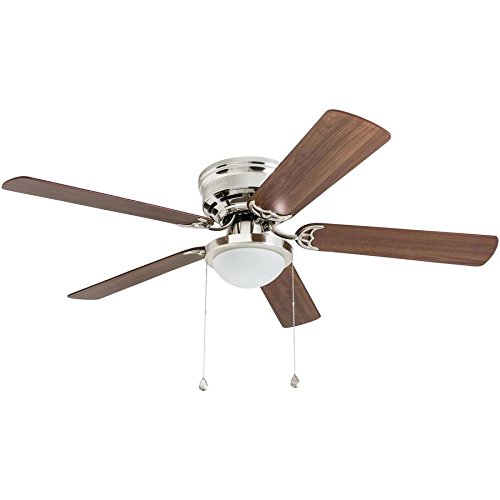
Installation Overview Video
This video provides a brief overview of the Harbor Breeze Armitage Ceiling Fan, demonstrating its appearance and functionality after installation.
Operating Instructions
Your Harbor Breeze Armitage ceiling fan is operated using two pull chains located on the light kit housing.
- Fan Speed Control: One pull chain controls the fan speed. Pull the chain repeatedly to cycle through high, medium, low, and off settings.
- Light Control: The other pull chain controls the light. Pull the chain to turn the light on or off.
- Reversible Motor: A small switch on the motor housing allows you to reverse the direction of the fan blades. This feature is useful for seasonal comfort: downward airflow for cooling in summer and upward airflow for circulating warm air in winter.
Fan Operation Demonstration Video
This video demonstrates the operation of the fan, including turning the light on/off and adjusting fan speeds using the pull chains, and highlights the reversible blade feature.
Maintenance
Regular maintenance ensures optimal performance and longevity of your ceiling fan.
- Cleaning: Clean the fan housing and blades with a soft, damp cloth. Do not use abrasive cleaners or solvents.
- Blade Inspection: Periodically check that all blade screws are tight. Over time, they may loosen, causing the fan to wobble.
- Light Bulb Replacement: Ensure power is off before replacing the LED bulb. Use only the specified bulb type (E26 Medium base, 6.5-watt LED).
- No Lubrication Needed: The motor is permanently lubricated and does not require oiling.
Troubleshooting
If you experience issues with your fan, refer to the table below for common problems and solutions.
| Problem | Possible Cause | Solution |
|---|---|---|
| Fan will not start | No power to the fan; loose wire connections; incorrect wiring. | Check circuit breaker/fuses; ensure all connections are secure; verify wiring against manual. |
| Fan makes noise | Loose motor housing screws; loose blade screws; fan not properly balanced. | Tighten all screws; ensure blades are securely attached; use a balancing kit if necessary. |
| Fan wobbles | Loose blade screws; unbalanced blades; mounting bracket not secure. | Tighten blade screws; check blade balance; ensure mounting bracket is firmly attached to the ceiling. |
| Light will not turn on | Loose wire connections in light kit; faulty bulb; light kit switch is off. | Check light kit wiring; replace bulb; ensure light pull chain is in the 'on' position. |
Specifications
| Feature | Detail |
|---|---|
| Brand | Harbor Breeze |
| Model Number | 41391 |
| Color | Brushed Nickel (housing), Toffee/Cocoa (reversible blades) |
| Material | Glass (shade) |
| Style | Modern |
| Light Fixture Form | Close to Ceiling (Flush Mount) |
| Product Dimensions | 10"L x 22"W x 15"H |
| Indoor/Outdoor Usage | Indoor |
| Power Source | Corded Electric |
| Control Method | Pull Chain |
| Light Source Type | LED |
| Wattage | 6.5 watts (LED bulb) |
| Bulb Base | E26 Medium |
| Light Output Maximum | 600 Lumens |
| Air Flow Capacity | 2263 Cubic Feet Per Minute |
| Item Weight | 15.12 pounds |
| Voltage | 120 Volts (AC) |
Warranty and Support
For warranty information or technical support, please refer to the documentation included with your product packaging or visit the official Harbor Breeze website. Keep your proof of purchase for any warranty claims.


