
1. Introduction
Thank you for purchasing the EMB TOWER10BT PK1 Portable PA Speaker System. This manual provides essential information for the safe and efficient operation of your new audio equipment. Please read this manual thoroughly before use and retain it for future reference.
The EMB TOWER10BT PK1 is a portable, all-in-one linear array PA speaker system designed for various applications. It features Bluetooth connectivity, a powerful 1500-watt amplifier, dual 10-inch subwoofers, and eight 3-inch neodymium full-range speakers. The system supports wireless linking between two speakers, includes a built-in DSP processor, USB charging, AUX line input, microphone input, instrument input, and comes with a remote control. It is suitable for home use, parties, meetings, karaoke, camping, jobsites, and construction environments.
2. Important Safety Instructions
- Read these instructions carefully.
- Keep these instructions for future reference.
- Heed all warnings.
- Follow all instructions.
- Do not use this apparatus near water.
- Clean only with a dry cloth.
- Do not block any ventilation openings. Install in accordance with the manufacturer's instructions.
- Do not install near any heat sources such as radiators, heat registers, stoves, or other apparatus (including amplifiers) that produce heat.
- Do not defeat the safety purpose of the polarized or grounding-type plug. A polarized plug has two blades with one wider than the other. A grounding-type plug has two blades and a third grounding prong. The wide blade or the third prong are provided for your safety. If the provided plug does not fit into your outlet, consult an electrician for replacement of the obsolete outlet.
- Protect the power cord from being walked on or pinched, particularly at plugs, convenience receptacles, and the point where they exit from the apparatus.
- Only use attachments/accessories specified by the manufacturer.
- Use only with the cart, stand, tripod, bracket, or table specified by the manufacturer, or sold with the apparatus. When a cart is used, use caution when moving the cart/apparatus combination to avoid injury from tip-over.
- Unplug this apparatus during lightning storms or when unused for long periods of time.
- Refer all servicing to qualified service personnel. Servicing is required when the apparatus has been damaged in any way, such as power-supply cord or plug is damaged, liquid has been spilled or objects have fallen into the apparatus, the apparatus has been exposed to rain or moisture, does not operate normally, or has been dropped.
3. Package Contents
Carefully unpack your EMB TOWER10BT PK1 system and ensure all items are present and in good condition. If any items are missing or damaged, contact your retailer immediately.
- 1x EMB TOWER10BT PK1 Subwoofer Unit
- 1x Linear Array Speaker Column (multiple sections)
- 2x Speaker Pole Extensions
- 1x Power Cable
- 1x Remote Control
- User Manual (this document)

Figure 3.1: All components of the EMB TOWER10BT PK1 system, including the subwoofer, linear array speaker column, pole extensions, and remote control.
4. Product Overview
Familiarize yourself with the main components and controls of your EMB TOWER10BT PK1 speaker system.
4.1. Subwoofer Unit
The main subwoofer unit houses the amplifier, control panel, and input/output connections.

Figure 4.1: The main subwoofer unit of the EMB TOWER10BT PK1 system.
4.2. Linear Array Speaker Column
The linear array speaker column consists of multiple sections that connect to form a single tower, providing wide sound dispersion.
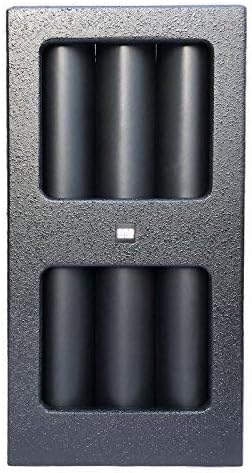
Figure 4.2: A section of the linear array speaker column.
4.3. Control Panel
The control panel on the subwoofer unit allows you to manage inputs, volume, and other settings.

Figure 4.3: Detailed view of the control panel with various knobs and ports.
Key controls and ports include:
- Master Volume: Adjusts the overall output level.
- Input Volume Controls: Individual volume adjustments for Mic, Instrument, and AUX inputs.
- Bluetooth Pairing Button: Initiates Bluetooth pairing mode.
- Stereo Link Button: For wirelessly linking two TOWER10BT PK1 speakers.
- USB Charging Port: For charging external USB devices.
- AUX Line Input: 3.5mm or RCA input for external audio sources.
- Mic Input: XLR or 1/4" input for microphones.
- Instrument Input: 1/4" input for instruments.
- DSP Processor: Built-in digital signal processing for sound optimization.
5. Setup
Follow these steps to assemble and prepare your EMB TOWER10BT PK1 speaker system for use.
5.1. Assembling the Speaker System
- Place the subwoofer unit on a stable, flat surface.
- Insert the speaker pole extensions into the designated sockets on top of the subwoofer unit.
- Carefully stack the linear array speaker column sections onto the pole extensions, ensuring they are securely connected.

Figure 5.1: Individual components of the speaker column ready for assembly onto the subwoofer unit.
5.2. Power Connection
- Ensure the speaker's power switch is in the OFF position.
- Connect the provided power cable to the power inlet on the subwoofer unit.
- Plug the other end of the power cable into a suitable AC power outlet.
6. Operating Instructions
6.1. Powering On/Off
- To power on, flip the power switch on the subwoofer unit to the ON position. The power indicator light will illuminate.
- To power off, flip the power switch to the OFF position.
6.2. Bluetooth Pairing
- Ensure the speaker is powered on.
- Press the Bluetooth pairing button on the control panel. The Bluetooth indicator light will flash, indicating it is in pairing mode.
- On your Bluetooth-enabled device (smartphone, tablet, laptop), go to the Bluetooth settings and search for available devices.
- Select "EMB TOWER10BT PK1" from the list.
- Once connected, the Bluetooth indicator light on the speaker will become solid, and you will hear a confirmation tone.
- You can now play audio from your device through the speaker. The effective range for Bluetooth connectivity is up to 150 feet (approximately 45 meters).
6.3. Wireless Speaker Linking (Stereo Link)
The TOWER10BT PK1 supports wireless linking between two speakers for a stereo sound experience without cables between them.
- Ensure both TOWER10BT PK1 speakers are powered on and not currently connected to any Bluetooth device.
- On the first speaker (this will be your 'Master' speaker), press and hold the 'Stereo Link' button until the indicator light flashes.
- On the second speaker (this will be your 'Slave' speaker), press and hold the 'Stereo Link' button until its indicator light also flashes.
- The speakers will automatically search and connect to each other. Once linked, the indicator lights on both speakers will become solid.
- Now, connect your Bluetooth device to the 'Master' speaker as described in Section 6.2. Audio will play in stereo across both linked speakers.
6.4. Using Inputs (AUX, Mic, Instrument)
- AUX Line Input: Connect an external audio source (e.g., CD player, mixer) to the AUX input using a compatible cable. Adjust the 'AUX' volume knob on the control panel.
- Mic Input: Connect a microphone to the 'Mic' input (XLR or 1/4" jack). Adjust the 'Mic' volume knob.
- Instrument Input: Connect an instrument (e.g., guitar, keyboard) to the 'Instrument' input (1/4" jack). Adjust the 'Instrument' volume knob.
6.5. USB Charging
The USB port on the control panel can be used to charge compatible USB devices. Simply connect your device's USB charging cable to the speaker's USB port.
6.6. Remote Control
The included remote control allows for convenient adjustment of basic functions such as volume, play/pause, and track selection (for Bluetooth sources) from a distance. Point the remote control towards the front of the subwoofer unit for optimal response.
7. Maintenance
7.1. Cleaning
- Always disconnect the power cable before cleaning.
- Use a soft, dry cloth to wipe down the exterior surfaces of the speaker.
- Do not use abrasive cleaners, waxes, or solvents as they may damage the finish.
- Avoid getting moisture into any openings or ports.
7.2. Storage
- When not in use for extended periods, store the speaker in a cool, dry place, away from direct sunlight and extreme temperatures.
- It is recommended to disassemble the speaker column and store components in their original packaging or protective covers to prevent damage.
8. Troubleshooting
If you encounter issues with your EMB TOWER10BT PK1, refer to the following common problems and solutions:
| Problem | Possible Cause | Solution |
|---|---|---|
| No power | Power cable not connected; Power outlet not active; Power switch off | Ensure power cable is securely connected; Check power outlet with another device; Flip power switch to ON. |
| No sound output | Volume too low; Incorrect input selected; Source device not playing; Cables loose | Increase Master Volume and individual input volumes; Ensure correct input is active; Check source device playback; Secure all audio cables. |
| Bluetooth not connecting | Speaker not in pairing mode; Device too far; Incorrect device selected; Previous connection active | Press Bluetooth pairing button; Move device closer to speaker; Select 'EMB TOWER10BT PK1' from device list; Disconnect from other Bluetooth devices. |
| Wireless Stereo Link not working | Speakers not in linking mode; Bluetooth device connected to one speaker already | Ensure both speakers are in Stereo Link pairing mode; Disconnect any Bluetooth devices from both speakers before linking. |
| Distorted sound | Volume too high (clipping); Source audio quality poor; Loose connections | Reduce Master Volume and/or input volumes; Check source audio; Secure all connections. |
9. Specifications
Below are the technical specifications for the EMB TOWER10BT PK1 Portable PA Speaker System:
| Feature | Detail |
|---|---|
| Model Name | PK1 |
| Item Model Number | TOWER10BT |
| Speaker Type | Subwoofer, Linear Array |
| Special Feature | Portable |
| Recommended Uses | Home, DJ, Construction, Karaoke, Meeting, Camping |
| Compatible Devices | Laptop, Smartphone, Tablet, Television |
| Subwoofer Diameter | 10 Inches (x2) |
| Full Range Speaker Size | 3 Inches (x8 Neodymium) |
| Surround Sound Channel Configuration | 2.0 |
| Included Components | Remote |
| Item Weight | 49 Pounds |
| Is Waterproof | FALSE (Not Water Resistant) |
| Maximum Range (Bluetooth) | 150 Feet (approx. 45 meters) |
| Control Method | Remote |
| Wireless Communication Technology | Bluetooth |
| Power Source | Corded Electric |
| Audio Driver Type | Dynamic Driver |
| Connectivity Technology | Wireless, Bluetooth, XLR, 1/4" Jack, AUX |
| Speaker Amplification Type | Active |
| Wattage (Max Output) | 1500 Watts |
| Audio Output Mode | Stereo |
| Mounting Type | Floor Standing |
| Product Dimensions | 16 x 19 x 37 inches |
10. Warranty Information
The EMB TOWER10BT PK1 Portable PA Speaker System comes with a Limited Warranty. For specific details regarding warranty coverage, duration, and terms, please refer to the warranty card included with your product or contact EMB customer support directly.
11. Customer Support
If you have any questions, require technical assistance, or need to report an issue that is not covered in this manual, please contact EMB customer support. Contact information can typically be found on the manufacturer's website or on the product packaging.