
1. Product Overview
The System Sensor P2RL is a 2-wire wall horn strobe designed for fire alarm systems. It features a red housing and is marked 'FIRE'. This device combines an audible horn with a visual strobe to alert occupants in case of an emergency. Its plug-in design simplifies installation and maintenance.
Key Features:
- Plug-in design with minimal intrusion into the back box.
- Tamper-resistant construction for enhanced security.
- Automatic selection of 12- or 24-volt operation at 15 and 30 candela.
- Field-selectable candela settings on wall units: 15, 30, 75, 95, 110, 135, and 185.
- Horn rated at 88+ dBA at 16 volts.
- Rotary switch for horn tone and two volume selections.
- Mounting plate for all standard and compact wall units.
- Mounting plate shorting spring checks wiring continuity before device installation.
- Electrically compatible with legacy SpectrAlert and SpectrAlert Advance devices.
- Compatible with MDL3 sync module.
2. Installation and Setup
Proper installation is crucial for the reliable operation of your System Sensor P2RL Horn Strobe. Always ensure power is disconnected before beginning any installation or wiring procedures. Consult local electrical codes and fire safety regulations.
2.1 Mounting the Device
The P2RL features a mounting plate designed for easy installation. The device is intended for wall-mount applications.
- Secure the mounting plate to the wall using appropriate fasteners. Ensure the plate is level and firmly attached.
- The mounting plate includes a shorting spring that allows for wiring continuity checks before the device is fully installed.
- Once wiring is complete, align the horn strobe unit with the mounting plate and push it into place until it clicks securely.
2.2 Wiring Instructions
The P2RL operates on DC 12V or 24V. Connect the power supply to the designated terminals on the back of the unit. Observe polarity: connect the positive (+) wire to the positive terminal and the negative (-) wire to the negative terminal.
The device is compatible with 12 to 18 AWG input terminal wire gauges.
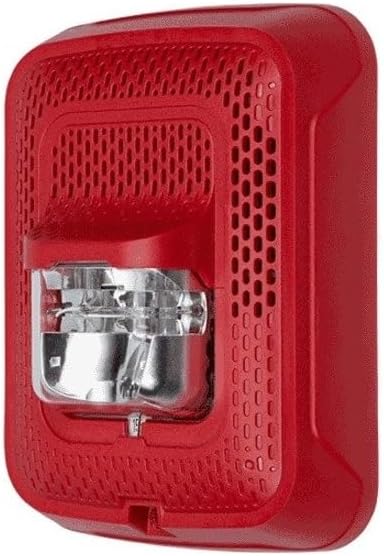
Figure 2.1: Back view of the P2RL Horn Strobe, highlighting the wiring terminals and the specifications label. The label provides details on working voltage, current, and tone settings.
For a visual guide on wiring and testing a similar fire alarm system, refer to the video below:
Video 2.1: Demonstration of connecting and testing a fire alarm pull station with a horn strobe. This video illustrates the wiring process and the activation of the alarm, providing a practical example for setup.
3. Operating Instructions
The System Sensor P2RL Horn Strobe is designed for automatic operation upon activation by a fire alarm control panel. However, certain settings can be configured during installation.
3.1 Candela Settings
The strobe light intensity (candela) can be field-selected to meet specific requirements. Available settings include 15, 30, 75, 95, 110, 135, and 185 candela. Refer to the device's internal markings or the specifications label for instructions on adjusting this setting, typically via a switch or jumper.
3.2 Horn Tone and Volume Selection
The horn features a rotary switch for selecting different tones and two volume levels. Consult the device's internal diagrams or the specifications label to identify the rotary switch and its corresponding tone/volume options.

Figure 3.1: Front view of the P2RL Horn Strobe. The speaker grille is visible at the top, and the clear strobe lens is located below it, indicating the visual alert component.
To hear examples of different alarm tones, watch the video below:
Video 3.1: This video demonstrates various alarm siren tones, including a 3-tone sound. It provides an audible reference for the different horn outputs available from a fire alarm siren.
4. Maintenance
Regular maintenance ensures the longevity and proper functioning of your horn strobe unit.
- Cleaning: Periodically clean the exterior of the device with a soft, dry cloth. Do not use abrasive cleaners or solvents. Ensure the strobe lens is clear of dust or obstructions.
- Inspection: Regularly inspect the device for any visible damage, loose connections, or signs of tampering.
- Testing: Follow your local fire safety regulations and system manufacturer guidelines for routine testing of fire alarm devices.
5. Troubleshooting
If your System Sensor P2RL Horn Strobe is not functioning as expected, consider the following common issues:
- No Power/No Activation:
- Verify that the power supply (12V or 24V DC) is correctly connected and active.
- Check all wiring connections for proper polarity and secure terminals. Loose or incorrect wiring is a common cause of malfunction.
- Ensure the fire alarm control panel is functioning correctly and sending an activation signal.
- Strobe Not Flashing/Horn Not Sounding:
- Confirm the device is receiving adequate power.
- Inspect the strobe lens for any physical damage or obstructions.
- If the horn is silent, check the rotary switch settings for tone and volume.
- Ensure the device is compatible with your fire alarm control panel and sync module (e.g., MDL3).
- Intermittent Operation:
- Check for loose wiring connections or intermittent power supply.
- Ensure the operating voltage is stable and within the specified range (8 to 17.5 V for 12V nominal, or 16 to 33 V for 24V nominal).
If troubleshooting steps do not resolve the issue, contact a qualified fire alarm technician or System Sensor customer support.
6. Technical Specifications
| Feature | Specification |
|---|---|
| Model Number | SPSRL |
| Working Voltage | Regulated 12 DC or regulated 24 DC/FWR |
| Operating Voltage Range | 8 to 17.5 V (12 V nominal) or 16 to 33 V (24 V nominal) |
| Working Current | 75mA / 150mA (depending on voltage) |
| Horn Output (SPL) | 88+ dBA at 16 volts |
| Strobe Flash Rate | 1 flash per second |
| Candela Settings | 15, 30, 75, 95, 110, 135, 185 (field-selectable) |
| Operating Temperature | 32°F to 120°F (0°C to 49°C) |
| Humidity Range | 10 to 93% non-condensing |
| Input Terminal Wire Gauge | 12 to 18 AWG |
| Mounting Type | Wall Mount |
| Color | Red |
| Product Dimensions | 5.6"L x 4.7"W x 1.91"D (Wall-Mount) / 6.7"L x 5.5"W x 3.4"H |
| Item Weight | 0.01 ounces |
| Manufacturer | SYSTEM SENSOR |
| UPC | 783863047732, 783863048326 |
7. Warranty and Support
For warranty information, technical support, or service inquiries, please contact System Sensor customer service or refer to the official System Sensor website. Keep your purchase receipt for warranty claims.


