
1. Introduction
This manual provides essential instructions for the installation, operation, and maintenance of your LiftMaster 8365W-267 Premium Chain Drive Wi-Fi Garage Door Opener. Please read all instructions carefully before beginning installation or operation. Retain this manual for future reference.
1.1. Safety Information
Always observe safety precautions to prevent injury or property damage. Garage door openers involve electrical components and moving parts. Professional installation is recommended. Ensure the garage door is balanced and in good working order before installing the opener.
2. Package Contents
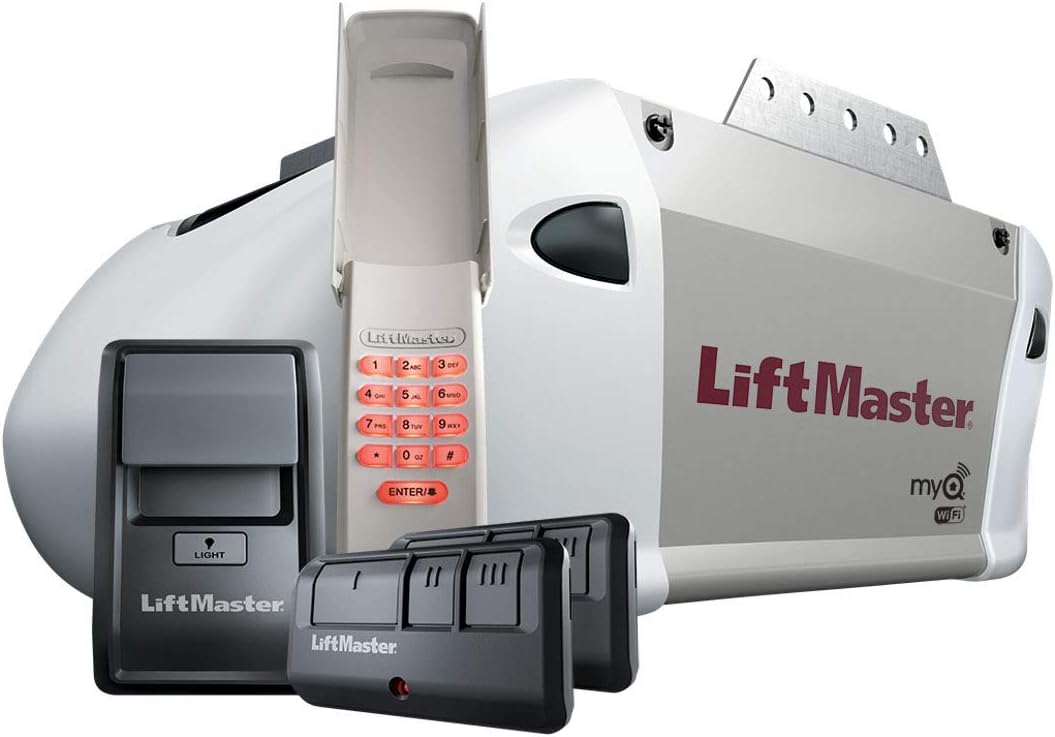
Verify that all components are present before beginning installation. The LiftMaster 8365W-267 unit typically includes the following:
- Garage Door Opener Head (Motor Unit)
- Wireless Keypad
- Two (2) Remote Controls
- Wall Control Panel
- Safety Reversing Sensors (Photo-Eyes)
- Mounting Hardware
Note: The rail assembly for the chain drive is NOT included with this model and must be purchased separately or reused from a compatible existing installation.
3. Installation
Installation of a garage door opener requires mechanical and electrical skills. If you are not comfortable with these tasks, it is recommended to seek professional assistance.
3.1. Pre-Installation Checks
- Ensure the garage door is properly balanced. It should stay open at any point of travel when disconnected from the opener.
- Verify that the garage door track is clear of obstructions and the rollers move freely.
- Confirm that a suitable power outlet is available near the ceiling where the opener will be mounted.
3.2. Mounting the Opener Head
The opener head is designed for screw-in installation. Securely attach the opener head to the ceiling support structure using appropriate hardware. Ensure the unit is level and centered with the garage door.

3.3. Connecting the Rail and Chain
Attach the chain drive rail (not included) to the opener head and the header bracket above the garage door. Ensure the chain is properly tensioned according to the rail manufacturer's instructions.
3.4. Wiring Safety Sensors and Wall Control
Install the safety reversing sensors (photo-eyes) approximately 6 inches (15 cm) above the garage floor on either side of the door opening. Connect the wall control panel to the opener head. Follow the wiring diagrams provided in the rail assembly manual for correct connections.
4. Setup
4.1. Setting Travel Limits
After installation, the opener's travel limits (how far the door opens and closes) must be set. Refer to the detailed instructions in the rail assembly manual for your specific rail type. This typically involves pressing and holding program buttons while the door moves to the desired open and close positions.
4.2. Programming Remote Controls and Keypad
To program the included remote controls and wireless keypad:
- Locate the 'Learn' button on the opener head.
- Press and release the 'Learn' button. The LED indicator will light up.
- Within 30 seconds, press and hold the button on your remote control or enter your desired PIN on the keypad and press the 'Enter' button.
- Release the button when the opener lights flash or two clicks are heard, indicating successful programming.
4.3. Wi-Fi Setup (myQ Connectivity)
The LiftMaster 8365W-267 features integrated Wi-Fi for myQ connectivity, allowing you to control and monitor your garage door from your smartphone.
- Download the myQ app from your device's app store.
- Create a myQ account or log in if you already have one.
- Follow the in-app instructions to connect your garage door opener to your home Wi-Fi network. This typically involves locating the Wi-Fi learn button on the opener and following prompts in the app.

5. Operating Instructions
5.1. Using Remote Controls
Press the programmed button on your remote control to open or close the garage door. Pressing it again while the door is in motion will stop the door.
5.2. Using the Wall Control Panel
Press the large button on the wall control panel to open or close the garage door. The wall control may also feature a light button to control the opener's light independently.
5.3. Using the Wireless Keypad
Enter your programmed PIN on the wireless keypad, then press the 'Enter' button to operate the garage door.
5.4. Using the myQ App
Once connected to myQ, use the app on your smartphone to open, close, and monitor the status of your garage door from anywhere with an internet connection.
6. Maintenance
Regular maintenance ensures optimal performance and longevity of your garage door opener.
- Monthly: Test the safety reversing sensors. The door should reverse if the beam is interrupted.
- Monthly: Test the safety reverse system. The door should reverse if it encounters an obstruction while closing.
- Annually: Lubricate the garage door's moving parts (rollers, hinges, bearings) with a garage door lubricant.
- Annually: Inspect the chain for proper tension and lubricate if necessary with a non-grease lubricant.
- Periodically: Clean the lenses of the safety reversing sensors to ensure an unobstructed beam.
7. Troubleshooting
Refer to the following table for common issues and their solutions.
| Problem | Possible Cause | Solution |
|---|---|---|
| Opener does not operate from remote or wall control. | No power; remote battery dead; remote not programmed. | Check power supply; replace remote battery; reprogram remote. |
| Door closes partially then reverses. | Safety sensors obstructed or misaligned. | Clear obstruction; align sensors (LEDs should be steady green). |
| Door opens but does not close. | Safety sensors obstructed or misaligned. | Clear obstruction; align sensors. |
| Wi-Fi connection issues. | Router too far; incorrect Wi-Fi password; network interference. | Move router closer; re-enter password in myQ app; check for interference. |
| Opener lights flash 10 times. | Safety sensors are obstructed or misaligned. | Clear obstruction; align sensors. |
8. Specifications
| Feature | Detail |
|---|---|
| Model Number | 8365W-267 |
| Brand | LiftMaster |
| Drive Type | Chain Drive |
| Horsepower | 1/2 hp |
| Connectivity | Integrated Wi-Fi (myQ compatible) |
| Safety Standard | UL Listed |
| Item Weight | 21 pounds (9.53 Kilograms) |
| Package Dimensions | 20.25 x 11.5 x 9.75 inches |
| Color/Finish | Silver |
| Installation Type | Screw In |
| UPC | 012381187218 |
9. Warranty and Support
For specific warranty details, please refer to the warranty card included with your product or visit the official LiftMaster website. For technical assistance, troubleshooting beyond this manual, or to order replacement parts, please contact LiftMaster customer support.
LiftMaster Customer Support: Refer to your product packaging or the official LiftMaster website for current contact information.