1. Product Overview
The HOMCOM 84-inch projector screen offers a wide 160° viewing angle and a 4:3 aspect ratio, suitable for various applications from home cinema to professional presentations. Its portable design with an adjustable tripod stand ensures versatility and ease of use.

Image description: A person sitting on a sofa, watching a movie projected onto the HOMCOM screen in a living room setting.
Key Features
- 160° Viewing Angle: Enjoy an exceptional 160° viewing angle for a comfortable and immersive visual experience. Ideal for home cinema, outdoor projections, classroom education, office meetings, and conference presentations.
- Adjustable Tripod: The metallic support stand is height-adjustable for optimal visibility. Robust feet reduce vibrations and keep the screen stable.
- Easy to Transport: This projector screen stand is foldable, allowing for easy transport. Facilitates family trips, camping, or garden movie nights.
- Solid Structure: Made from quality matte plastic, this projector screen is wrinkle-free and easy to clean with water. The three-layer material with a black backing prevents light penetration.
- Specifications: Screen dimensions: 171L x 131H cm, Format: 4:3. Diagonal: 84 inches.
2. Package Contents
Verify that all components are present in the package before proceeding with assembly.

Image description: A cardboard box labeled "HOMCOM" with "1x PAQUET" indicating one package, representing the product packaging.
- 1 x Projector Screen
- 1 x Tripod Stand Assembly
- 1 x User Manual (this document)
3. Setup Instructions
Step 1: Unfolding the Tripod
Carefully unfold the tripod legs until they are fully extended and stable. Ensure the locking mechanisms are engaged.

Image description: A diagram illustrating the three steps for setting up the projector screen: 1. Unroll the screen, 2. Position the screen, 3. Fold the tripod legs.
Step 2: Attaching the Screen
Mount the projector screen casing onto the top support of the tripod. Ensure it is securely seated.

Image description: A close-up view of the screen's top attachment point, showing how it connects to the tripod support bar.
Step 3: Adjusting Screen Height
Use the height adjustment mechanism on the tripod to raise or lower the screen to your desired viewing height. Lock the mechanism securely once adjusted.

Image description: A diagram showing the projector screen on its tripod with arrows indicating vertical height adjustment, and a close-up of the green lever for locking the height.
4. Operating Instructions
Deploying the Screen
Gently pull down the screen from its casing. The screen will lock into place at various intervals. Pull down slightly further and release to retract the screen.
Optimal Viewing Angle
The screen offers a 160° viewing angle. Position your projector and audience within this range for the best image quality.
5. Maintenance
Cleaning the Screen
The screen surface is made of matte plastic and is easy to clean. Use a soft, damp cloth with mild soap and water. Do not use abrasive cleaners or harsh chemicals, as these can damage the screen surface.
Storage
When not in use, retract the screen fully into its casing and fold the tripod for compact storage. Store in a dry, cool place away from direct sunlight.
6. Troubleshooting
- Screen does not retract smoothly: Ensure the screen is pulled down slightly and released gently. Check for any obstructions in the retraction mechanism.
- Image appears distorted or blurry: Verify that the projector is correctly aligned with the screen and focused. Ensure the screen surface is flat and free of wrinkles.
- Tripod is unstable: Ensure all tripod legs are fully extended and locked. Place the tripod on a flat, stable surface.
- Screen has wrinkles: The screen material is designed to be wrinkle-free. If wrinkles appear, ensure the screen is fully extended and allowed to hang for some time. Avoid folding or creasing the screen material.
7. Specifications
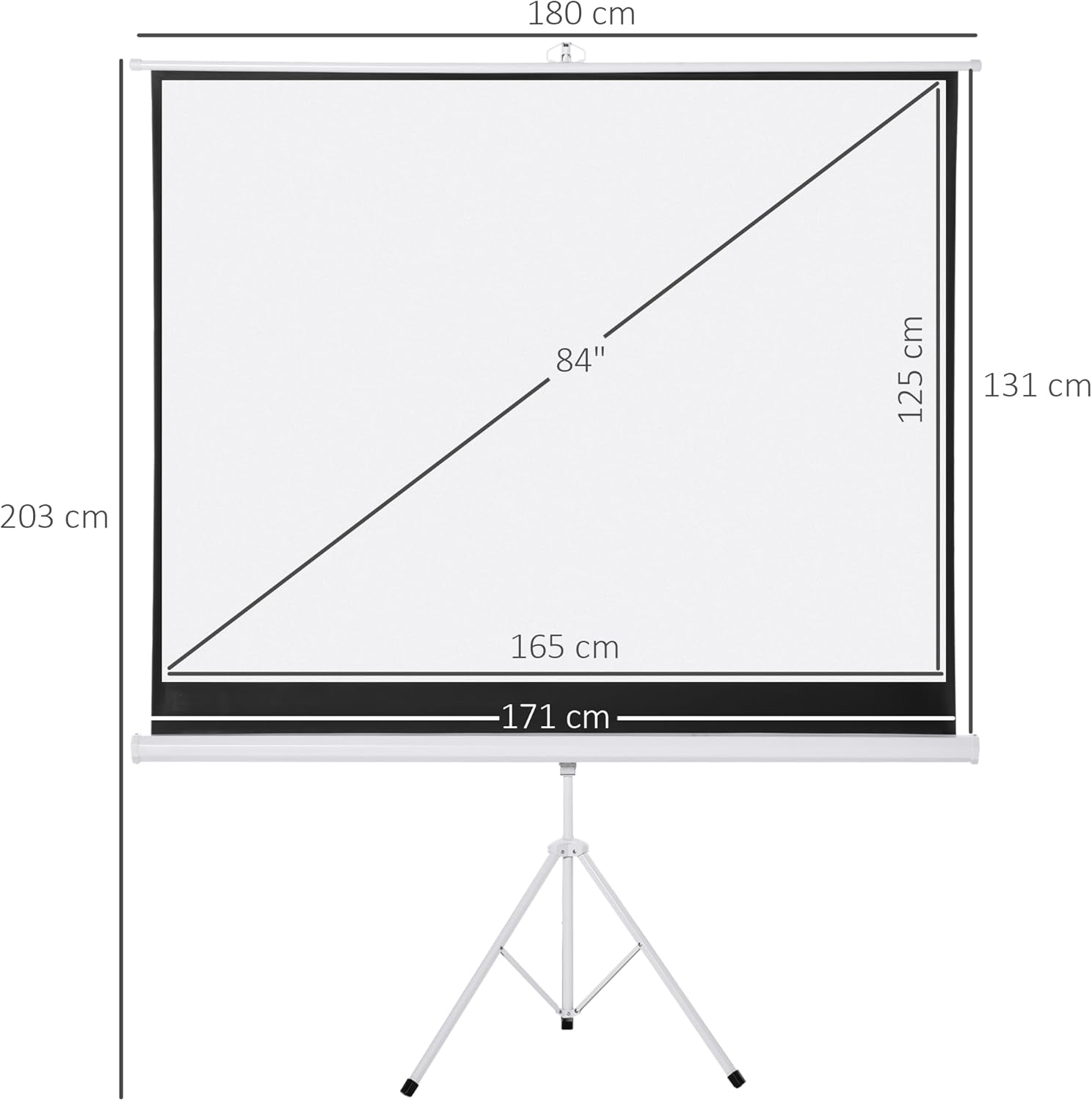
Image description: A detailed diagram showing the dimensions of the 84-inch projector screen and its tripod stand, including screen width (171 cm), screen height (128 cm), diagonal (84 inches), and overall height (131 cm to 203 cm).
| Feature | Detail |
|---|---|
| Brand | HOMCOM |
| Model Number | 84 Pollici |
| Color | White |
| Mounting Type | Floor Mount |
| Product Dimensions (Overall) | 177L x 131H centimeters |
| Material | Metal, Plastic |
| Screen Dimensions (Viewing Area) | 171 cm x 128 cm |
| Screen Surface Description | Matte |
| Item Weight | 6.5 Kilograms |
| Diagonal | 84 inches |
| Aspect Ratio | 4:3 |
| Viewing Angle | 160° |
| ASIN | B079Z5G6BV |
8. Safety Information
- Do not hang heavy objects on the screen or tripod.
- Ensure the tripod is placed on a stable, level surface to prevent tipping.
- Keep the screen away from heat sources and open flames.
- Supervise children when near the projector screen.
- Do not attempt to modify the product. Use only as intended.
9. Warranty and Support
Warranty information for this product is not explicitly provided in the available product data. For specific warranty details or technical support, please contact HOMCOM customer service or refer to your purchase documentation.


