
1. Introduction and Overview
The Sekonic L-308X-U Flashmate is a compact and lightweight digital light meter designed for precise exposure measurement in various photographic and cinematographic applications. It offers dedicated modes for still photography, HD cinematography, and professional cinema, providing accurate readings for both incident and reflected light.

Image 1.1: Front view of the Sekonic L-308X-U Flashmate Light Meter, displaying exposure settings.
2. Key Features
- Exposure Accuracy: Provides exposure readings accurate to a tenth-of-a-stop for both ambient and electronic flash light.
- Wide Measurement Range: At ISO 100, the ambient EV range is 0 to 19.9. Flash f/stops range from f/1.0 to f/90.9, with a shutter-speed span of 60 seconds to 1/8000th of a second (1 second to 1/500th for flash).
- Photo Mode: Tailored for still photographers, offering shutter or aperture priority display and comprehensive ambient and flash functions, including cord and cordless flash measurement.
- HD Cine Mode: Ideal for DSLR and mirrorless video production, enabling exposure readings and light control using shutter speeds and frame rates.
- Cine Mode: Designed for professional cinema cameras, allowing users to select from useful frame rates and shutter angles for exposure control with tenth-stop accuracy.
3. Setup
3.1. Battery Installation
The Sekonic L-308X-U requires two AAA batteries for operation. To install or replace batteries:
- Locate the battery compartment cover on the back of the meter.
- Slide the cover open in the direction indicated by the arrow.
- Insert two AAA batteries, ensuring correct polarity (+/-) as marked inside the compartment.
- Close the battery compartment cover securely.
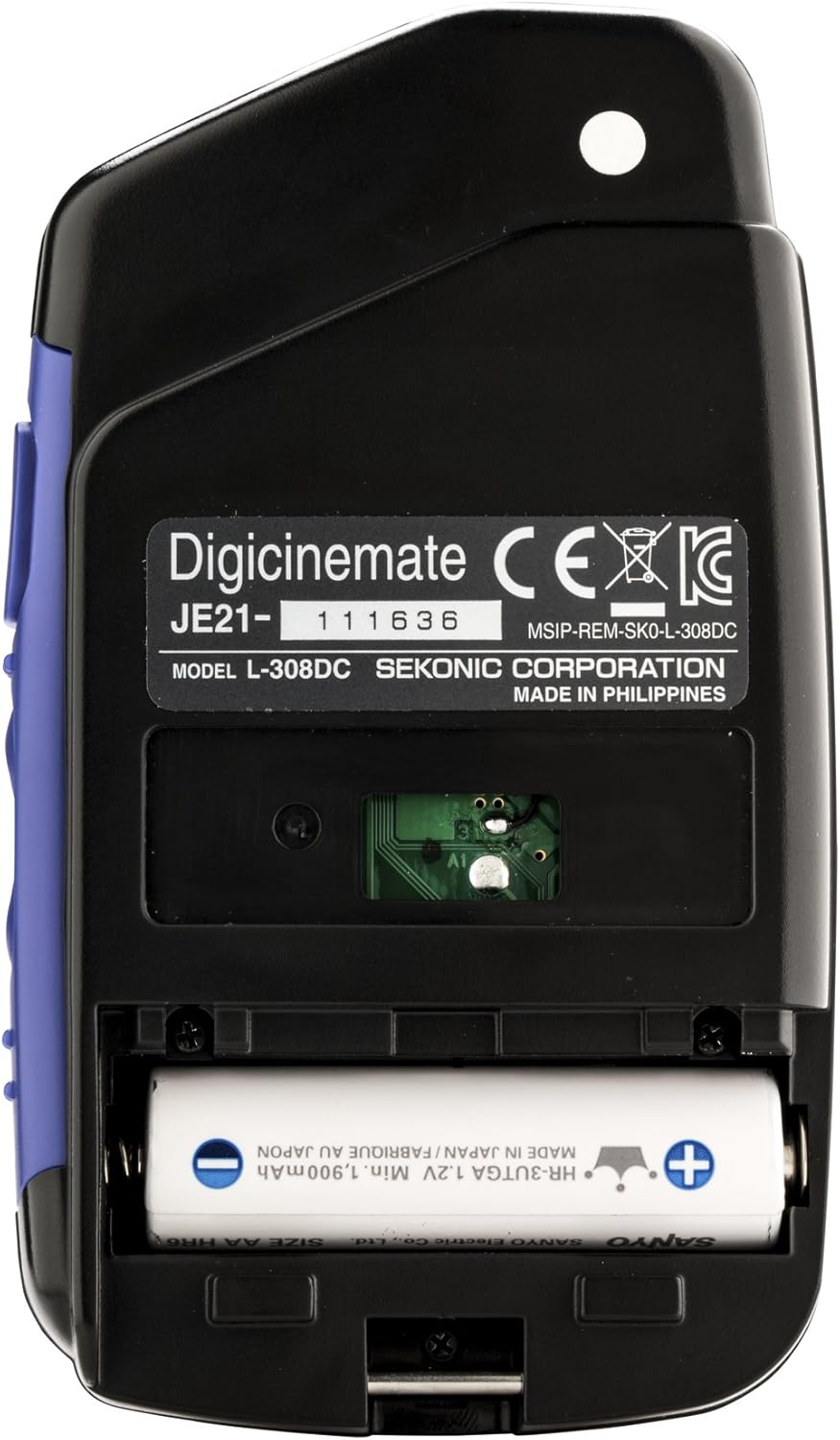
Image 3.1: Rear view of the light meter with the battery compartment open.
3.2. Power On/Off
Press and hold the power button (usually located on the top left of the meter) to turn the unit on or off. The display will illuminate upon power-on.
4. Operating Modes
The L-308X-U offers three primary operating modes: Photo, HD Cine, and Cine. Use the MODE button to cycle through these options.
4.1. Photo Mode
This mode is designed for still photography. It allows measurement of both ambient and flash light. You can select between incident light (using the lumisphere) and reflected light (with the lumisphere retracted or using an optional flat diffuser).
- Ambient Light Measurement: Point the lumisphere towards the camera position for incident readings, or towards the subject for reflected readings. Press the measurement button.
- Flash Light Measurement (Cord): Connect a sync cord to the meter and the flash unit. Point the lumisphere towards the camera and trigger the flash.
- Flash Light Measurement (Cordless): Point the lumisphere towards the camera. Press the measurement button, then manually trigger the flash within the meter's standby period.

Image 4.1: Light meter with the lumisphere retracted for reflected light measurement.
4.2. HD Cine Mode
Optimized for DSLR and mirrorless video production. In this mode, you can set frame rates and shutter speeds to determine appropriate aperture values for video recording. This helps in maintaining consistent exposure across different lighting conditions.
4.3. Cine Mode
Designed for professional cinema cameras, this mode allows for precise exposure control by enabling selection of specific frame rates and shutter angles. Measurements are displayed with tenth-stop accuracy, crucial for film production workflows.
5. Maintenance
- Cleaning: Use a soft, dry cloth to clean the meter's body. For the display, use a lens cleaning cloth. Avoid abrasive cleaners or solvents.
- Storage: Store the meter in a cool, dry place away from direct sunlight and extreme temperatures. If storing for extended periods, remove the batteries to prevent leakage.
- Handling: The meter is a precision instrument. Avoid dropping it or subjecting it to strong impacts.
6. Troubleshooting
- Meter does not power on:
- Check if batteries are correctly inserted with proper polarity.
- Replace old batteries with new AAA batteries.
- Inaccurate readings:
- Ensure the lumisphere is correctly positioned for incident or reflected light measurement.
- Verify ISO settings match your camera's ISO.
- Check for any obstructions on the light sensor.
- Flash measurement issues:
- For corded flash, ensure the sync cable is securely connected.
- For cordless flash, ensure the flash is triggered within the meter's measurement window.
If problems persist, contact Sekonic customer support for further assistance.
7. Specifications
| Model | L-308X-U (401-305) |
| Measurement Modes | Photo, HD Cine, Cine |
| Light Reception | Incident (Lumisphere), Reflected (Lumisphere retracted) |
| ISO Range | ISO 3 to 8000 |
| Ambient EV Range (ISO 100) | 0 to 19.9 |
| Flash f/stop Range (ISO 100) | f/1.0 to f/90.9 |
| Shutter Speed Range | 60 seconds to 1/8000th of a second (1 sec to 1/500th for flash) |
| Power Source | 2 x AAA batteries |
| Dimensions (H x W x D) | 4.3 x 2.5 x 0.9 inches (109 x 64 x 23 mm) |
| Weight | 3.52 ounces (100 g) |
| Manufacturer | MacGroup (for Sekonic) |
8. Warranty and Support
For information regarding warranty coverage, service, or technical support for your Sekonic L-308X-U Flashmate Light Meter, please refer to the warranty card included with your product or visit the official Sekonic website. Contact details for customer support are typically available on the manufacturer's website.
Online Resources: For additional guides, FAQs, and software updates, please visit the Sekonic Official Store on Amazon or the main Sekonic website.


