Product Overview
The Think Tank Pixel Racing Harness V3.0 is an adjustable shoulder strap and harness system designed to enhance comfort and weight distribution for photographers carrying camera gear. It is intended to be used in conjunction with an optional Think Tank belt system.
Key features include:
- Designed for both enthusiasts and professionals.
- Adjustable straps for a customized and secure fit.
- Optimized for weight distribution to reduce strain during extended use.
- Compatible with Think Tank belt systems for modular gear attachment.
Assembly and Initial Setup
Follow these steps to properly assemble and set up your Pixel Racing Harness V3.0:
- Unpack the Harness: Carefully remove the harness from its packaging. Lay it flat to identify all components.
- Orient the Harness: The harness is designed to be worn over your shoulders with the main attachment plate positioned at the front of your chest. The wider padded sections are for your shoulders.
- Adjust Shoulder Straps: Place the harness over your shoulders. Adjust the length of the shoulder straps using the buckles to ensure a snug yet comfortable fit. The harness should sit securely without restricting movement.
- Connect to Think Tank Belt (Optional): If using with an optional Think Tank belt, thread the harness's lower straps through the designated loops on your belt. Secure the buckles or hook-and-loop fasteners to integrate the harness with the belt. This distributes the weight across your shoulders and hips.
- Final Adjustments: Ensure all straps are evenly tensioned and comfortable. The harness should not dig into your skin or cause discomfort.
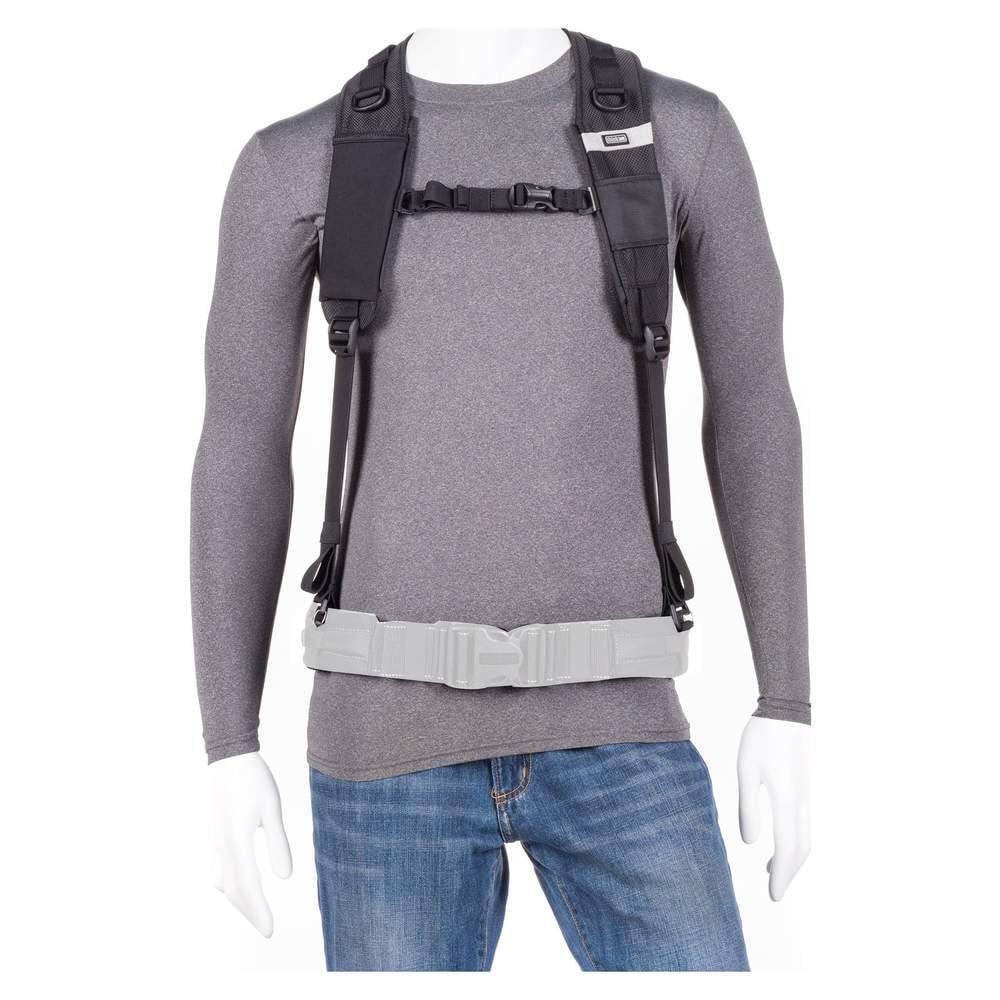
Figure 1: Front view of the Think Tank Pixel Racing Harness V3.0 on a mannequin, showing the shoulder straps and waist belt attachment points.

Figure 2: Rear view of the Think Tank Pixel Racing Harness V3.0 on a mannequin, highlighting the back support and strap configuration.
Operating Your Harness
The Pixel Racing Harness V3.0 is designed for quick and secure access to your camera gear. When combined with a Think Tank belt, it allows for efficient workflow and reduced fatigue.
- Attaching Camera Pouches/Accessories: Utilize the modular attachment points on your Think Tank belt (not included) to secure various camera pouches, lens cases, or other accessories. The harness helps support the weight of these items.
- Camera Quick Release: If your belt system includes a quick-release plate or clip for your camera, ensure it is securely attached to your camera's tripod mount. The harness helps stabilize the camera against your body when not in active use.
- Adjusting for Active Use: For dynamic shooting situations, you may need to slightly tighten the harness straps to minimize camera movement. For more relaxed carrying, loosen them for comfort.

Figure 3: Close-up of the Think Tank Pixel Racing Harness V3.0 showing strap adjustments and material texture.
Video 1: This video demonstrates the Think Tank Modular Belt System V3.0, illustrating how various components, including the Pixel Racing Harness, can be integrated for a customized and efficient gear-carrying setup.
Care and Maintenance
To ensure the longevity and optimal performance of your Think Tank Pixel Racing Harness V3.0, follow these care instructions:
- Cleaning: Spot clean the harness with a soft cloth, mild soap, and water. Avoid harsh detergents or abrasive cleaners, as these can damage the fabric and materials. Allow to air dry completely before storing.
- Storage: Store the harness in a cool, dry place away from direct sunlight and extreme temperatures. Ensure it is clean and dry before storage to prevent mold or mildew.
- Inspection: Periodically inspect all straps, buckles, and stitching for any signs of wear or damage. Replace any worn or damaged components immediately to maintain safety and functionality.
Troubleshooting
If you encounter any issues with your Pixel Racing Harness V3.0, consider the following:
- Discomfort or Uneven Weight Distribution: Re-adjust all shoulder and waist straps. Ensure the harness is centered on your back and chest. Distribute your gear evenly across your belt system.
- Gear Feeling Loose or Swaying: Tighten the straps of the harness and ensure all pouches and accessories on your belt are securely fastened. Check that the harness is properly integrated with your Think Tank belt.
- Difficulty Attaching/Detaching Gear: Ensure all clips and attachment points are clean and free of debris. Refer to the specific instructions for your Think Tank belt and accessory pouches for proper attachment methods.
Product Specifications
| Feature | Detail |
|---|---|
| Product Dimensions | 13 x 10 x 1 inches |
| Item Weight | 7.1 ounces |
| Item Model Number | 700018 |
| ASIN | B079YVV3LR |
| Manufacturer | Think Tank |
| Department | unisex-adult |
| Date First Available | February 21, 2018 |
Warranty and Customer Support
Think Tank products are built to the highest standards and are backed by a commitment to quality. For specific warranty details, product registration, or to contact customer support, please visit the official Think Tank website or refer to the warranty card included with your purchase. Keep your proof of purchase for any warranty claims.


