
Daitsu ASD18UI-DN
Daitsu Inverter ASD18UI-DN 18000 BTU Air Conditioner User Manual
Model: ASD18UI-DN
1. Introduction
This manual provides essential information for the safe and efficient operation, installation, and maintenance of your Daitsu Inverter ASD18UI-DN 18000 BTU Air Conditioner. Please read this manual thoroughly before using the appliance and retain it for future reference.
The Daitsu Inverter ASD18UI-DN is a high-efficiency split system air conditioner designed for both cooling and heating, offering optimal comfort and energy savings.
2. Safety Information
Always observe the following safety precautions to reduce the risk of electric shock, fire, injury, or damage to the product.
- Installation must be performed by qualified personnel in accordance with local and national electrical codes.
- Ensure the power supply matches the specifications listed on the unit's nameplate.
- Do not insert fingers or objects into the air inlet/outlet.
- Do not attempt to repair or modify the unit yourself. Contact qualified service personnel.
- Turn off the power supply before cleaning or performing any maintenance.
- Keep the remote control out of reach of children.
3. Product Overview
The Daitsu Inverter ASD18UI-DN system consists of an indoor unit, an outdoor unit, and a remote control for convenient operation.

Image 3.1: Overview of the Daitsu Inverter ASD18UI-DN air conditioner system, showing the indoor unit, outdoor unit, and remote control.
3.1 Indoor Unit
The indoor unit is responsible for circulating conditioned air within the room. It features a sleek design and an integrated display for temperature and status indicators.

Image 3.2: Daitsu Inverter ASD18UI-DN indoor unit, highlighting its compact design and dimensions (Width: 970mm, Height: 300mm, Depth: 224mm). Also shows the operating temperature range.
3.2 Outdoor Unit
The outdoor unit houses the compressor and condenser, responsible for heat exchange with the outside environment.

Image 3.3: Daitsu Inverter ASD18UI-DN outdoor unit, showing its dimensions (Width: 842mm, Height: 596mm, Depth: 320mm).
3.3 Remote Control
The wireless remote control allows you to conveniently adjust settings from anywhere in the room.

Image 3.4: The remote control for the Daitsu Inverter ASD18UI-DN, displaying its screen and various function buttons.
4. Setup and Installation
The Daitsu Inverter ASD18UI-DN is a split system air conditioner. Installation requires specialized tools and knowledge of refrigeration systems and electrical wiring. For safety and optimal performance, professional installation by a certified technician is mandatory.
4.1 Pre-Installation Checks
- Ensure the installation site can support the weight of both indoor and outdoor units.
- Verify that the electrical supply meets the unit's requirements (230V/1/50Hz).
- Ensure proper drainage for condensate water.
4.2 Installation Steps (Professional Only)
- Mount the indoor unit securely on a wall, ensuring proper clearance for airflow.
- Install the outdoor unit on a stable, level surface, away from obstructions.
- Connect the refrigerant piping between the indoor and outdoor units. The maximum piping distance is 20 meters, with a maximum height difference of 10 meters.
- Perform vacuuming and refrigerant charging (R410A).
- Connect the electrical wiring according to the wiring diagram provided with the unit.
- Test the system for leaks and proper operation.
5. Operating Instructions
Use the remote control to operate your air conditioner. Ensure the remote control is pointed towards the indoor unit when sending commands.
5.1 Basic Functions
- Power On/Off: Press the power button to turn the unit on or off.
- Mode Selection: Cycle through modes (Cool, Heat, Dry, Fan) using the mode button.
- Temperature Adjustment: Use the up/down arrows to set the desired temperature. The operating range is typically 16°C to 30°C.
- Fan Speed: Adjust fan speed (Low, Medium, High, Auto) to control airflow.
5.2 Special Features
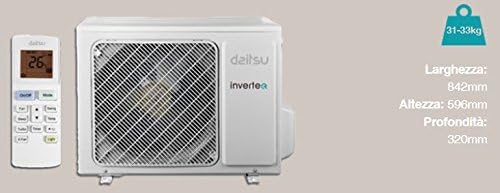
Image 5.1: Explanation of various features including Turbo, Active Carbon Filter, Swing, Dry, Timer, Light, and Sleep functions.

Image 5.2: Explanation of additional features including Fan Speed settings, X-Fan, Self-Test, Start, Intelligent Defrosting, Reset, and Lock functions.
- Turbo: Increases cooling or heating capacity to reach the desired temperature quickly.
- Swing: Activates automatic vertical movement of the air outlet louvers to distribute air evenly.
- Dry: Reduces humidity in the room.
- Timer: Allows programming the unit to turn on or off within a 24-hour period.
- Light: Turns off all indicator lights on the indoor unit for undisturbed sleep.
- Sleep: Adjusts the room temperature level for maximum comfort and energy saving during sleep.
- X-Fan: Dries the indoor unit's heat exchanger to prevent mold formation.
- Self-Test: Checks the equipment's function and displays an error code on the indoor unit's panel if an issue is detected.
- Start: The indoor unit fan activates only when the heat exchanger reaches the ideal temperature.
- Intelligent Defrosting: An intelligent defrosting system that activates only when necessary, significantly increasing energy savings and comfort.
- Lock: Locks the remote control buttons to prevent accidental changes.
6. Maintenance
Regular maintenance ensures optimal performance and extends the lifespan of your air conditioner.
6.1 Air Filter Cleaning
The unit is equipped with an Active Carbon Filter which absorbs small dust particles and smoke, preventing allergic reactions. Clean the air filters regularly (every two weeks or more often depending on usage) to maintain efficiency.
- Turn off the air conditioner and disconnect the power supply.
- Open the front panel of the indoor unit.
- Remove the air filters.
- Clean the filters with a vacuum cleaner or wash them with lukewarm water and a mild detergent.
- Allow the filters to dry completely in a shaded area before reinstalling.
- Close the front panel and restore power.
6.2 Outdoor Unit Cleaning
Periodically clean the outdoor unit's coils and fan blades to remove dirt, leaves, and other debris. This should ideally be done by a professional technician.
6.3 Seasonal Checks
Before the cooling or heating season, it is recommended to have a professional technician inspect the refrigerant levels, electrical connections, and overall system operation.
7. Troubleshooting
Before contacting service, check the following common issues:
- Unit does not turn on: Check power supply, circuit breaker, and ensure the remote control batteries are not depleted.
- Insufficient cooling/heating: Ensure doors and windows are closed, air filters are clean, and the temperature setting is appropriate.
- Unusual noises: Minor noises during operation are normal. If loud or unusual noises occur, turn off the unit and contact service.
- Water leakage from indoor unit: Check if the drainage hose is blocked or kinked.
- Error codes: If an error code appears on the indoor unit display, refer to the Self-Test function or contact service with the code.
If the problem persists after performing these checks, disconnect the power supply and contact a qualified service technician.
8. Specifications
Detailed technical specifications for the Daitsu Inverter ASD18UI-DN air conditioner.

Image 8.1: Technical specifications table for the Daitsu Inverter ASD18UI-DN, detailing power, capacity, efficiency, and other parameters.
| Specification | Value |
|---|---|
| Brand | Daitsu |
| Model Number | ASD18UI-DN |
| Cooling Capacity | 18000 BTU (1.5 tons) / 4.6 kW (0.65-5.2 kW range) |
| Heating Capacity | 5 kW (0.7-5.2 kW range) |
| SEER/SCOP | 6.1 / 4 |
| Energy Class (Cooling/Heating) | A++ / A+ |
| Power Supply | 230 V / 1 Phase / 50 Hz |
| Power Consumption (Cooling/Heating) | 1.43 kW / 1.38 kW |
| Indoor Unit Airflow (Min/Max) | 520 / 850 m³/h |
| Outdoor Unit Airflow (Max) | 2200 m³/h |
| Indoor Unit Sound Pressure (A/M/B/Q) | 45 / 41 / 37 / 33 dB(A) |
| Outdoor Unit Sound Pressure | 54 dB(A) |
| Refrigerant Type | R410A |
| Max. Piping Distance (Length/Height) | 20 m / 10 m |
| Indoor Unit Dimensions (W x H x D) | 970 x 300 x 224 mm |
| Outdoor Unit Dimensions (W x H x D) | 842 x 596 x 320 mm |
| Indoor Unit Weight | 13.5 kg |
| Outdoor Unit Weight | 31-33 kg |
9. Warranty and Support
For warranty information and technical support, please refer to the documentation provided at the time of purchase or contact your authorized Daitsu dealer. Daitsu offers distribution and support through specialized distributors.
Keep your purchase receipt as proof of purchase for warranty claims.
Related documentsASD18UI-DN


Ask a question about this manual
Ask about setup, troubleshooting, compatibility, parts, safety, or missing instructions. Manuals+ will review the question and use this page’s manual context to help answer it.