
1. Introduction
Thank you for choosing the SCS Sentinel OneGate 2 Swing Gate Automation System. This manual provides essential information for the safe and efficient installation, operation, and maintenance of your gate opener. Please read this manual thoroughly before beginning installation or operation to ensure proper functionality and to prevent damage or injury.
2. Safety Information
Always observe the following safety precautions to reduce the risk of injury or damage:
- Ensure all electrical connections are made by a qualified electrician and comply with local regulations.
- Disconnect power to the system before performing any maintenance or repairs.
- Keep children and pets away from the gate area during operation.
- Do not attempt to operate the gate if any part of the system is damaged or malfunctioning.
- Install safety devices such as photocells to prevent the gate from closing on obstacles.
- Ensure the gate is properly balanced and moves freely before installing the automation system.
3. Package Contents
Verify that all components are present in the package:
- 2 x 12V Articulated Arm Motors (1 main motor + 1 slave motor)
- 2 x 4-Channel Remote Controls
- 1 x 12V Flashing Warning Light
- Mounting Screws and Tabs
- Key for Manual Unlock
- Instruction Manual (this document)
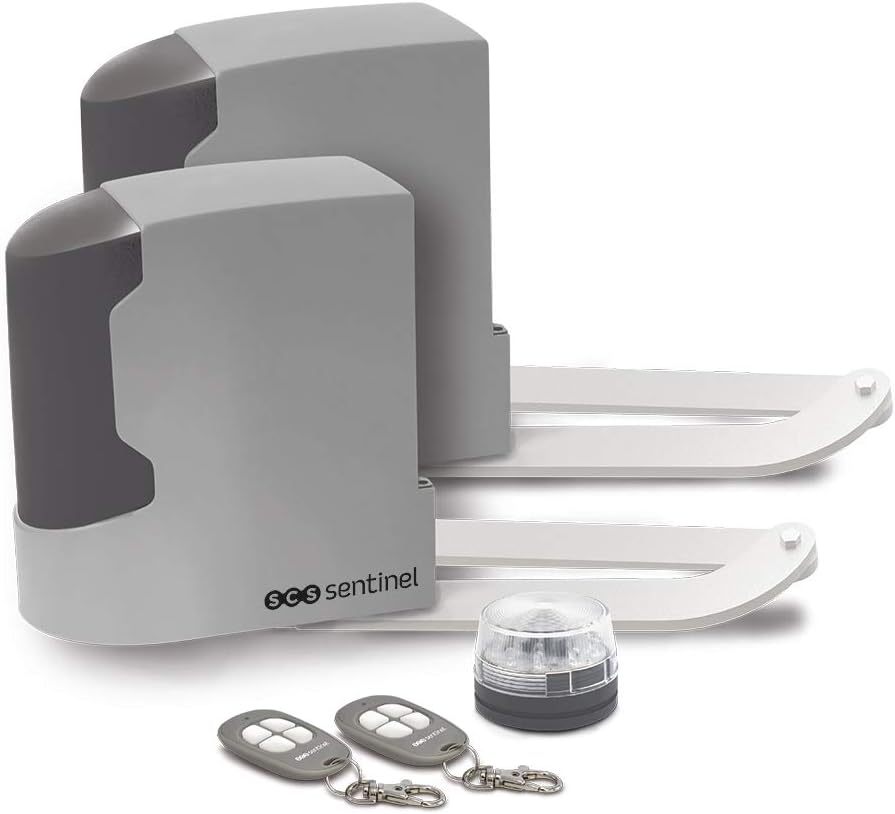
This image displays the complete SCS Sentinel OneGate 2 kit, including the two grey articulated arm motors, two grey four-channel remote controls, and a clear flashing warning light. These components are essential for automating a swing gate.
4. Setup and Installation
The installation process involves three main steps: mechanical installation, electrical connection, and programming.

This diagram illustrates the three primary stages of installing the OneGate 2 system: first, the mechanical mounting of the motors to the gate and posts; second, connecting the electrical wiring; and third, programming and synchronizing the remote controls with the gate operators.
4.1 Mechanical Installation
Mount the articulated arm motors securely to your gate posts and gate leaves. Ensure the arms have a clear range of motion and that the gate can open and close smoothly without obstruction. Refer to the detailed diagrams in the included installation guide for precise measurements and mounting positions. The system is designed for gates up to 4 meters in length and 400 kg maximum weight.
4.2 Electrical Connection
Connect the 12V power supply to the control unit. Wire the main and slave motors according to the provided wiring diagram. If using optional accessories like photocells or an external keypad, connect them to the designated terminals on the control board. Ensure all connections are tight and insulated to prevent short circuits.
4.3 Programming and Synchronization
After mechanical and electrical installation, the system needs to be programmed. This typically involves a learning procedure where the gate travels its full open and close cycles to determine its limits. Follow the specific programming steps outlined in the detailed installation guide to synchronize the remote controls and set desired functionalities such as automatic closing time, pedestrian opening, and obstacle sensitivity.
5. Operating Instructions
5.1 Remote Control Operation
Your system comes with two 4-channel remote controls. Each button can be programmed to perform a specific function, such as full opening, partial (pedestrian) opening, or stopping the gate. Press the assigned button once to activate the gate. Pressing it again during operation will typically stop the gate.

A detailed view of the grey four-channel remote control, featuring four distinct white buttons for controlling various gate functions and a sturdy metal keyring for attachment.
5.2 Gate Functions
- Full Opening: Opens both gate leaves completely.
- Partial (Pedestrian) Opening: Opens only one gate leaf for pedestrian access.
- Slow End of Race: The gate slows down as it approaches its fully open or closed position for smoother operation.
- Stop on Obstacle: If an obstacle is detected (e.g., by photocells), the gate will stop or reverse its movement.
- Automatic Closing: The gate will automatically close after a set delay (requires photocells for safety).
- Manual Unlocking: In case of power failure, use the provided key to manually unlock the motors and operate the gate by hand.
- Learning the Race: The system learns the gate's travel limits during initial setup or after a reset.

An illustrative image depicting a double swing gate, equipped with the SCS Sentinel OneGate 2 articulated arm motors, fully opened to allow passage. The motors are discreetly mounted on the gate posts.

This image shows the 12V flashing warning light, designed to alert pedestrians and vehicles when the gate is in motion. It has a clear, ribbed dome and a dark grey base.
6. Maintenance
Regular maintenance ensures the longevity and reliable operation of your gate automation system:
- Monthly: Check for any obstructions in the gate's path. Clean the photocells (if installed) to ensure proper function.
- Quarterly: Inspect all mounting hardware for tightness. Lubricate moving parts of the gate hinges and motor arms with appropriate grease.
- Annually: Have a qualified technician inspect the electrical connections and overall system performance.
- Keep the area around the motors clean and free of debris.
7. Troubleshooting
Refer to the table below for common issues and their potential solutions:
| Problem | Possible Cause | Solution |
|---|---|---|
| Gate does not respond to remote control. | Dead remote battery; remote out of range; remote not programmed; power outage. | Replace remote battery; move closer to gate; reprogram remote; check power supply. |
| Gate stops or reverses unexpectedly. | Obstruction in gate path; dirty photocells; sensitivity setting too high. | Remove obstruction; clean photocells; adjust sensitivity setting (refer to programming guide). |
| Gate opens partially. | Partial opening mode activated; limits not set correctly. | Ensure full opening button is pressed; re-run the learning procedure to set limits. |
| Motors make unusual noise. | Lack of lubrication; worn parts; obstruction. | Lubricate moving parts; inspect for worn components; check for obstructions. |
8. Specifications
| Feature | Detail |
|---|---|
| Model | OneGate 2 |
| Item Model Number | 3701085200138 |
| Manufacturer Part Number | MBA0054 |
| Voltage | 12 Volts |
| Max Gate Length | 4 metres |
| Max Gate Weight | 400 kg |
| Product Dimensions | 30 x 41 x 31 cm |
| Item Weight | 1 kg |
| Operation Mode | Electric |
| Recommended Use | Remote Control |
9. Warranty and Support
This product is covered by a manufacturer's warranty. Please refer to the warranty card included in your package for specific terms and conditions. For technical support, troubleshooting assistance, or to inquire about replacement parts, please visit the official SCS Sentinel website or contact their customer service department.
Official Website: www.scs-sentinel.com