
1. Introduction
This manual provides detailed instructions for the proper use, setup, operation, and maintenance of the Lutron PHB-318 Electronic Humidity and Barometer Temperature Meter. Please read this manual thoroughly before operating the device to ensure accurate measurements and safe handling.
2. Safety Information
Observe the following safety precautions to prevent damage to the meter and ensure personal safety:
- Do not expose the meter to extreme temperatures, humidity, or direct sunlight for extended periods.
- Avoid dropping the meter or subjecting it to strong impacts.
- Do not attempt to open the meter casing or modify its internal components. This will void the warranty.
- Keep the meter away from strong electromagnetic fields.
- Remove batteries if the meter is not to be used for a long period to prevent leakage.
3. Product Overview
The Lutron PHB-318 is a portable, multi-functional meter designed to measure humidity, barometric pressure, and temperature. It features a clear LCD display and intuitive button controls.

Figure 1: Front view of the Lutron PHB-318 Electronic Humidity and Barometer Temperature Meter, showing the LCD display, control buttons (POWER, HOLD, MAX), and the sensor probe at the top.
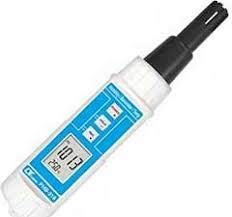
Figure 2: Angled view of the Lutron PHB-318 Meter, highlighting its ergonomic design and the integrated sensor probe.
4. Setup
4.1 Battery Installation
- Locate the battery compartment cover on the back of the meter.
- Slide or unscrew the cover to open the compartment.
- Insert the required batteries (typically 9V or AA, refer to the battery compartment label) ensuring correct polarity (+/-).
- Replace the battery compartment cover securely.
5. Operating Instructions
5.1 Powering On/Off
- Press the POWER button to turn the meter on.
- Press and hold the POWER button for a few seconds to turn the meter off.
5.2 Taking Measurements
Once powered on, the meter will automatically display current humidity, barometric pressure, and temperature readings on the LCD. Ensure the sensor probe is exposed to the environment you wish to measure.
5.3 HOLD Function
- Press the HOLD button to freeze the current readings on the display.
- Press the HOLD button again to release the hold and resume live readings.
5.4 MAX Function
- Press the MAX button to display the maximum recorded values for humidity, barometer, and temperature since the meter was powered on or the MAX function was reset.
- Press the MAX button again to cycle through other modes or return to live readings (depending on model specifics). Consult the on-screen indicators.
6. Maintenance
6.1 Cleaning
- Wipe the meter's exterior with a soft, dry cloth.
- Do not use abrasive cleaners or solvents, as they may damage the casing or display.
- Keep the sensor area clean and free from dust or debris.
6.2 Storage
When not in use, store the meter in a cool, dry place, away from direct sunlight and extreme temperatures. If storing for an extended period, remove the batteries.
6.3 Battery Replacement
When the low battery indicator appears on the display, replace the batteries as described in Section 4.1. Dispose of used batteries according to local regulations.
7. Troubleshooting
- Meter does not power on: Check battery installation and ensure batteries are not depleted. Replace if necessary.
- Inaccurate readings: Ensure the sensor is clean and unobstructed. Allow the meter to stabilize in the environment for a few minutes before taking readings. Avoid placing the meter near heat sources or direct airflow.
- Display is blank or flickering: Low battery. Replace batteries.
8. Specifications
| Feature | Detail |
|---|---|
| Model Number | PHB-318 |
| Manufacturer | Lutron |
| Product Dimensions | 11.6 x 6.5 x 3.5 cm |
| Weight | 210 g |
| Country of Origin | USA |
| Date First Available | March 15, 2018 |
9. Warranty and Support
For warranty information, technical support, or service inquiries, please contact Lutron customer service directly. Refer to the official Lutron website or product packaging for the most current contact details.