Introduction
Thank you for choosing the Genius GLT-85.4D 4-Channel Class-D Car Amplifier. This compact, high-performance amplifier is designed to deliver exceptional audio quality and power efficiency for your vehicle's sound system. This manual provides essential information for proper installation, operation, and maintenance of your amplifier. Please read it thoroughly before attempting installation or use.
Safety Information
Always observe the following safety precautions during installation and operation:
- Disconnect the vehicle's negative battery terminal before any electrical work to prevent short circuits.
- Ensure all wiring is properly insulated to prevent damage and electrical hazards.
- Mount the amplifier securely in a dry, well-ventilated area, away from direct sunlight, heat sources, and moisture.
- Use appropriate gauge wiring for power, ground, and speaker connections as specified in this manual.
- Do not operate the amplifier if it is damaged or malfunctioning. Refer to the troubleshooting section or seek professional assistance.
- Keep the amplifier away from children.
Package Contents
Verify that all items are present in the package:
- Genius GLT-85.4D 4-Channel Amplifier
- Mounting Hardware (screws)
- User Manual (this document)
Product Overview
The Genius GLT-85.4D is a compact 4-channel Class-D amplifier designed for high efficiency and powerful audio output. Its nanotechnology and SMD components contribute to its small size and robust performance.
Amplifier Top View

This image shows the top view of the Genius GLT-85.4D amplifier, highlighting its compact design and the "GENIUS AUDIO" branding along with the model number "GLT-85.4D" and "1000wMax" power rating.
Control Panel Layout (Input Side)
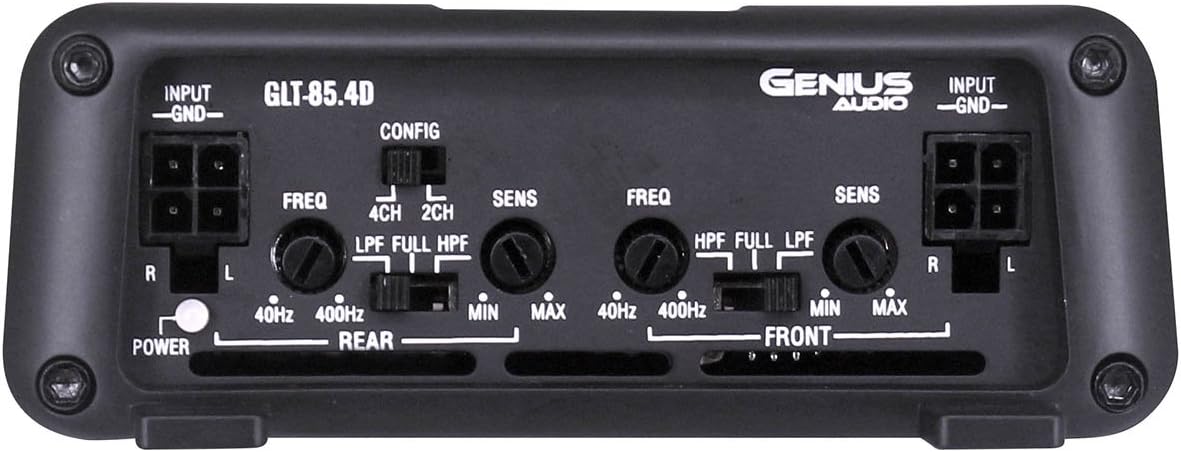
This image displays the input side of the GLT-85.4D amplifier, detailing the various controls and connections. It includes RCA input terminals (R, L) for both Rear and Front channels, gain controls (SENS MIN/MAX), frequency adjustment knobs (FREQ 40Hz-400Hz), and crossover switches (LPF, FULL, HPF) for both Rear and Front channels. A configuration switch (CONFIG 4CH, 2CH) is also visible, along with the Power indicator light.
Power and Speaker Terminal Layout (Output Side)

This image shows the output side of the GLT-85.4D amplifier, featuring the power and speaker terminals. From left to right, it includes the GROUND terminal, REMOTE turn-on terminal, +12V power terminal, and speaker output terminals for REAR BRIDGED (L+, L-, R+, R-) and FRONT BRIDGED (L+, L-, R+, R-) connections. The "4 Channel 'CLASS D' 2 ohm Stable Stereo Bridgeable MOSFET" text indicates key amplifier capabilities.
Setup and Installation
Proper installation is crucial for optimal performance and safety. If you are unsure about any step, consult a professional installer.
Mounting Location
- Choose a location that is dry, well-ventilated, and protected from direct sunlight, excessive heat, and moisture.
- Ensure sufficient airflow around the amplifier for proper cooling.
- Mount the amplifier securely to a solid surface using the provided mounting hardware to prevent movement during vehicle operation.
Wiring Connections
Before making any connections, disconnect the vehicle's negative battery terminal.
- Power Wire (+12V): Run a heavy-gauge power cable (e.g., 8 AWG or thicker, depending on total system power) directly from the positive terminal of the vehicle's battery to the +12V terminal on the amplifier. Install an in-line fuse holder with an appropriate fuse (not supplied) within 18 inches (45 cm) of the battery.
- Ground Wire (GND): Connect a heavy-gauge ground cable (same gauge as power wire) from the GND terminal on the amplifier to a clean, unpainted metal surface on the vehicle's chassis. Ensure a solid, low-resistance connection.
- Remote Turn-On Wire (REMOTE): Connect a remote turn-on wire (typically 18 AWG) from your head unit's remote output to the REMOTE terminal on the amplifier. This wire signals the amplifier to turn on and off with your head unit.
- RCA Input Cables: Connect RCA cables from your head unit's pre-amp outputs (Front and Rear) to the corresponding RCA input jacks on the amplifier.
- Speaker Wires: Connect your speakers to the amplifier's speaker output terminals. Ensure correct polarity (+ to + and - to -). The GLT-85.4D supports 2-ohm stereo and 4-ohm bridged configurations. Refer to the "Power and Speaker Terminal Layout" image for terminal identification.
Note: For bridged operation, connect the speaker to the designated bridged terminals (e.g., L+ and R- for a single channel in bridged mode). Consult a wiring diagram for specific bridged configurations.
Operating Instructions
Initial Power-Up
- After all connections are made and verified, reconnect the vehicle's negative battery terminal.
- Turn on your head unit. The amplifier's power indicator light should illuminate.
- Start with the amplifier's gain (SENS) controls set to minimum.
- Play a familiar piece of music at a moderate volume level on your head unit.
Adjusting Controls
- Gain (SENS): Slowly increase the gain control for each channel until you hear distortion, then back off slightly. The gain control matches the amplifier's input sensitivity to the head unit's output voltage. It is not a volume control.
- Crossover (LPF/FULL/HPF):
- LPF (Low Pass Filter): Allows only frequencies below the set point to pass. Typically used for subwoofers.
- HPF (High Pass Filter): Allows only frequencies above the set point to pass. Typically used for full-range speakers to prevent low-frequency distortion.
- FULL: Allows all frequencies to pass.
- Configuration (CONFIG 4CH/2CH): This switch determines how the input signals are routed to the amplifier channels.
- 4CH: Uses all four RCA inputs (Front L/R, Rear L/R) to drive the four output channels independently.
- 2CH: Uses only the Front L/R RCA inputs and internally routes them to all four output channels. Useful if your head unit only has two pre-amp outputs but you want to power four speakers.
Recommendation: Fine-tune settings gradually and listen carefully to avoid speaker damage or poor sound quality.
Maintenance
- Keep the amplifier clean by wiping it with a soft, dry cloth. Do not use harsh chemicals or abrasive cleaners.
- Ensure that the amplifier's cooling fins are free from dust and debris to maintain proper heat dissipation.
- Periodically check all wiring connections for tightness and corrosion.
Troubleshooting
| Problem | Possible Cause | Solution |
|---|---|---|
| No Power / Amplifier does not turn on |
|
|
| No Sound |
|
|
| Distorted Sound |
|
|
| Amplifier Overheats |
|
|
Specifications
| Feature | Detail |
|---|---|
| Model | GLT-85.4D |
| Channels | 4 |
| Amplifier Class | Class-D |
| Max Power @ 12.6V | 1700W |
| RMS Power Output (4 Ohm Stereo @ 12.6V) | 85W x 4 |
| RMS Power Output (2 Ohm Stereo @ 12.6V) | 120W x 4 |
| RMS Power Output (4 Ohm Bridged @ 12.6V) | 240W x 2 |
| Minimum Supply Voltage | 8.5V |
| Maximum Supply Voltage | 16.8V |
| Idle Current Consumption @ 12.6VDC | 0.66A |
| Musical Max Current Consumption @ 12.6VDC | 31A |
| Dimensions (L x W x H) | 11.02 x 7.99 x 2.76 inches |
| Item Weight | 3.5 pounds |
Warranty and Support
For warranty information, technical support, or service inquiries, please refer to the official Genius Audio website or contact their customer service department. Keep your purchase receipt as proof of purchase for warranty claims.
Official Website: Genius Audio Store on Amazon


