1. Introduction
This manual provides essential instructions for the assembly, use, and maintenance of your Crown Mark Fulton Dark Brown Wood/Faux Leather Counter Height Bench (Model: 2727-BENCH-V). Please read these instructions carefully before assembly and use to ensure safe and proper operation.
The Crown Mark Fulton bench is designed to complement counter-height dining sets, featuring a dark brown wood frame and a padded faux leather seat for comfort and durability.
2. Safety Information
Adhere to the following safety guidelines to prevent injury and damage to the product:
- Maximum Weight Recommendation: The bench is designed to support a maximum weight of 240 pounds. Do not exceed this limit.
- Ensure all bolts and screws are securely tightened before use. Periodically check and retighten as necessary.
- Do not stand on the bench.
- Keep small parts away from children during assembly.
- Use on a flat, stable surface to prevent tipping.
3. Package Contents
Before beginning assembly, verify that all components are present and undamaged. If any parts are missing or damaged, contact customer support immediately.
- Bench (Main components and hardware for assembly)
Note: The table shown in some product images is sold separately and is not included with this bench.
4. Setup and Assembly
Assembly is required for this counter height bench. It is recommended to assemble the bench on a soft, clean surface to prevent scratching. Two people may be required for easier assembly.
4.1. Required Tools (Not Included)
- Phillips head screwdriver
- Allen wrench (often included with hardware, but a personal set can be helpful)
4.2. Assembly Steps
- Unpack Components: Carefully remove all parts from the packaging and lay them out on a protected surface. Identify all components against the parts list (if provided with the physical product).
- Attach Legs to Seat Frame: Secure the bench legs to the underside of the seat frame using the provided bolts and washers. Ensure the legs are oriented correctly. Do not fully tighten bolts at this stage.
- Install Stretchers/Support Bars: Connect the horizontal stretchers between the legs. These provide stability. Use the appropriate screws or bolts, again, do not fully tighten yet.
- Align and Tighten: Once all components are loosely assembled, place the bench upright on a flat surface. Gently apply pressure to ensure all parts are aligned and the bench is level. Then, systematically tighten all bolts and screws until secure. Avoid over-tightening.
- Final Check: Verify that the bench is stable and all connections are firm before use.

Figure 1: The Crown Mark Fulton Counter Height Bench shown as part of a dining set. This image illustrates the assembled product in a typical usage environment.
5. Operating and Usage
The Crown Mark Fulton Counter Height Bench is designed for seating at counter-height tables or bars. Its padded faux leather seat provides comfort for extended periods.
- Ensure the bench is placed on a level surface before sitting.
- Distribute weight evenly across the seat.
- Avoid dragging the bench across floors to prevent damage to the legs or floor surface. Lift and move as needed.
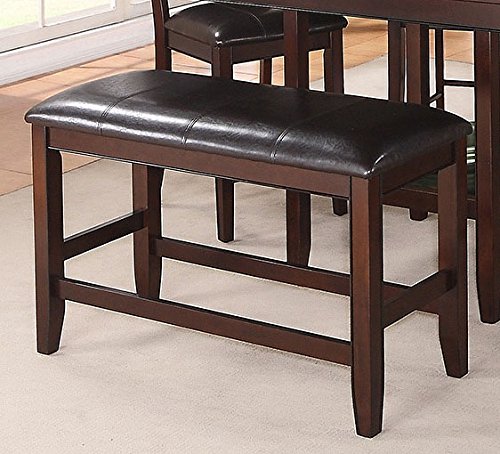
Figure 2: A detailed view of the Crown Mark Fulton Counter Height Bench, showcasing the design and materials.
6. Maintenance
Proper care will extend the life and appearance of your bench:
- Cleaning the Wood Frame: Wipe the wood frame with a dry, soft cloth to remove dust. For deeper cleaning, use a slightly damp cloth and immediately dry with a clean cloth. Avoid harsh chemicals or abrasive cleaners.
- Cleaning the Faux Leather Seat: For general cleaning, wipe with a damp cloth. For spills, blot immediately with a clean, dry cloth. Use a mild soap solution for stubborn stains, then wipe clean with a damp cloth and dry thoroughly. Do not use abrasive cleaners, solvents, or furniture polish on faux leather.
- Regular Inspection: Periodically check all bolts and screws to ensure they remain tight. Retighten as needed to maintain stability and safety.
- Avoid Direct Sunlight: Prolonged exposure to direct sunlight can cause fading or damage to the wood finish and faux leather.
- Avoid Excessive Moisture: Protect the bench from excessive moisture and humidity.
7. Troubleshooting
7.1. Bench Feels Wobbly After Assembly
- Check Tightness: Ensure all bolts and screws are fully tightened. Loose connections are a common cause of wobbling.
- Re-align and Re-tighten: Loosen all bolts slightly, place the bench on a flat surface, and gently press down on the seat to ensure all legs are touching the ground evenly. Then, tighten all bolts systematically.
- Uneven Floor: Verify that the floor surface is level. If the floor is uneven, consider using furniture pads or shims under the legs to stabilize the bench.
7.2. Difficulty During Assembly
- Review Instructions: Double-check the assembly steps and diagrams (if provided with the physical product) to ensure correct orientation of parts.
- Do Not Force: If parts do not fit easily, do not force them. Re-examine the alignment and ensure no parts are reversed.
- Seek Assistance: If issues persist, contact Crown Mark customer support for guidance.
8. Specifications
| Model Number | 2727-BENCH-V |
| Brand | Crown Mark |
| Dimensions (L x W x H) | 40"L x 17"W x 25"H (17"D x 40"W x 25"H) |
| Weight | 27.6 lbs |
| Color | Dark Brown |
| Materials | Wood Veneers & Solids, Faux Leather |
| Seat Features | Padded Leather-Look Seat, Polyester Wrapped Foam Seat Cushion, Decorative Topstitching |
| Maximum Weight Capacity | 240 pounds |
9. Warranty and Support
For information regarding warranty coverage, parts replacement, or technical support, please contact Crown Mark customer service directly. Refer to the original purchase documentation or the manufacturer's website for contact details.
When contacting support, please have your model number (2727-BENCH-V) and purchase date available.


