1. Product Overview
The Code Alarm CAT4M is a 4-button replacement remote transmitter designed for use with compatible Code Alarm vehicle security and remote start systems. This remote operates at 915MHz using FHSS (Frequency Hopping Spread Spectrum) technology and features a red LED indicator. It is intended to replace or supplement existing CAT4 remotes and is compatible with various Code Alarm system models.
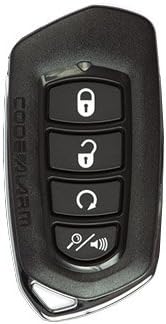
Image 1.1: Front view of the Code Alarm CAT4M 4-button remote transmitter. The remote features four distinct buttons: Lock, Unlock, Remote Start/Trunk Release, and Panic/Auxiliary, arranged vertically. The Code Alarm logo is visible on the left side.
2. Setup and Programming
This section outlines the general procedure for programming your Code Alarm CAT4M remote transmitter. Please note that specific programming steps may vary slightly depending on your vehicle's alarm system model. Always refer to your vehicle's alarm system manual for the most accurate and detailed instructions.
2.1 Compatibility
The CAT4M remote is programmable to the following Code Alarm system models:
- CA1554, CA1555
- CA5154, CA5155, CA5354, CA5554
- CA6154, CA6155, CA6554, CA6555
- CA4BS, CA2LED5, CA2LCD5, CA2RELCD5
The FCC ID for this remote is H50T59 (also referred to as H5OT59).
2.2 General Programming Procedure
To program the remote, you will typically need to access your system's valet switch (also known as the programming or override button). The exact location of this switch varies by vehicle and installation. Consult your vehicle's alarm system manual for its precise location.
- Prepare the Vehicle: Ensure the vehicle's ignition is OFF and all doors are closed.
- Enter Programming Mode:
- Insert the key into the ignition.
- Turn the ignition to the ON position (do not start the engine).
- Within 5 seconds, press and release the valet switch a specific number of times (e.g., 3, 5, or 7 times, depending on the system). The system will usually respond with a chirp or light flash to confirm entry into programming mode.
- Program the Remote:
- While the system is in programming mode, press and hold the LOCK button on the new CAT4M remote for approximately 1-2 seconds.
- Release the button. The system should chirp or flash its lights to confirm the remote has been programmed.
- Exit Programming Mode:
- Turn the ignition OFF.
- The system will typically chirp a few times to indicate it has exited programming mode.
- Test the Remote: After exiting programming mode, test all buttons on the new remote to ensure proper functionality.
If you encounter difficulties, repeat the procedure or consult a professional installer.
3. Operating Your Remote Transmitter
The Code Alarm CAT4M remote features four distinct buttons, each controlling specific functions of your vehicle's alarm and remote start system. The functions are typically as follows:
- Lock Button (Closed Padlock Icon): Press to arm the security system and lock the vehicle doors.
- Unlock Button (Open Padlock Icon): Press to disarm the security system and unlock the vehicle doors.
- Remote Start / Trunk Release Button (Circular Arrow Icon):
- Press and hold for approximately 2-3 seconds to activate the remote start function (if installed and enabled).
- A quick press may activate trunk release or another auxiliary function, depending on system configuration.
- Panic / Auxiliary Button (Magnifying Glass with Speaker Icon):
- Press and hold to activate the panic alarm.
- A quick press may activate an auxiliary function (e.g., power sliding door, rear defrost) if programmed.
The red LED on the remote will illuminate when a button is pressed, indicating signal transmission.
4. Maintenance
4.1 Battery Replacement
The CAT4M remote uses one Lithium Metal battery. When the remote's range decreases significantly or the LED indicator fails to light up, it is likely time to replace the battery.
- Carefully open the remote casing, typically by prying it apart at the seam using a small, flat tool.
- Note the orientation of the existing battery.
- Remove the old battery and insert a new Lithium Metal battery of the same type, ensuring correct polarity.
- Carefully snap the remote casing back together.
- Test the remote's functionality.
4.2 Care and Handling
- Avoid dropping the remote or subjecting it to strong impacts.
- Keep the remote dry and away from extreme temperatures.
- Clean the remote with a soft, dry cloth if necessary. Do not use harsh chemicals.
5. Troubleshooting
| Problem | Possible Cause | Solution |
|---|---|---|
| Remote does not work or has poor range. |
|
|
| Vehicle does not respond to specific button presses. |
|
|
For persistent issues, it is recommended to contact a certified Code Alarm installer or technical support.
6. Specifications
| Model Name | CAT4M |
| Brand | Code Alarm |
| FCC ID | H50T59 (H5OT59) |
| Frequency | 915MHz (FHSS, Spread Spectrum Technology) |
| Number of Buttons | 4 |
| Battery Type | 1 Lithium Metal battery |
| Material | Metal (frame) |
| Item Weight | 0.95 ounces (approx. 0.03 Kilograms) |
| Package Dimensions | 5.55 x 2.8 x 0.43 inches |
| Automotive Fit Type | Universal Fit |
7. Warranty and Support
Warranty information for the Code Alarm CAT4M remote transmitter is typically provided by the manufacturer or the seller at the time of purchase. Please retain your proof of purchase for warranty claims.
For technical support, detailed programming assistance, or warranty inquiries, please contact Code Alarm customer service or refer to the official Code Alarm website. You may also consult the installer of your vehicle's alarm system for professional assistance.


