
1. Introduction
This manual provides essential instructions for the safe and efficient use of your Airam LED Cabinet Lamp 1.2W. This battery-operated lamp features a PIR motion sensor, automatically illuminating when motion is detected, making it ideal for cabinets, drawers, and other enclosed spaces. Please read this manual thoroughly before installation and operation.
2. Setup
2.1 Package Contents
Before proceeding, ensure all components are present:
- Airam LED Cabinet Lamp 1.2W
- Mounting hardware (screws or adhesive strips, typically included in packaging)

Figure 1: Airam LED Cabinet Lamp in its retail packaging, showing the lamp and typical mounting accessories.
2.2 Battery Installation
The Airam LED Cabinet Lamp requires 4 x AA 1.5V batteries (not included).
- Locate the battery compartment cover on the back or side of the lamp.
- Slide or unclip the cover to open the compartment.
- Insert 4 AA batteries, ensuring correct polarity (+ and - terminals match the markings inside the compartment).
- Close the battery compartment cover securely.
2.3 Mounting the Lamp
The lamp can be mounted using screws or adhesive strips, depending on the included hardware and your preference. Choose a location where the motion sensor has a clear line of sight to the area where movement is expected (e.g., inside a cabinet door, above a drawer).
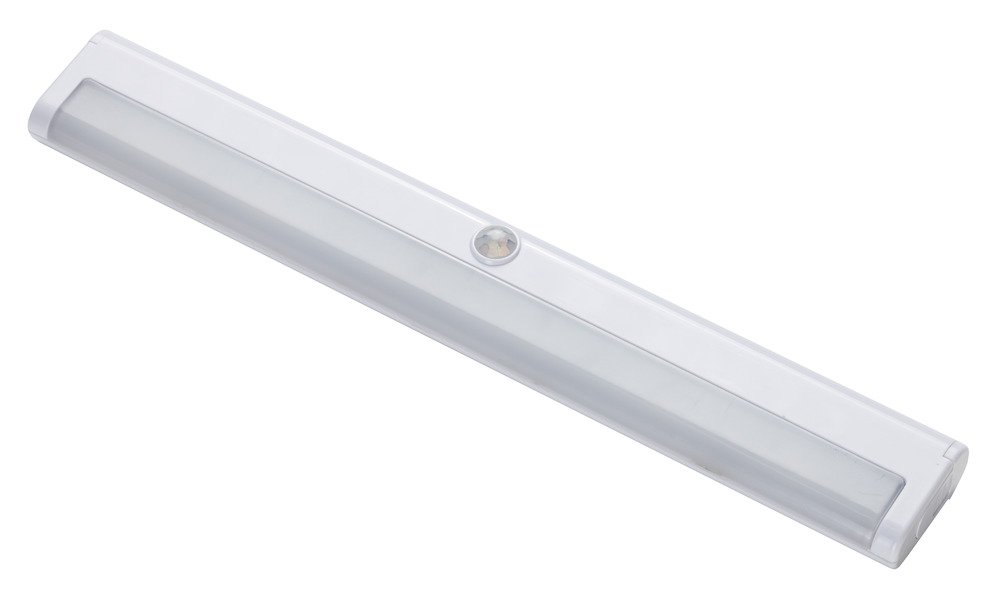
Figure 2: Front view of the Airam LED Cabinet Lamp, highlighting the central motion sensor.
Using Screws (if applicable):
- Mark the desired mounting position.
- Drill pilot holes if necessary, matching the lamp's mounting holes.
- Secure the lamp using the provided screws.
Using Adhesive Strips (if applicable):
- Clean the mounting surface thoroughly to ensure it is dry and free of dust or grease.
- Peel the protective backing from the adhesive strips.
- Firmly press the lamp onto the desired surface for at least 30 seconds.
3. Operation
The Airam LED Cabinet Lamp is designed for automatic operation using its integrated PIR (Passive Infrared) motion sensor.
- Once batteries are installed and the lamp is mounted, it will enter standby mode.
- When the PIR motion sensor detects movement within its range (e.g., opening a cabinet door or drawer), the LED lights will automatically turn on.
- The lamp will remain illuminated for approximately 25 seconds after motion is detected.
- If no further motion is detected within this period, the lamp will automatically turn off to conserve battery power.
- If continuous motion is detected, the lamp will remain on until motion ceases for 25 seconds.
Note: Ensure the motion sensor is not obstructed for optimal performance.
4. Maintenance
4.1 Battery Replacement
When the light output diminishes or the lamp stops functioning, it is time to replace the batteries. Refer to section 2.2 Battery Installation for detailed instructions.
- Always replace all 4 AA batteries at the same time.
- Do not mix old and new batteries, or different types of batteries.
- Dispose of used batteries responsibly according to local regulations.
4.2 Cleaning
The lamp is constructed from polycarbonate and ABS plastic. To clean the lamp:
- Wipe the surface with a soft, dry, or slightly damp cloth.
- Do not use abrasive cleaners, solvents, or harsh chemicals, as these can damage the plastic finish or the sensor.
- Ensure no liquid enters the battery compartment or sensor area.
5. Troubleshooting
| Problem | Possible Cause | Solution |
|---|---|---|
| Lamp does not turn on. |
|
|
| Lamp stays on continuously. |
|
|
| Light is dim. |
|
|
6. Specifications
| Brand | AIRAM |
| Model Number | 8710464 |
| Color | White |
| Material | Polycarbonate + ABS Plastic |
| Style | Modern |
| Power Source | Battery Powered (4 x AA 1.5V, not included) |
| Special Features | PIR Motion Sensor, Automatic On/Off |
| Light Source Type | LED |
| Wattage | 1.2 Watts |
| Brightness | 80 Lumens |
| Voltage | 5 Volts (DC from batteries) |
| Automatic Shut-off | Approx. 25 seconds after last motion detected |
| Battery Life | 24 - 30 hours (continuous use) |
| Mounting Type | Removable (typically screw or adhesive) |
| Dimensions (approx.) | 300 x 45 mm |
| Manufacturer | Bot Lighting |
| ASIN | B079V33GJR |
| GTIN | 06435200213563 |
7. Warranty and Support
Specific warranty information may vary by region and retailer. Please refer to your purchase documentation or contact your point of sale for details regarding warranty coverage.
For technical support or further assistance, please contact the manufacturer, Bot Lighting, or your retailer. Keep your purchase receipt as proof of purchase.