Product Overview
This manual provides essential information for the setup, operation, and maintenance of your LG 65SK8000 65-Inch 4K UHD Smart LED TV. Please read thoroughly before use.
The LG 65SK8000 is a 65-inch 4K Ultra HD Smart LED TV designed to enhance your viewing experience. It features an Intelligent Processor that optimizes color, depth, and sharpness for a realistic picture. With Dolby Atmos support, it delivers theater-quality audio.
What's in the Box
Verify that all items are present before proceeding with setup:
- LG 65SK8000 65-Inch 4K UHD Smart LED TV
- Power Cable
- TV Stand (components for assembly)
- Remote Control
- 2 AA Batteries (for remote control)
Setup
1. Unpacking and Placement
Carefully remove the TV from its packaging. It is recommended to have at least two people for safe handling due to the size and weight of the unit.
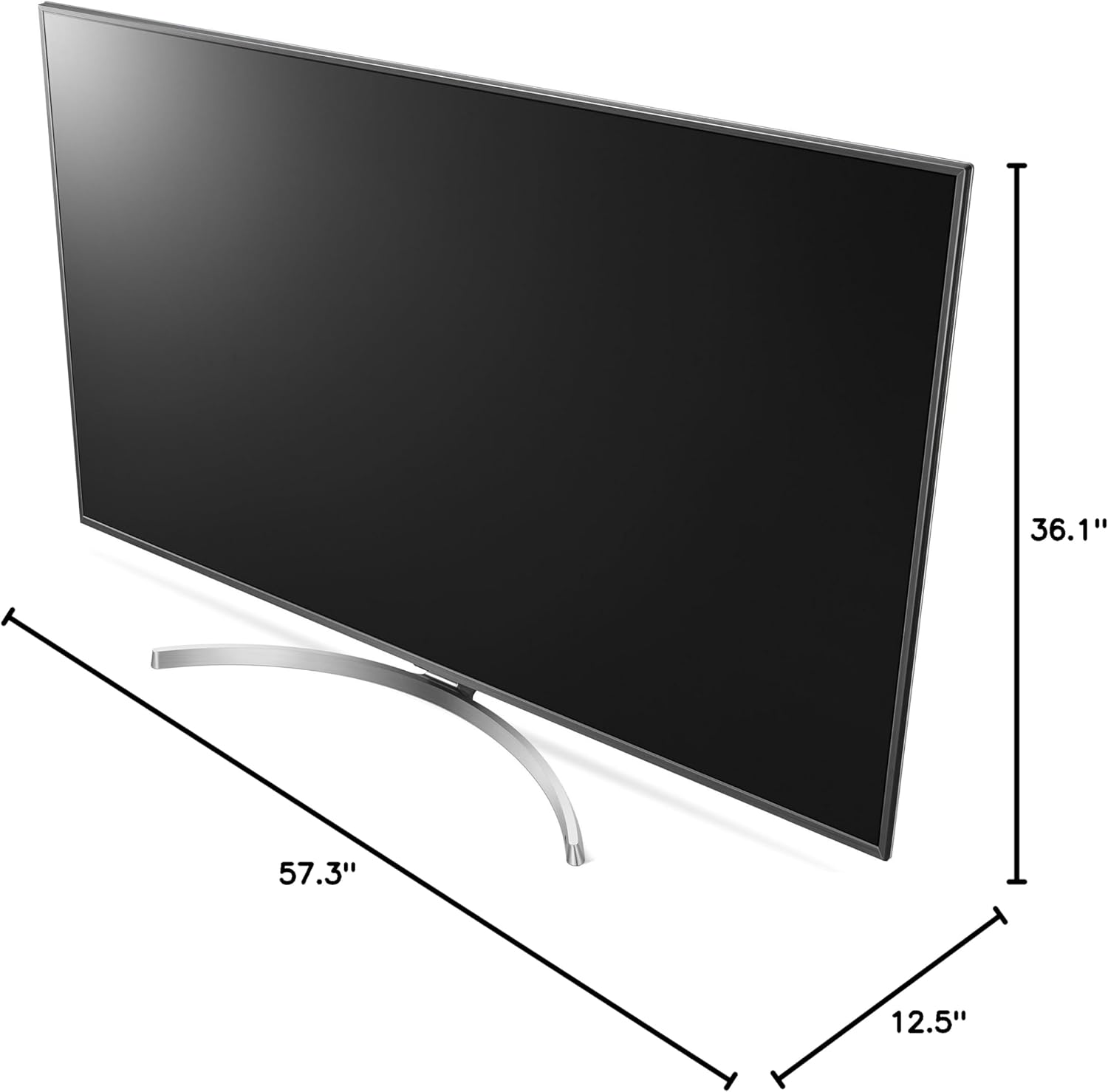
Figure 1: Product dimensions for placement planning. The TV measures approximately 12.5"D x 57.3"W x 36.1"H.
Choose a stable, flat surface or a suitable wall mount location. Ensure adequate ventilation around the TV.
2. Attaching the Stand (if not wall-mounting)
Follow the instructions provided with the stand components to securely attach the stand to the TV. Ensure all screws are tightened properly.
3. Connecting Peripherals
Connect your external devices (e.g., cable box, Blu-ray player, gaming console) to the appropriate ports on the back of the TV. The LG 65SK8000 features multiple HDMI and USB ports, along with Ethernet connectivity.

Figure 2: Rear view of the LG 65SK8000 TV, highlighting the various input ports for connecting external devices.

Figure 3: A closer look at the input ports on the LG 65SK8000, including HDMI, USB, and Ethernet connections.
4. Power Connection
Connect the power cable to the TV and then to a wall outlet. Insert the supplied AA batteries into the remote control.
5. Initial Power On and Setup Wizard
Press the power button on the remote control or the TV. The TV will guide you through an initial setup wizard to configure language, network settings, and channel scanning.
Operating Instructions
Picture Quality Features
- High Dynamic Range (HDR10, HLG, Dolby Vision, Advanced HDR by Technicolor): This feature extends picture contrast and brightness, providing a more vivid and detailed image when viewing HDR content from connected sources or built-in apps.
- TruMotion 240 Blur Reduction (120Hz Refresh Rate): Enhances motion clarity, reducing blur in fast-moving scenes for a smoother viewing experience.
- IPS (In-Plane Switching) LCD Panel: Provides wide viewing angles, ensuring consistent picture quality even when viewed from the side.
- Expanded Color Range with Billion Rich Colors: Utilizes an 8-bit panel with 10-bit dithering to display a broader spectrum of colors, resulting in richer and more accurate hues.
- 4K Upscaler: Automatically upconverts standard-definition and high-definition video content to near-4K quality, improving clarity and detail for non-4K sources.
Audio Features
The LG 65SK8000 supports Dolby Atmos, delivering immersive, theater-quality audio. Adjust audio settings via the TV's on-screen menu to optimize your sound experience.
Smart TV Functionality
Access a variety of streaming services and apps directly from your TV. The intuitive interface allows for easy navigation. Connect to your home network via Wi-Fi or Ethernet to utilize smart features.
Maintenance
Cleaning the Screen
Gently wipe the screen with a soft, dry microfiber cloth. For stubborn smudges, lightly dampen the cloth with water or a screen-specific cleaning solution (avoid harsh chemicals).
Cleaning the TV Body
Use a soft, dry cloth to clean the frame and back of the TV. Do not use abrasive cleaners or solvents.
Software Updates
Periodically check for and install software updates to ensure optimal performance and access to the latest features. This can usually be done through the TV's settings menu under "Support" or "Software Update."
Troubleshooting
| Problem | Possible Cause | Solution |
|---|---|---|
| No power | Power cable disconnected; outlet issue | Ensure power cable is securely connected to TV and a working outlet. Test outlet with another device. |
| No picture, but sound is present | Incorrect input selected; faulty HDMI cable | Verify correct input source. Try a different HDMI cable or port. |
| No sound, but picture is present | Volume muted/low; external audio system issue | Check TV volume and mute status. If using external audio, ensure it's powered on and correctly configured. |
| Remote control not working | Dead batteries; obstruction; pairing issue | Replace batteries. Remove obstructions. Re-pair the remote if it's a smart remote (refer to TV's on-screen guide). |
| Smart features not working/slow | Network connectivity issues; outdated software | Check Wi-Fi connection or Ethernet cable. Restart router. Update TV software. |
Specifications
| Feature | Detail |
|---|---|
| Brand | LG |
| Model Number | 65SK8000 |
| Screen Size | 65 Inches |
| Display Technology | LED |
| Resolution | 4K (3840 x 2160) |
| Refresh Rate | 120 Hz (TruMotion 240) |
| Special Feature | Flat, Smart TV, HDR (HDR10, HLG, Dolby Vision, Advanced HDR by Technicolor) |
| Connectivity Technology | Ethernet, HDMI, USB |
| Aspect Ratio | 16:9 |
| Product Dimensions (D x W x H) | 12.5" x 57.3" x 36.1" |
| Item Weight | 57.8 Pounds |
| Wattage | 100 watts |
| Included Components | Power Cable, Remote Control, Stand |
Warranty and Support
For warranty information and technical support, please refer to the official LG website or contact LG customer service directly. Keep your purchase receipt and product serial number handy for any inquiries.
Online resources and FAQs are available on the LG Support website.