
1. Introduction
Thank you for choosing the FITCARE Muscle Pack 2 EMS Abdominal Trainer. This device is designed to provide electrical muscle stimulation (EMS) for body line exercise and muscle toning. Please read this manual thoroughly before use to ensure correct and safe operation, and retain it for future reference.
2. Safety Information
WARNING: This product is not a medical device. Consult a physician before use if you have any medical conditions.
Do not use this product if you have any of the following conditions:
- Heart disease, malignant tumors, acute or febrile diseases, abnormal blood pressure.
- Infectious diseases, tuberculosis, trigeminal neuralgia.
- Pregnancy, menstruation, immediately after childbirth, or breastfeeding.
- Allergic constitution, skin diseases (e.g., atopic dermatitis), sensitive skin.
- Poor physical condition, after consuming alcohol, severe fatigue, or while taking medication or undergoing medical treatment.
- Capillary dilation due to long-term steroid hormone use or liver dysfunction.
- Undergoing dental treatment, inflammation from excessive sunburn, or pathological spots due to physical irritation.
- Areas that have undergone plastic surgery, or have embedded metal, plastic, or silicone.
- Tattooed areas, or any other condition deemed inappropriate by a doctor.
General Precautions:
- Keep out of reach of children.
- Avoid using or storing near fire or in hot, humid places.
- Do not disassemble or modify the device.
- Do not plug or unplug the power cord with wet hands.
- Do not apply the device to the same spot for an extended period.
- If you experience any discomfort or abnormality during use, stop immediately and consult a doctor.
3. Package Contents
Verify that all items are present in the package:
- Main EMS Unit (1)
- Remote Control (1)
- USB Charging Cable (1)
- Gel Pads (2 sheets x 2 sets, total 4 pads)
- Instruction Manual (1)
4. Product Overview

Figure 4.1: The FITCARE Muscle Pack 2 EMS Abdominal Trainer main unit attached to a torso, with the remote control shown separately. The image highlights features like 2 modes, USB charging, remote control, 25-minute auto-training, and 15 intensity levels.

Figure 4.2: The FITCARE Muscle Pack 2 EMS Abdominal Trainer in use, demonstrating its application on the abdomen. Below the main image, close-ups of the device's control buttons are shown, indicating 'Training Mode' and 'Relax Mode' options.
The FITCARE Muscle Pack 2 consists of a main EMS unit and a remote control. The main unit is a flexible pad with electrodes that attach to your skin via gel pads. The remote control allows you to power on/off, select modes, and adjust intensity levels.
- Main EMS Unit: Contains the electronic components for muscle stimulation.
- Remote Control: Used to operate the device wirelessly.
- Gel Pads: Adhesive pads that conduct electrical impulses to the skin. These are consumable items.
5. Setup
- Charge the Device: Before first use, fully charge the main EMS unit using the provided USB cable. Connect the USB cable to the charging port on the main unit and a suitable USB power source. A red indicator light will typically illuminate during charging. Once fully charged, a blue indicator light should appear (or the red light will turn off, depending on the model). Refer to Section 7 for more details on charging.
- Attach Gel Pads: Carefully peel off the protective film from the gel pads. Align the gel pads with the electrode areas on the main EMS unit and firmly press them into place. Ensure there are no air bubbles.
- Prepare Skin: Ensure the skin area where you intend to apply the device is clean, dry, and free from lotions, oils, or sweat. This ensures optimal adhesion and conductivity of the gel pads.
6. Operating Instructions
- Apply the Device: Gently peel the main EMS unit with attached gel pads from its storage sheet. Apply the unit firmly to the desired muscle area (e.g., abdomen). Ensure good contact with the skin.
- Power On: Press and hold the power button on the remote control for a few seconds to turn on the device. An indicator light on the main unit or remote will illuminate.
- Select Mode: Press the 'M' (Mode) button on the remote control to cycle through the available modes: Training Mode and Relax Mode. Select the mode that suits your preference.
- Adjust Intensity: Use the '+' and '-' buttons on the remote control to adjust the intensity of the electrical stimulation. Start with the lowest intensity and gradually increase it to a comfortable yet effective level. There are 15 intensity levels available.
- Automatic Program: The device features an automatic training program that runs for approximately 25 minutes. After this duration, the device will automatically power off.
- Power Off: To turn off the device manually, press and hold the power button on the remote control until the indicator light turns off.
- Remove and Store: After use, always turn off the power. Carefully peel the main EMS unit from your skin. Detach the gel pads from the main unit and reattach them to their original storage sheet to preserve their adhesive quality.
7. Charging
The FITCARE Muscle Pack 2 is equipped with a USB rechargeable battery.
- Connect the small end of the provided USB cable to the charging port on the main EMS unit.
- Connect the larger end of the USB cable to a standard USB power adapter (not included) or a computer's USB port.
- During charging, a red indicator light will typically be visible.
- Once charging is complete, the indicator light should change to blue or turn off, depending on the specific unit's design.
- Avoid overcharging the device. Disconnect it once fully charged.
8. Maintenance
Proper maintenance ensures the longevity and effectiveness of your device.
- Cleaning the Main Unit: Wipe the main EMS unit with a soft, dry cloth. Do not use abrasive cleaners or immerse the unit in water.
- Cleaning Gel Pads: If the gel pads lose some stickiness due to dust or lint, gently rinse the adhesive side under lukewarm water for a few seconds. Allow them to air dry completely (adhesive side up) before reattaching to the storage sheet or main unit. Do not rub or wipe the adhesive surface.
- Replacing Gel Pads: Gel pads are consumables. Replace them when their adhesive strength significantly weakens, or if they become damaged. Using worn-out gel pads can reduce the effectiveness of the stimulation.
- Storage: After each use, always turn off the device, remove the gel pads from the main unit, and reattach them to their protective storage sheets. Store the device and gel pads in a cool, dry place, away from direct sunlight and extreme temperatures.
9. Troubleshooting
| Problem | Possible Cause | Solution |
|---|---|---|
| Device does not turn on. | Battery is depleted. Device is not properly charged. | Charge the device fully. Ensure the USB cable is securely connected. |
| No or weak stimulation. | Gel pads are worn out or not making good contact. Intensity level is too low. Skin is not clean/dry. | Replace gel pads if adhesive is weak. Ensure gel pads are firmly attached to skin. Increase intensity level. Clean and dry skin before application. |
| Charging indicator light does not change to blue after charging. | Device may not be fully charged. Faulty charging cable or port. | Ensure device is charged for sufficient time (e.g., 5+ hours as per a user review). Try a different USB cable or power source. If problem persists, contact customer support. |
| Skin irritation after use. | Allergic reaction to gel pads. Device used for too long or at too high intensity. | Discontinue use immediately. Consult a doctor. Ensure proper skin preparation and follow usage guidelines. |
10. Specifications
| Feature | Detail |
|---|---|
| Model Number | MEM012-CBBK |
| Modes | Training Mode, Relax Mode |
| Intensity Levels | 15 levels |
| Auto-off Timer | Approx. 25 minutes |
| Power Source | USB Rechargeable |
| Main Unit Size | Approx. 19 x 17 x 1.5 cm |
| Main Unit Weight | Approx. 50g |
| Remote Control Size | Approx. 3.7 x 8.5 x 1.5 cm |
| Remote Control Weight | Approx. 15g |
| Package Size | 22.6 x 19.7 x 2.7 cm |
| Package Weight | 0.23 kg |
11. Warranty and Support
For warranty information, please refer to the documentation provided at the time of purchase or contact your retailer. For product support, inquiries, or troubleshooting assistance, please contact the manufacturer's service center:
Manufacturer/Seller: MG Co., Ltd.
Service Center Address: 2-1-4 Ikebukuro, Toshima-ku, Tokyo 170-0014, Japan
Service Center Phone: +81-3-6834-8884
Reception Hours: Weekdays 10:00 - 17:00 (Japan Standard Time)
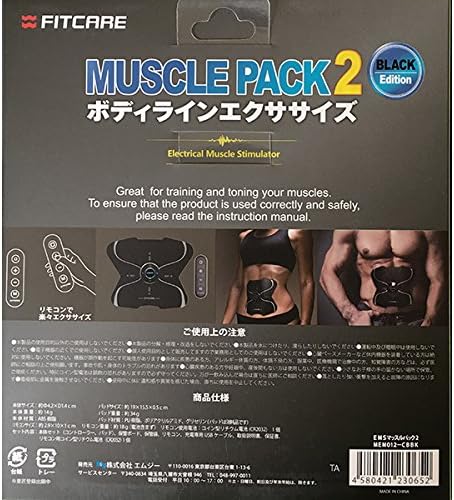
Figure 11.1: The back of the FITCARE Muscle Pack 2 packaging, displaying product specifications, precautions for use, and contact information for the service center.