
Awenta KWS100H
Awenta System+ Fan Housing KWS100H User Manual
Model: KWS100H | Brand: Awenta
Introduction
This manual provides essential information for the safe and efficient installation, operation, and maintenance of your Awenta System+ Fan Housing, model KWS100H. Please read this manual thoroughly before using the product and retain it for future reference.
Product Overview
The Awenta System+ Fan Housing KWS100H is an electronic component designed for forced air cooling. It features a 100 cm diameter housing and is compatible with desktop and server systems. Its primary function is to facilitate air circulation for thermal management.
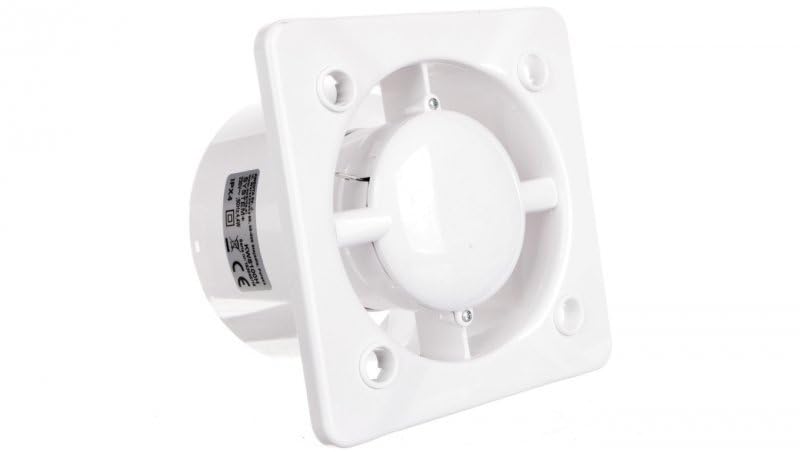
Figure 1: Front view of the Awenta System+ Fan Housing KWS100H. This image shows the white square housing with the central fan unit and mounting holes at each corner.
Safety Instructions
Always observe the following safety precautions to prevent injury or damage to the product:
- Ensure power is disconnected before installation or maintenance.
- Do not operate the fan housing if it is damaged.
- Keep hands and foreign objects away from moving parts during operation.
- Install in a well-ventilated area.
- This product is an electronic component; handle with care to avoid electrostatic discharge.
Setup and Installation
Follow these steps for proper installation:
- Unpacking: Carefully remove the fan housing from its packaging. Inspect for any signs of damage.
- Mounting: Position the fan housing in the desired location, ensuring adequate clearance for airflow. Secure the housing using appropriate fasteners through the designated mounting holes.
- Electrical Connection: Connect the 4-Pin power connector from the fan housing to a compatible power source on your desktop or server system. Ensure the connection is secure.
- Pre-Operation Check: Before powering on, double-check all connections and ensure no obstructions are present around the fan blades.
Operating Instructions
The Awenta System+ Fan Housing operates automatically once connected to a powered system. It is designed for continuous operation to provide consistent cooling.
- Power On: Once the system it is connected to is powered on, the fan housing will begin to operate.
- Monitoring: Periodically check for proper fan rotation and airflow.
- Power Off: The fan will cease operation when the connected system is powered off.
Maintenance
Regular maintenance ensures optimal performance and longevity of your fan housing.
- Cleaning: Periodically clean the fan blades and housing to prevent dust buildup, which can impede airflow and reduce efficiency. Use a soft, dry cloth or compressed air. Ensure power is disconnected before cleaning.
- Inspection: Routinely inspect the power cable and connections for any signs of wear or damage.
- Lubrication: This unit is designed for maintenance-free operation and does not require lubrication.
Troubleshooting
If you encounter issues with your Awenta System+ Fan Housing, refer to the following common problems and solutions:
| Problem | Possible Cause | Solution |
|---|---|---|
| Fan does not spin. | No power supply; Loose connection; Fan motor failure. | Ensure the connected system is powered on. Check the 4-Pin power connection. If issues persist, contact support. |
| Reduced airflow. | Dust buildup on blades; Obstruction. | Disconnect power and clean the fan blades and housing. Remove any obstructions. |
| Unusual noise during operation. | Loose mounting; Foreign object in fan; Bearing wear. | Check mounting screws for tightness. Disconnect power and inspect for foreign objects. If noise persists, contact support. |
Specifications
- Brand: Awenta
- Model: KWS100H
- Manufacturer: AWENTA
- Diameter: 100 cm (Housing)
- Colour: White
- Item Weight: 430 g
- Package Dimensions: 14 x 13.8 x 9.8 cm
- Power Connector Type: 4-Pin
- Cooling Method: Forced Air
- Compatible Devices: Desktop, Server
Warranty and Support
Specific warranty details for the Awenta System+ Fan Housing KWS100H are not provided in this manual. Please refer to the original purchase documentation or contact Awenta customer support for warranty information and technical assistance.
For support, please visit the official Awenta website or contact your retailer.
Related documentsKWS100H


Ask a question about this manual
Ask about setup, troubleshooting, compatibility, parts, safety, or missing instructions. Manuals+ will review the question and use this page’s manual context to help answer it.