
MINELAB EQUINOX 600 Detector
MINELAB EQUINOX 600 Metal Detector User Manual
Model: EQUINOX 600 (3720-0001)
Brand: MINELAB
Introduction
The MINELAB EQUINOX 600 is a versatile multi-frequency metal detector engineered for optimal performance across various terrains and target types. Utilizing revolutionary Multi-IQ technology, it simultaneously transmits and receives a wide spectrum of frequencies, enhancing target detection and minimizing ground noise. This manual provides essential information for setting up, operating, maintaining, and troubleshooting your EQUINOX 600 detector.

The MINELAB EQUINOX 600 Metal Detector, featuring its control unit, shaft, and 11-inch Double-D Smart Coil.
Setup
Before first use, ensure all components are present and properly assembled. The EQUINOX 600 is designed for easy assembly and quick deployment.
In the Box
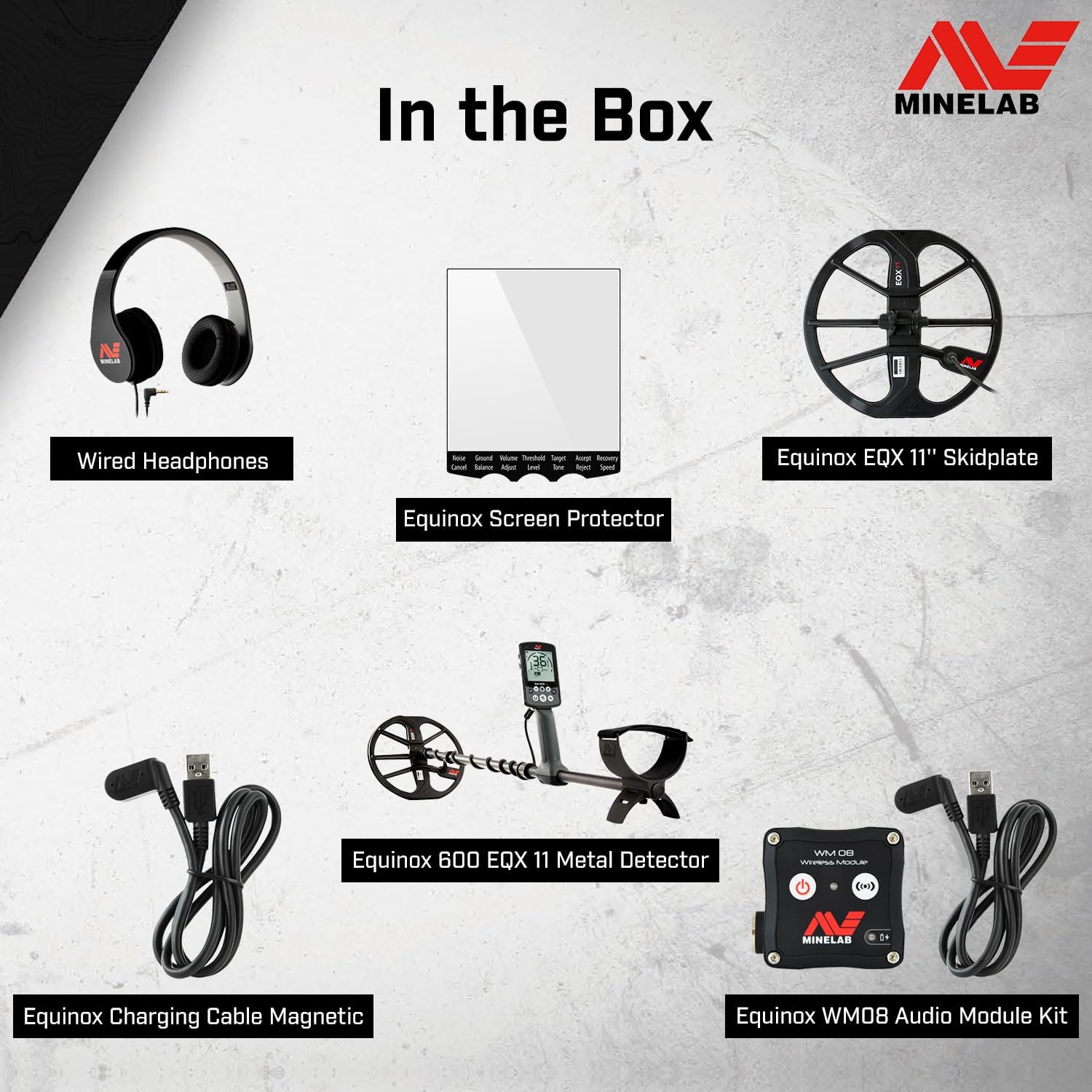
Included components: Wired Headphones, Equinox Screen Protector, Equinox EQX 11" Skidplate, Equinox 600 EQX 11 Metal Detector, Equinox Charging Cable Magnetic, and Equinox WM08 Audio Module Kit.
- MINELAB EQUINOX 600 Control Unit and Shaft
- 11-inch Double-D Smart Coil with Skidplate
- Wired Headphones
- Magnetic Charging Cable
- Screen Protector
Assembly and Charging
Connect the coil to the lower shaft, then attach the lower shaft to the main shaft. Secure the control unit to the upper shaft. Ensure the coil cable is wrapped snugly around the shaft and connected to the control unit. The detector is powered by a built-in Lithium-ion battery. Charge the battery fully before initial use using the provided magnetic charging cable. A full charge provides approximately 12 hours of run time.

The EQUINOX 600 detector shown with its coil, wired headphones, screen protector, and magnetic charging cable.
Operating Instructions
The EQUINOX 600 offers intuitive controls and multiple detect modes to optimize your search in various environments.
Control Panel Overview
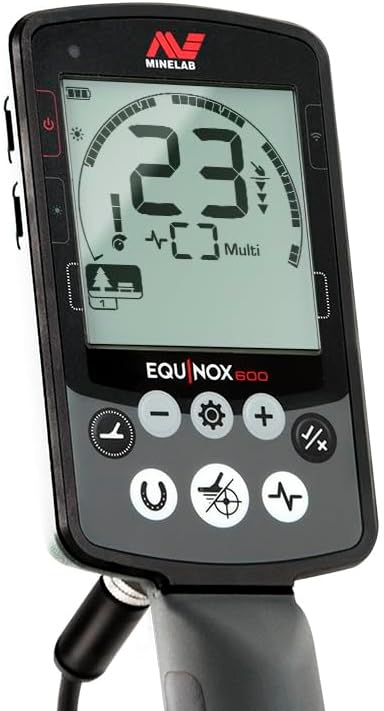
The control panel features a clear LCD display and easy-to-access buttons for mode selection, settings adjustment, and target identification.
Detect Modes
The EQUINOX 600 features three primary detect modes, each optimized for specific detecting conditions:
- Park Mode: Ideal for high-trash recreational areas such as parks and sports grounds. This mode is also an excellent all-around option for beginners and is effective for large silver coins.
- Field Mode: A good option for low-trash areas like farm fields. It is slightly more sensitive to smaller coins typically found in these environments.
- Beach Mode: Specifically designed for use in saltwater and wet sand conditions. This mode effortlessly manages ground balance in challenging beach environments while maintaining high sensitivity.

Detecting on a beach, utilizing the waterproof capabilities of the EQUINOX 600.

Searching for targets in a field environment.
Key Features and Settings
- Multi-IQ Technology: Simultaneously processes multiple frequencies for superior performance in all ground conditions and for all target types.
- Waterproof Design: Fully waterproof and submersible up to 10 ft (3 m), allowing for detection in rivers, lakes, and beaches.
- Target ID: Provides fast and accurate target identification with large Target ID numbers on the display. The 50-segment notch discrimination scale helps differentiate between ferrous and non-ferrous targets.
- Adjustable Frequencies: Choose between 5 kHz, 10 kHz, and 15 kHz single frequencies, or utilize Multi-IQ for simultaneous multi-frequency operation.
- Custom Search Profiles: Save your favorite two settings in each mode for quick access.
- High-Speed Wireless Audio: Bluetooth compatible audio allows for high-speed audio operation. Wired headphones are included.
- Recovery Speed: Adjustable recovery speed helps in separating targets in trashy areas.
Official Product Videos
Minelab Equinox Introduction
This video provides a comprehensive introduction to the Minelab Equinox series, highlighting its key features and capabilities for various detecting environments.
Just set your detecting location and go
A short demonstration showcasing the ease of use of the Minelab Equinox, allowing users to quickly select a location and begin detecting.
Maintenance
Proper maintenance ensures the longevity and optimal performance of your MINELAB EQUINOX 600.
- Cleaning: After each use, especially in wet or sandy conditions, rinse the coil and lower shaft with fresh water. Wipe down the control unit with a damp cloth. Do not use abrasive cleaners or solvents.
- Battery Care: Recharge the built-in Li-ion battery as needed. Avoid completely draining the battery for extended periods. Store the detector in a cool, dry place when not in use.
- Storage: Disassemble the detector if storing for long periods to prevent stress on cables and connections. Store in a protective case to prevent damage.
Troubleshooting
If you encounter issues with your EQUINOX 600, consider the following common solutions:
- No Power: Ensure the battery is fully charged. Check the charging cable connection.
- Erratic Signals/Noise: Perform a Noise Cancel operation. Re-ground balance the detector for the current conditions. Check for electromagnetic interference from nearby power lines or electronic devices.
- No Target Response: Verify the coil is properly connected. Ensure the sensitivity setting is appropriate for the environment.
- Display Issues: If the display is dim or unresponsive, ensure the battery is charged.
For persistent issues not covered here, please refer to the official MINELAB support resources.
Specifications
| Brand | MINELAB |
| Model Number | 3720-0001 |
| Product Dimensions | 12.28"L x 4.96"W x 56.7"H (31.2 cm L x 12.6 cm W x 144 cm H) |
| Item Weight | 2.96 lbs (1.34 kg) |
| Power Source | Battery Powered (Built-in Li-ion) |
| Battery Life | Approx. 12 hours |
| Waterproof Rating | Fully waterproof up to 10 ft (3 m) |
| Operating Frequencies | Multi-IQ, 5 kHz, 10 kHz, 15 kHz |
| Coil Type | 11-inch Double-D Smart Coil |
| Display Type | LCD |
Warranty and Support
MINELAB products are backed by a manufacturer's warranty. For detailed warranty information, product registration, and technical support, please visit the official MINELAB website or contact their customer service. Keep your proof of purchase for warranty claims.
MINELAB Official Website: www.minelab.com
Related documentsEQUINOX 600 Detector


Ask a question about this manual
Ask about setup, troubleshooting, compatibility, parts, safety, or missing instructions. Manuals+ will review the question and use this page’s manual context to help answer it.