Introduction
This manual provides detailed instructions for the operation and maintenance of your Sony Digital8 Camcorder DCR-TRV460. Designed for capturing and playing back memories on Digital8 and Hi8 tapes, this camcorder offers a blend of classic video recording capabilities with modern digital transfer options. Please read this manual thoroughly before using your camcorder to ensure proper operation and to maximize its lifespan.
Setup
Package Contents
Before you begin, ensure all items are present in your package:
- Sony Digital8 Camcorder DCR-TRV460
- Battery
- USB Cable
- AC Adapter
- A/V Cable (Yellow, White, Red RCA connectors)
- User Manual (this document)

Figure 1: Included accessories for the DCR-TRV460 camcorder.

Figure 2: USB cable for data transfer.
Battery Installation and Charging
To install the battery, align it with the battery compartment on the rear of the camcorder and slide it in until it clicks into place. To remove, press the battery release button and slide the battery out. Connect the AC adapter to the camcorder and a power outlet to charge the battery. The charging indicator will illuminate.
Camcorder Overview

Figure 3: Front-side view of the DCR-TRV460 camcorder with the LCD screen open.

Figure 4: Front view of the DCR-TRV460 camcorder.
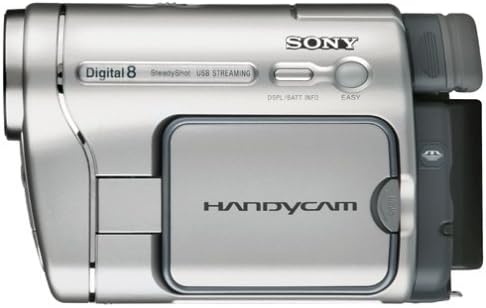
Figure 5: Top view of the DCR-TRV460 camcorder.
Operating Instructions
Power On/Off
- To power on the camcorder, slide the POWER switch to the 'CAMERA' or 'PLAYER' position.
- To power off, slide the POWER switch to 'OFF'.
Tape Loading and Ejection
- Ensure the camcorder is in 'PLAYER' mode.
- Press the 'EJECT' button to open the tape compartment.
- Insert a Digital8 or Hi8 tape with the window facing outwards.
- Gently close the tape compartment until it locks. The camcorder will automatically load the tape.
- To eject, press the 'EJECT' button again.
Recording
- Slide the POWER switch to 'CAMERA'.
- Open the LCD screen or use the viewfinder.
- Press the 'START/STOP' button (located on the rear or top) to begin recording.
- Press 'START/STOP' again to pause recording.
- Use the zoom controls (front or back) to adjust magnification.
Playback
- Slide the POWER switch to 'PLAYER'.
- Use the playback controls (Play, Rewind, Fast Forward, Stop, Pause) located on the side panel to navigate your recordings.
- The LCD screen or viewfinder will display the video.
Advanced Functions
The camcorder features various controls on the side panel for advanced settings, including:
- Date/Time Set: Adjust the date and time stamp for your recordings.
- Backlight: Activate the backlight function for improved visibility in certain lighting conditions.
- Display: Toggle on-screen display information.
- Counter Reset: Reset the tape counter.
- End Search: Quickly locate the end of recorded material on the tape.
Maintenance
- Cleaning: Use a soft, dry cloth to clean the exterior of the camcorder. For the lens, use a specialized lens cleaning cloth and solution.
- Storage: Store the camcorder in a cool, dry place away from direct sunlight and extreme temperatures. Remove the battery if storing for extended periods.
- Tape Care: Store tapes vertically in their cases to prevent damage. Avoid exposing tapes to magnetic fields.
Troubleshooting
| Problem | Solution |
|---|---|
| Camcorder does not power on. | Ensure the battery is charged and correctly inserted, or connect the AC adapter. Check the POWER switch position. |
| Tape does not eject or load properly. | Ensure the camcorder is in 'PLAYER' mode. Gently check for any obstructions in the tape compartment. |
| No image on LCD/viewfinder during recording. | Ensure the POWER switch is set to 'CAMERA'. Check if the lens cap is removed. |
| Poor video quality during playback. | Clean the camcorder's video heads using a dry head cleaning tape. Ensure the tape is not damaged. |
Specifications
| Feature | Detail |
|---|---|
| Brand | Sony |
| Model Number | DCR-TRV460 |
| Product Dimensions | 4 x 3 x 2 inches |
| Item Weight | 4.18 pounds |
| Photo Sensor Technology | CCD |
| Video Capture Resolution | 576p |
| Maximum Focal Length | 8 Millimeters |
| Maximum Aperture | 1.8 Millimeters |
| Flash Memory Type | Micro SD |
| Video Capture Format | Digital8 |
| Supported Audio Format | Dolby Digital/AC-3 |
| Screen Size | 2.5 Inches |
| Connectivity Technology | FireWire |
Warranty and Support
This Sony Digital8 Camcorder DCR-TRV460 is a renewed product. Renewed products are professionally inspected and tested to work and look like new. If not satisfied with your purchase, renewed products are eligible for replacement or refund under the Amazon Renewed Guarantee.
For further assistance, please refer to the Amazon Renewed Guarantee details or contact Amazon customer support directly.


