
1. Introduction
This manual provides comprehensive instructions for the setup and operation of your ZdalaMit RC-RCA1 replacement remote control. This remote is designed to function as a direct replacement for various RCA LCD and LED TV models, requiring no programming or pairing. Simply install batteries, and the remote is ready for use.
2. Safety Information
- Do not mix old and new batteries.
- Do not mix alkaline, standard (carbon-zinc), or rechargeable (nickel-cadmium) batteries.
- Ensure batteries are inserted with correct polarity (+ and -).
- Remove batteries if the remote control will not be used for an extended period.
- Keep batteries out of reach of children.
3. Package Contents
- 1 x ZdalaMit RC-RCA1 Replacement Remote Control
Note: Batteries and a separate instruction manual are not included in the package.
4. Setup
4.1 Battery Installation
- Locate the battery compartment on the back of the remote control.
- Press down on the tab and slide the battery cover downwards to open it.
- Insert two (2) 1.5V AAA alkaline batteries, ensuring the positive (+) and negative (-) ends match the diagrams inside the compartment.
- Slide the battery cover back into place until it clicks securely.
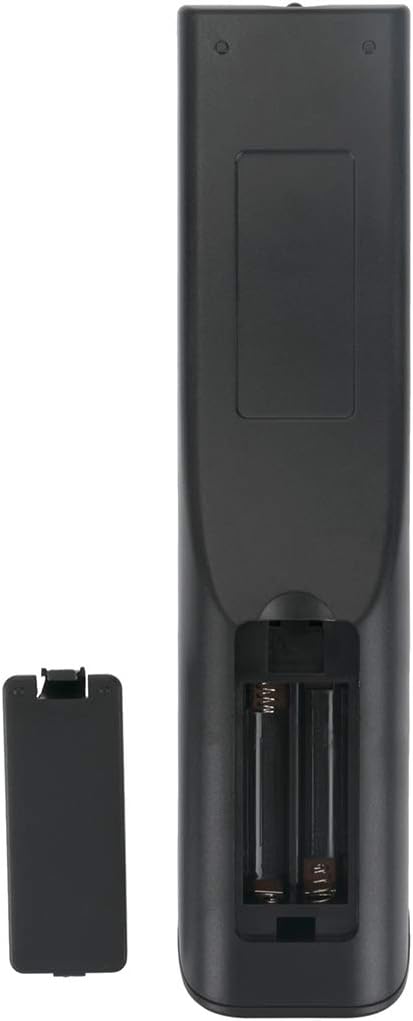
Figure 1: Back view of the remote control with the battery compartment open.
Once batteries are installed, the remote control is ready for immediate use with compatible RCA TV models. No programming or pairing is required.
5. Operation
5.1 Button Functions Overview
The ZdalaMit RC-RCA1 remote control features standard buttons for navigating and controlling your RCA TV. Refer to the image below for a visual guide to the buttons.

Figure 2: Front view of the RC-RCA1 remote control.
| Button | Function |
|---|---|
| POWER | Turns the TV on or off. |
| A-B / ZOOM / REPEAT / INPUT | Specific functions for A-B repeat, zoom, repeat playback, and input source selection. |
| 0-9 (Number Buttons) | Direct channel selection. |
| CC | Activates or deactivates Closed Captions. |
| EPG | Accesses the Electronic Program Guide. |
| Navigation (Up, Down, Left, Right, ENTER) | Navigates menus and confirms selections. |
| EXIT | Exits current menu or function. |
| SOUND | Accesses sound settings. |
| VOL +/- | Adjusts the volume level. |
| CH +/- | Changes the TV channel. |
| MENU | Opens the TV's main menu. |
| PLAY/PAUSE/STOP/PREV/FR/FF/NEXT | Media playback controls (if supported by TV/connected device). |
| SLEEP | Sets the sleep timer. |
| ASPECT | Changes the screen aspect ratio. |
| CH.LIST | Displays the channel list. |
| MTS | Selects Multi-channel Television Sound options. |
| FREEZE | Freezes the current image on screen. |
| DISPLAY | Displays on-screen information. |
| SUB-T | Activates or deactivates subtitles. |
| AUDIO | Selects audio tracks or modes. |
| PICTURE | Accesses picture settings. |
| DVD-M | DVD menu access (if TV supports integrated DVD player). |
| TITLE | Accesses title menu (if TV supports integrated DVD player). |
| SETUP | Accesses system setup menu. |
6. Compatibility
The ZdalaMit RC-RCA1 replacement remote control is compatible with a wide range of RCA LCD and LED TV models, including but not limited to:
- WD12143, WD12372, WD11392, WD12422, WD12192, WD11442, WD12101
- LED50B45RQ, RE20QP80, 26LARQD, LED30B30RQ
- 40LA45RQ, LED42C45, 32LA30RQD, LED32B30RQ
- WD11452, WD12492, WD12021
- RCA 46LB45RQ, LED39B45RQ, 26LA30RQD
- 32LA30RQ, 32LA30, LED42C45RQ
- LED46A55R120Q, RCA 42PA30RQ
This remote is designed to work directly with these models without requiring any complex setup procedures.
7. Troubleshooting
- Remote not responding: Ensure batteries are inserted correctly with the proper polarity. Replace old batteries with new 1.5V AAA alkaline batteries. Check for any obstructions between the remote and the TV's infrared sensor.
- Some buttons not working: This could indicate low battery power. Replace batteries. If the issue persists, ensure the remote is pointed directly at the TV's sensor.
- Remote works intermittently: This often points to weak batteries. Replace them.
- No programming needed: This remote is pre-programmed for compatible RCA TVs. If it does not work after battery installation, verify your TV model is listed in the compatibility section.
8. Specifications
| Feature | Detail |
|---|---|
| Model Number | RC-RCA1 |
| Brand | ZdalaMit |
| Power Supply | 2 x 1.5V AAA Alkaline Batteries (not included) |
| Dimensions | Approximately 8 x 2 x 0.5 inches |
| Item Weight | Approximately 1.41 ounces |
| Special Feature | Pre-Programmed |
| Compatible Devices | RCA Televisions (LCD, LED) |
9. Warranty and Support
For any questions or support regarding your ZdalaMit RC-RCA1 replacement remote control, please contact the seller or manufacturer directly. Specific warranty details may vary and are typically provided at the point of purchase.