
1. Introduction
This manual provides instructions for the installation, operation, and maintenance of your VTech DS6151 DECT 6.0 2-Line Cordless Phone System. This system includes a main base unit and one DS6101 cordless handset. Please read this manual thoroughly before using your new telephone system.

Image 1.1: The VTech DS6151 DECT 6.0 2-Line Cordless Phone System, showing the main base unit and the cordless handset in its charging cradle.
2. Setup
2.1 Package Contents
Ensure your package contains the following items:
- VTech DS6151 Base Unit
- DS6101 Cordless Handset
- Handset Charger
- Power Adapter for Base Unit
- Power Adapter for Handset Charger
- Telephone Line Cord (2)
- Rechargeable Battery Pack for Handset
- User's Manual (this document)
2.2 Battery Installation
The cordless handset requires one AA rechargeable battery. Follow these steps to install the battery:
- Locate the battery compartment cover on the back of the cordless handset.
- Slide the cover down and lift it off.
- Connect the battery pack connector securely into the jack inside the compartment, ensuring correct polarity.
- Place the battery pack into the compartment.
- Slide the battery compartment cover back into place until it clicks.

Image 2.1: The VTech DS6101 cordless handset, showing its front display and keypad.
2.3 Base Unit Connection
Connect the base unit as follows:
- Plug one end of the power adapter into the power jack on the back of the base unit.
- Plug the other end of the power adapter into a standard electrical outlet.
- Plug one end of the telephone line cord into the TEL LINE jack on the back of the base unit.
- Plug the other end of the telephone line cord into a telephone wall jack. If you have two phone lines, connect the second line cord to the LINE 2 jack and the second telephone wall jack.
2.4 Handset Charger Connection
Connect the handset charger as follows:
- Plug one end of the power adapter into the power jack on the back of the handset charger.
- Plug the other end of the power adapter into a standard electrical outlet.

Image 2.2: The VTech DS6101 cordless handset placed in its charging cradle.
2.5 Initial Charging
Place the cordless handset in the base unit or handset charger. The handset will begin charging. Allow the handset to charge for at least 16 hours before initial use. The CHARGE indicator on the handset will illuminate during charging.
3. Operating Instructions
3.1 Making and Receiving Calls
Making a Call:
- From the handset, press TALK/FLASH or SPEAKER. From the base, press LINE 1 or LINE 2.
- Dial the phone number.
Receiving a Call:
- When the phone rings, press TALK/FLASH or SPEAKER on the handset. From the base, press the flashing LINE 1 or LINE 2 button.
Ending a Call:
- Press OFF on the handset or place the handset in the charger. From the base, press the active LINE button.
3.2 2-Line Operation
The DS6151 system supports two separate telephone lines. You can make or receive calls on either line independently. When a line is in use, its corresponding button (LINE 1 or LINE 2) on the base will be lit. If a call comes in on an idle line, its button will flash.
3.3 Caller ID / Call Waiting
If you subscribe to Caller ID service, the caller's name and number will appear on the handset and base display. If you subscribe to Call Waiting Caller ID, the incoming call information will display during an active call.
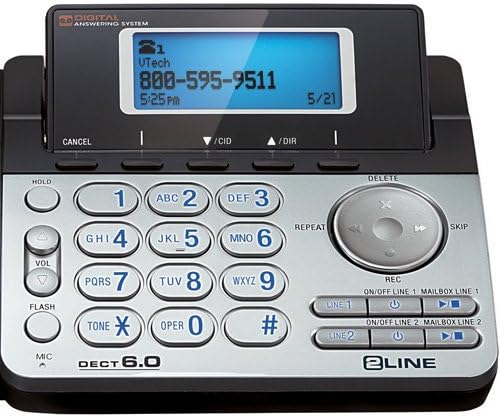
Image 3.1: Close-up of the VTech DS6151 base unit, highlighting the display and keypad for two-line operation.
3.4 Digital Answering System
The base unit features a digital answering system with a 13-minute recording capacity and a dedicated mailbox for each line. You can access messages from the base unit or the cordless handset.
Playing Messages:
- On the base, press PLAY/STOP.
- From the handset, press MENU/SELECT, scroll to 'Answering System', then 'Play Messages'.
Turning Answering System On/Off:
- On the base, use the ON/OFF LINE 1 and ON/OFF LINE 2 buttons.
3.5 Phonebook
The system can store up to 50 names and numbers in its phonebook directory. You can easily store frequently called numbers for quick dialing.
Adding a Phonebook Entry:
- Press MENU/SELECT on the handset.
- Scroll to 'Phonebook' and press MENU/SELECT.
- Select 'Add New Entry' and follow the on-screen prompts to enter the name and number.
3.6 Speakerphone
Both the base unit and the cordless handset feature a dual speakerphone function, allowing hands-free communication. Press the SPEAKER button on the handset or the speakerphone button on the base during a call to activate.
3.7 Redial
The system stores the last few numbers dialed. Press REDIAL on the handset to access the redial list.
3.8 Handset Locator / Paging
If you misplace your handset, press the PAGE button on the base unit. All registered handsets will ring, helping you locate them.
4. Maintenance
4.1 Cleaning Your Telephone
Clean the telephone and handset with a soft, slightly damp cloth. Do not use cleaning agents or abrasive materials, as these can damage the finish. Avoid getting moisture into any openings.
4.2 Battery Care
To ensure optimal battery performance:
- Charge the handset for 16 hours before first use.
- Avoid overcharging by not leaving the handset on the charger for extended periods after it is fully charged.
- Replace the battery pack when the handset indicates low battery or when talk time significantly decreases. Use only the specified rechargeable battery pack.
5. Troubleshooting
If you experience issues with your VTech DS6151 system, try the following common troubleshooting steps:
- No Dial Tone:
Ensure all power adapters and telephone line cords are securely plugged in. Check if your telephone service is active. Try plugging a different phone into the wall jack to confirm the line is working. - Handset Not Charging:
Verify the handset is correctly seated in the charger. Ensure the charger's power adapter is plugged into a working electrical outlet. Clean the charging contacts on both the handset and charger with a dry cloth. - Poor Call Quality / Static:
Move the handset closer to the base unit. Avoid placing the base unit near other electronic devices (e.g., microwaves, Wi-Fi routers) that may cause interference. Check for loose telephone line cord connections. - Handset Display is Blank:
Ensure the battery pack is correctly installed and fully charged. Place the handset on the charger for at least 30 minutes. - Answering System Not Recording:
Ensure the answering system for the respective line is turned ON. Check if the memory is full; delete old messages if necessary.
If problems persist, refer to the full troubleshooting section in the comprehensive user manual available on the VTech support website or contact VTech customer support.
6. Specifications
The following are key specifications for the VTech DS6151 DECT 6.0 2-Line Cordless Phone System:
| Feature | Description |
|---|---|
| Technology | DECT 6.0 (1.9GHz) |
| Lines Supported | 2-Line Operation |
| Expandability | Up to 12 Handsets |
| Answering System | 13 Minute Digital Answering System with dedicated mailbox per line |
| Display | Large Backlit LCD Display (Handset & Base) |
| Speakerphone | Dual Speakerphone (Base & Handset) |
| Keypad | Backlit Keypad |
| Caller ID Memory | 50 Station Name / Number |
| Phone Directory | 50 Station Name / Number |
| Batteries | 1 AA rechargeable battery required per handset |
| Material | Plastic |
| Item Weight | 4.13 pounds (total system) |
| Package Dimensions | 12.09 x 9.84 x 6.73 inches |
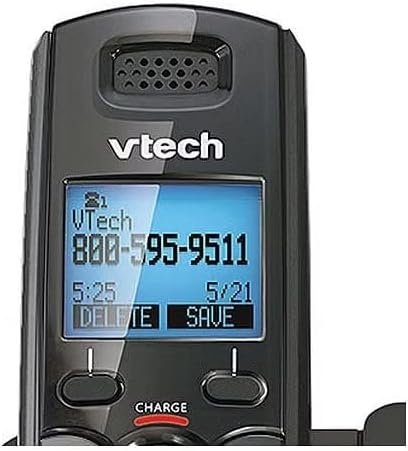
Image 6.1: Close-up of the VTech DS6101 cordless handset display, showing caller ID information.
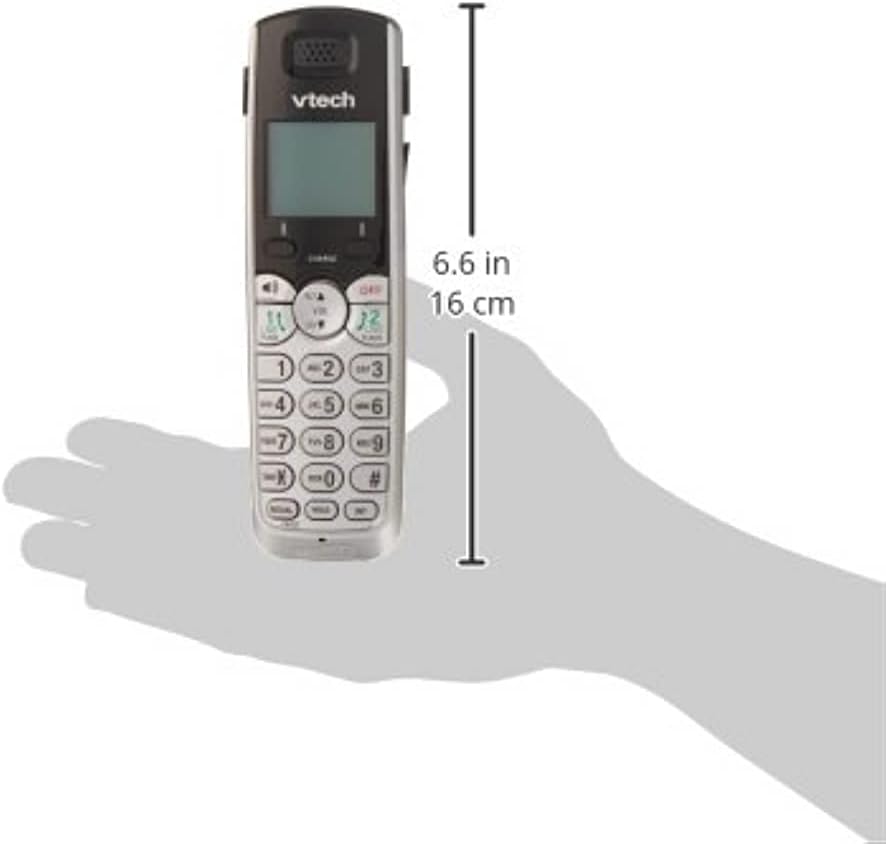
Image 6.2: The VTech DS6101 cordless handset with approximate dimensions indicated, showing its compact size.
7. Warranty and Support
For warranty information, please refer to the warranty card included with your product or visit the official VTech website. VTech provides customer support for product assistance, troubleshooting, and service inquiries.
For further assistance, please visit the VTech Store on Amazon or the official VTech support website.


