
Introduction
This manual provides detailed instructions for the proper setup, operation, and maintenance of your GUESS W0876G4 Hudson Men's Chronograph Watch. Please read this manual thoroughly to ensure optimal performance and longevity of your timepiece. Keep this manual for future reference.
Product Overview
The GUESS W0876G4 Hudson is a sophisticated men's chronograph watch featuring a polished silver-colored stainless steel case, a black leather strap, and a precise quartz movement. It includes a chronograph function for timing events and is water-resistant up to 50 meters.
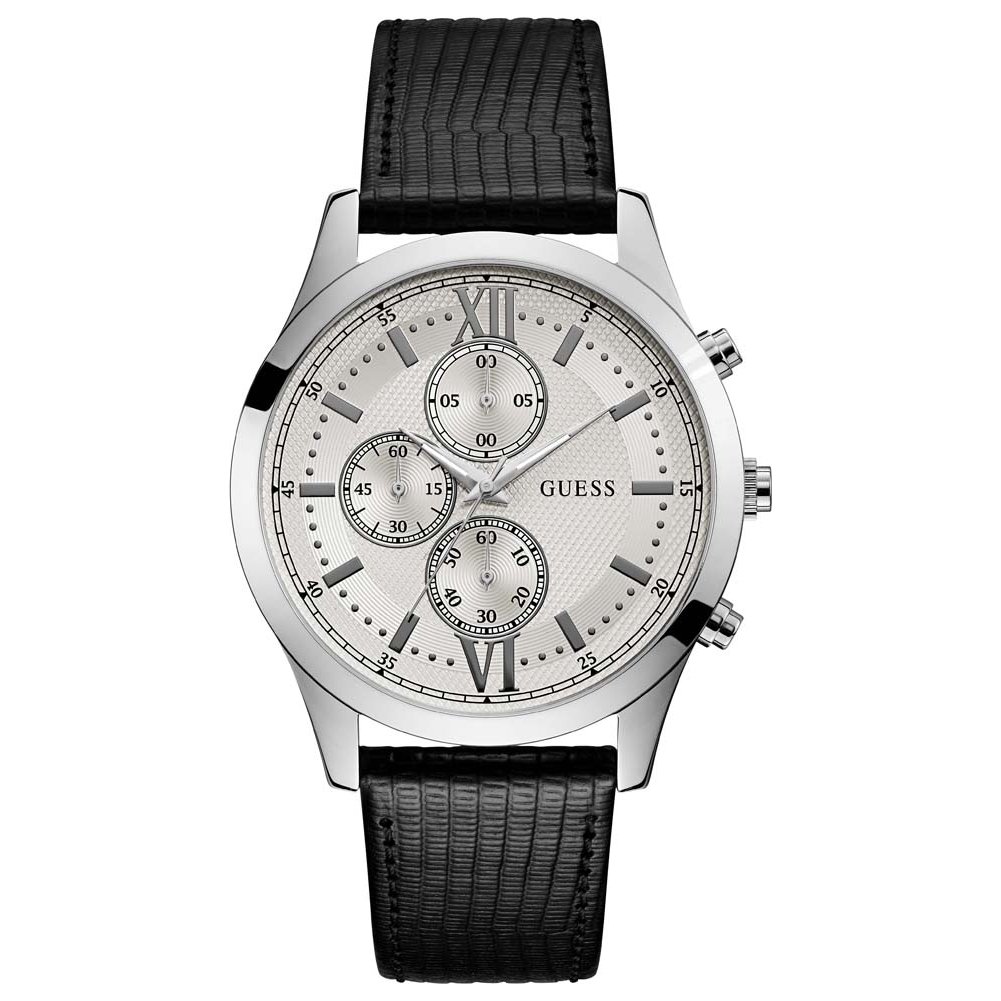
Image: The GUESS W0876G4 Hudson Men's Chronograph Watch, showcasing its silver-colored stainless steel case, black leather strap, and multi-function dial.
Setup
1. Setting the Time
- Pull the crown out to the second click position.
- Turn the crown to set the hour and minute hands to the desired time.
- Push the crown back into the normal position.
2. Adjusting the Strap
The watch features a pin buckle clasp. To adjust, simply slide the pin through the desired hole on the leather strap to achieve a comfortable and secure fit on your wrist.
Operation
1. Chronograph Function (Stopwatch)
The chronograph allows you to measure elapsed time. Your watch has two pushers, typically located at the 2 o'clock and 4 o'clock positions, in addition to the crown.
- Starting the Chronograph: Press the upper pusher (A) to start the chronograph. The chronograph second hand will begin to move.
- Stopping the Chronograph: Press the upper pusher (A) again to stop the chronograph. The elapsed time will be indicated by the chronograph hands.
- Resetting the Chronograph: After stopping, press the lower pusher (B) to reset all chronograph hands to their zero positions.
2. Water Resistance
This watch is water-resistant up to 50 meters (5 ATM). This rating means the watch is suitable for short periods of recreational swimming. It is not suitable for diving, snorkeling, or high-impact water sports. Ensure the crown is fully pushed in before any contact with water. Avoid operating the pushers or crown while the watch is wet or submerged.
Maintenance
1. Cleaning Your Watch
- Case and Crystal: Wipe the watch case and crystal with a soft, dry cloth. For stubborn dirt, a slightly damp cloth can be used, followed by immediate drying.
- Leather Strap: Avoid prolonged exposure of the leather strap to water, direct sunlight, and harsh chemicals. Clean with a soft, dry cloth. If it gets wet, allow it to air dry naturally, away from direct heat.
2. Battery Replacement
The GUESS W0876G4 uses a quartz movement powered by a battery. When the watch stops or the second hand begins to jump irregularly, it indicates a low battery. Battery replacement should be performed by a qualified watch technician to ensure proper sealing and maintain water resistance.
3. Storage
When not wearing your watch, store it in a cool, dry place, away from direct sunlight and strong magnetic fields.
Troubleshooting
- Watch Not Running: Check if the crown is fully pushed in. If it is, the battery may need replacement.
- Chronograph Hands Not Resetting to Zero: This may require a chronograph reset procedure. Consult a professional watch repair service if the issue persists after attempting to reset.
- Water Inside the Watch: If you notice condensation or water droplets inside the watch, immediately take it to a professional watch repair service. Do not attempt to open the watch yourself.
Specifications
| Model Number | W0876G4 |
| Brand | GUESS |
| Movement | Quartz |
| Display Type | Analog |
| Case Material | Stainless Steel |
| Case Diameter | 44 Millimeters |
| Case Thickness | 11 Millimeters |
| Band Material | Leather |
| Band Color | Black |
| Band Width | 22 Millimeters |
| Dial Color | Silver |
| Clasp Type | Pin Buckle |
| Water Resistance Depth | 50 Meters (5 ATM) |
| Special Features | Chronograph |
| Product Dimensions | 8.4 x 10 x 9.2 cm; 100 g |
| UPC | 091661480751 |
Warranty & Support
For warranty information, service, or support inquiries regarding your GUESS W0876G4 Hudson watch, please refer to the official GUESS website or contact GUESS customer service directly. Keep your proof of purchase for any warranty claims.
Official GUESS Website: www.guess.com