1. Introduction
This manual provides essential information for setting up, operating, and maintaining your Samsung UN65NU8000FXZA Flat 65" 4K UHD 8 Series Smart LED TV. The NU8000 series offers advanced smart features with voice control, stunning HDR Plus depth, and a wide color spectrum for a high-quality 4K viewing experience.
2. Setup
2.1. What's in the Box
- Samsung UN65NU8000FXZA 65-Inch TV
- Remote Control (requires 2 AAA batteries)
- TV Stand
- Power Cable
- User Manual (this document)
2.2. Stand Assembly and Placement
Carefully place the TV screen-down on a soft, flat surface. Attach the included stand to the designated slots on the bottom of the TV using the provided screws. Ensure the stand is securely fastened. Alternatively, the TV supports VESA wall mounting (600 x 1100 mm) for wall installation. The TV features cable management grooves on the rear to route cables along the back and through the stand, keeping them organized and out of sight.

Figure 1: Samsung UN65NU8000FXZA 65-Inch TV with its central stand.
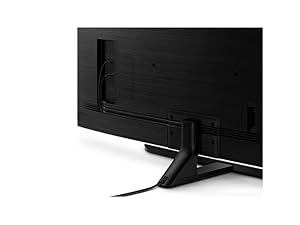
Figure 2: Cable management system on the TV's rear and stand for a tidy setup.
2.3. Connecting Devices
Connect your external devices (e.g., cable box, Blu-ray player, gaming console) to the TV's HDMI ports. This model features 4 HDMI ports and 2 USB 2.0 ports. All inputs connect directly into the side of the TV. Ensure all connections are secure.
3. Operating the TV
3.1. Basic Operation
Use the provided remote control to power on/off the TV, adjust volume, change channels, and navigate the Smart TV interface. The remote uses Bluetooth technology for enhanced control.
3.2. Picture Quality Features
The Samsung UN65NU8000FXZA TV is equipped with several technologies to enhance your viewing experience:
- HDR Plus: Delivers high dynamic range content as intended by the director, providing a wider range of contrast and color.
- Ultra Slim Array: Dynamically fine-tunes black levels and white brightness for sensational contrast.
- Dynamic Crystal Color: Expands the color palette with millions of shades beyond standard HDTVs, resulting in richer and more vibrant images.
- Motion Rate 240: Ensures smooth, crisp action even in fast-moving scenes, reducing motion blur.
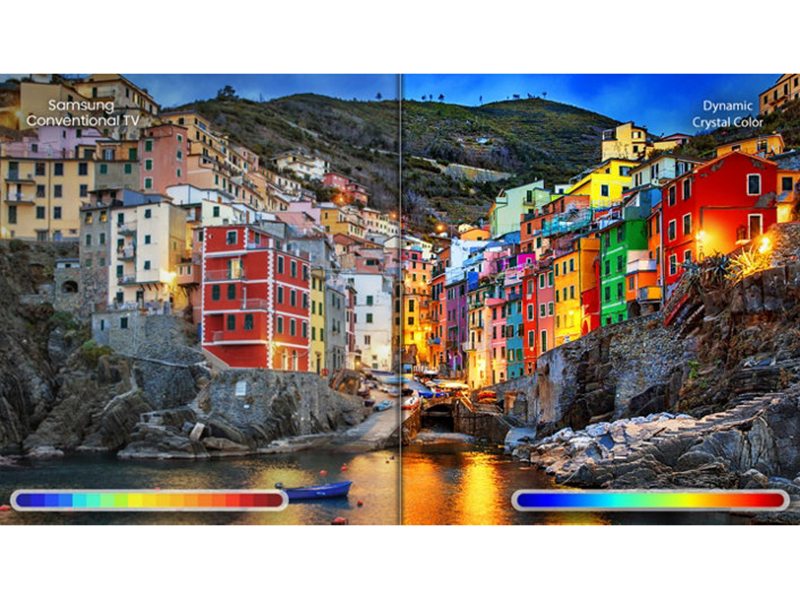
Figure 3: The TV's display showcasing a wide and dynamic range of colors.

Figure 4: Example of fluid motion on the screen, enhanced by Motion Rate 240.
3.3. Smart Features (Tizen OS & Bixby Voice)
The TV runs on the Tizen operating system, offering a well-organized and easy-to-navigate smart platform. It includes Bixby Voice, allowing you to control TV settings, search for content, and play/pause videos using voice commands. The Universal Guide helps you find streaming and live TV shows easily.
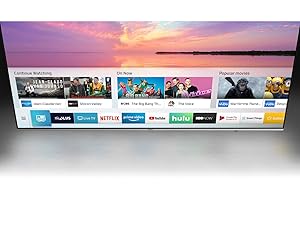
Figure 5: The Universal Guide interface for easy content discovery.
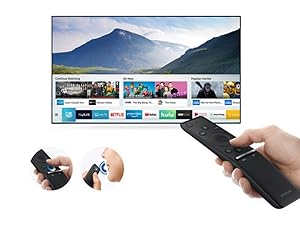
Figure 6: The Samsung One Remote, designed for simplified control of your TV and connected devices.
3.4. Gaming Features
The TV offers a very low input lag, making it responsive for gaming across 1080p, 4K, and HDR signals. It supports 120Hz input for a smooth gaming experience on compatible PCs. The Game Motion Plus menu includes features like LED Clear Motion for blur reduction without adding significant input lag.
Video 1: A detailed review of the Samsung NU8000 4K UHD Smart LED TV, covering design, picture quality, motion, smart features, and inputs. This video provides an in-depth look at the TV's performance and features, including its suitability for gaming and various viewing environments.
4. Maintenance
To ensure the longevity and optimal performance of your TV, follow these maintenance guidelines:
- Cleaning the Screen: Gently wipe the screen with a soft, dry microfiber cloth. For stubborn smudges, slightly dampen the cloth with water or a screen-safe cleaning solution (do not spray directly onto the screen).
- Cleaning the Frame: Use a soft, dry cloth to wipe the TV frame.
- Ventilation: Ensure adequate ventilation around the TV to prevent overheating. Do not block the ventilation openings.
- Power: Unplug the TV from the power outlet during lightning storms or when it will be left unattended for long periods.
5. Troubleshooting
If you encounter issues with your TV, try the following basic troubleshooting steps:
- No Power: Check if the power cable is securely connected to both the TV and the wall outlet. Try plugging another device into the same outlet to confirm it has power.
- No Picture/Sound: Verify that the correct input source is selected. Check all cable connections between the TV and external devices.
- Remote Not Working: Ensure the batteries are correctly inserted and not depleted. Point the remote directly at the TV.
- Poor Picture Quality: Adjust picture settings (brightness, contrast, sharpness, color). Ensure your content source is high quality (e.g., 4K content for 4K resolution).
- Smart Features Not Working: Check your Wi-Fi connection. Restart the TV and your router.
For more detailed troubleshooting or persistent issues, refer to the full electronic manual available on the Samsung support website or contact Samsung customer support.
6. Specifications
| Feature | Description |
|---|---|
| Screen Size | 64.5 Inches (65-Inch Class) |
| Brand | Samsung |
| Model Number | UN65NU8000FXZA |
| Display Technology | LED (Edge LED Backlight) |
| Resolution | 4K UHD (3840 x 2160) |
| Refresh Rate | 240 Hz (Motion Rate 240) |
| Special Feature | Flat Screen |
| Included Components | Remote, Stand, TV |
| Connectivity Technology | HDMI, Wi-Fi, Bluetooth |
| Total HDMI Ports | 4 |
| Total USB Ports | 2 (USB 2.0) |
| Aspect Ratio | 16:9 |
| Product Dimensions (with stand) | 13.8"D x 56.9"W x 35.8"H |
| Item Weight (with stand) | 58.2 Pounds |
| Maximum Display Brightness | 550 Nit |
| HDR Format Supported | HDR10 |
| Operating System | Tizen |
| Control Method | Voice (Bixby) |
| Audio Output Mode | Stereo |
| Speaker Description | 15W x 2 (RMS) |
| Speaker Maximum Output Power | 40 Watts |
| Power Consumption | 75 Watts |
| VESA Mount Standard | 600 x 1100 mm |
| Color | Slate Black + Eclipse Silver |
7. Warranty and Support
7.1. Limited Warranty
This Samsung TV comes with a 1-year limited warranty. Please refer to the warranty card included with your product or visit the official Samsung website for full terms and conditions.
7.2. Customer Support
For further assistance, technical support, or service requests, please contact Samsung Customer Support. You can find contact information on the official Samsung website or in the documentation provided with your TV.


